
What is a branded tracking page and how can it help my business?
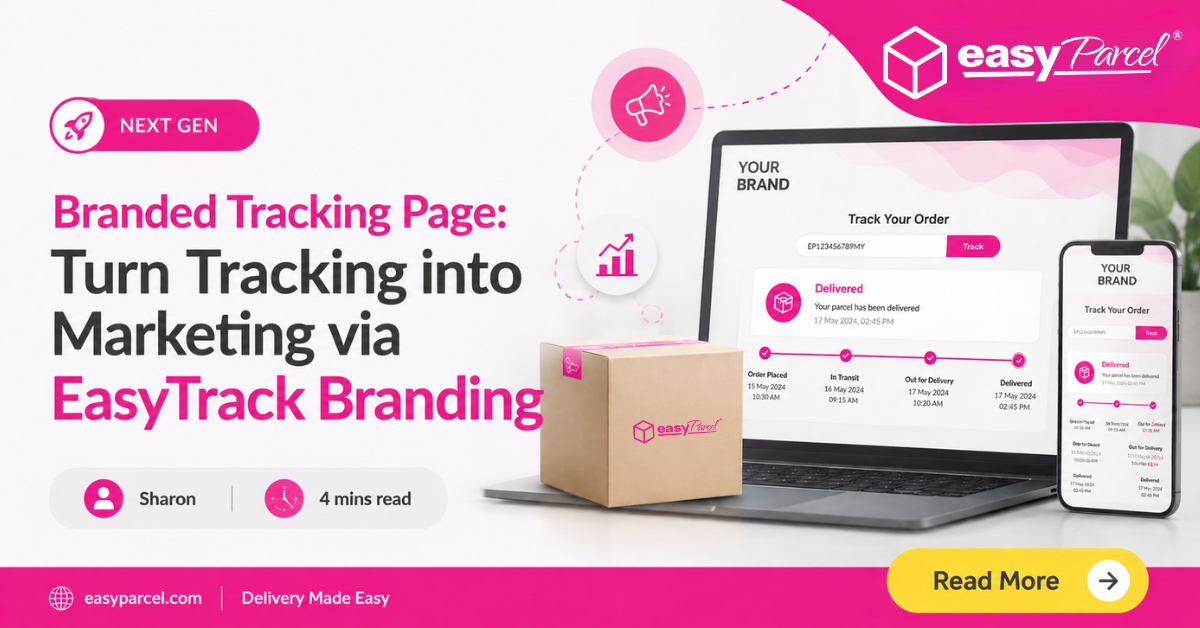
A branded tracking page is a customised parcel tracking page that displays your own logo, colours, banners, and product promotions instead of generic courier branding. EasyTrack Branding from EasyParcel lets you create fully branded tracking pages – removing EasyParcel logos, integrating GA4 analytics, adding sticky ads and featured products, and using multiple templates for different campaigns. Launching in the Next Gen update, this feature turns every “where is my parcel?” click into a post‑purchase marketing opportunity, increasing repeat sales and building brand trust.
Table of Contents
Why Your Business Needs a Branded Tracking Page
Every day, your customers click tracking links to see where their parcel is. Most courier tracking pages are generic – full of third‑party logos and zero brand presence. That’s a missed opportunity.
A branded tracking page changes that. It lets you take full control of the tracking experience, turning every parcel update into a branded touchpoint. Instead of a plain, white‑label page, your customers see:
- Your logo and brand colours
- Your promotional banners (with clickable links)
- Your featured products and sticky ads
- Your social media and selling channels
And because you can integrate GA4 tracking, you’ll know exactly how customers interact with your tracking page – data you can use to optimise conversions.
EasyTrack Branding is EasyParcel’s next‑generation solution for creating a branded tracking page effortlessly. It’s launching in the Next Gen update.
What You Can Do with EasyTrack Branding (Your Branded Tracking Page)
The feature is packed with customisation options to build the perfect branded tracking page. Here’s a breakdown of what’s possible.

Remove EasyParcel branding
Your branded tracking page shows only your brand – no third‑party logos.
Integrate GA4 tracking
Add your Google Analytics 4 measurement ID to track page views, clicks, and user behaviour.
Reuse or create an online form website
Use an existing QuickSend store (free online order form) or create a new one to power your branded page.

Upload custom banners
Add images with configurable redirect URLs – perfect for flash sales or seasonal campaigns.
Customise brand colours
Match your brand palette exactly (primary, secondary, accent colours).
Configure button corner styles
Choose rounded, square, or pill‑shaped buttons to match your design language.

Add up to 3 sticky ads
Persistent ads that stay visible as the customer scrolls on your branded tracking page.
Add up to 3 featured products
Showcase your best‑sellers or new arrivals directly on the tracking page.

Configure social platforms & selling channels
Link to your Instagram, TikTok, Shopee, Lazada, or WhatsApp.

Set a default EasyTrack template
Avoid manually selecting a template for every booking – set one as the default for all shipments, ensuring every tracking link uses your branded tracking page.
How to Get Started with Your Branded Tracking Page (EasyTrack Branding)
- Log in to your EasyParcel account (or sign up for free).
- Go to Branding Tools → EasyTrack Branding.
- Create your first branded tracking page template:
- Upload your logo and choose brand colours.
- Add banners, sticky ads, and featured products.
- Configure your social channels.
- Set a default template for all shipments (optional).
- Integrate GA4 tracking if you want to analyse visitor behaviour.
- On the booking page, select your branded template (or let the default apply automatically).
- For bulk uploads, set the custom branding in your CSV/Excel settings once – it applies to all rows.
New to EasyParcel?
Benefits of a Branded Tracking Page at a Glance

Increase repeat purchases
Promote products and flash sales directly on the tracking page.

Build brand trust
Every customer touchpoint reinforces your brand identity.
Reduce “where is my order?” queries
Clear, branded updates build confidence – fewer support tickets.

Data‑driven decisions
GA4 integration shows you what customers click and engage with.

Save time
Bulk update templates, auto‑enable settings, and use default templates.

Flexible & scalable
Multiple templates for different brands, seasons, or product lines.
Malaysia
Thailand
Indonesia