Singapore
 Thailand
 Indonesia
Your Shopee address settings do more than tell a courier where to go. They affect pickup success, return handling, fulfillment speed, seller operations, and how cleanly your marketplace orders flow into your shipping or inventory system.
For sellers, the most important distinction is this: your seller address is not the same thing as a buyer’s delivery address. A buyer may search for how to change delivery address in Shopee when they want an order sent somewhere else. A seller, on the other hand, needs to set the correct pickup and return address so parcels can be collected, returned, reconciled, and processed without unnecessary delays.
Shopee’s exact menu names can vary by country, app version, and Seller Center layout, but the overall setup is usually similar: add or edit the address, complete the required contact details, then assign the address for pickup, return, or default use. Shopee’s Seller Center guidance describes address registration as part of the early shop setup process and places it under Seller Center settings such as Shop Settings, Shipping, or Address Management, depending on the market.
Contents
Why Your Shopee Pickup and Return Address Must Be Correct

Source: Pinterest
A small address mistake can create a large operations problem. If the pickup address is wrong, the courier may arrive at the wrong location, fail the pickup attempt, or require your team to rebook the shipment. If the return address is wrong, buyer returns may go to an old office, a warehouse that no longer receives Shopee parcels, or a location where no one is responsible for inspecting returned items.
Correct address settings help you:
- Reduce failed pickup attempts
- Avoid delays before handover to the courier
- Keep returns moving to the right team or warehouse
- Improve inventory recovery after return approvals
- Keep Seller Center, your shipping tool, and your marketplace integration aligned
- Prevent staff from manually correcting orders one by one
- Maintain a cleaner fulfillment workflow during campaigns or high-volume periods
Shopee’s buyer-facing help also emphasizes that accurate local addresses help prevent delays, return-to-sender issues, and failed pickups. While that help article is written for account addresses, the same operational principle applies to seller pickup and return workflows.
Before You Start: Prepare the Right Address Details
Before you log in to Seller Center, decide exactly which address should be used for each purpose. Many sellers rush this step and simply enter their business registration address. That may work if you pack, ship, and receive returns from the same location. But if you use a warehouse, fulfillment partner, third-party logistics provider, office, or home-based stockroom, you need to be more deliberate.
Prepare the following information:
- Full recipient or business contact name
- Active mobile number or landline accepted by Shopee
- Complete street address, unit number, building name, floor, and room if applicable
- Province, city, district, postcode, or other required local fields
- Any pickup instructions your team follows internally
- The person or team responsible for answering courier calls
- The correct return receiving location
- Your preferred default address if Shopee asks for one
If your business uses more than one location, document each location’s role before editing Seller Center. For example:
- Main office: Administrative address only
- Warehouse A: Daily Shopee pickup address
- Warehouse B: Bulky-item pickup address
- Returns desk: Approved return parcel receiving address
- 3PL partner: Fulfillment and receiving location
This prevents a common mistake: setting the office as the pickup point when all Shopee orders are actually packed at the warehouse.
Step 1: Log in to Shopee Seller Center
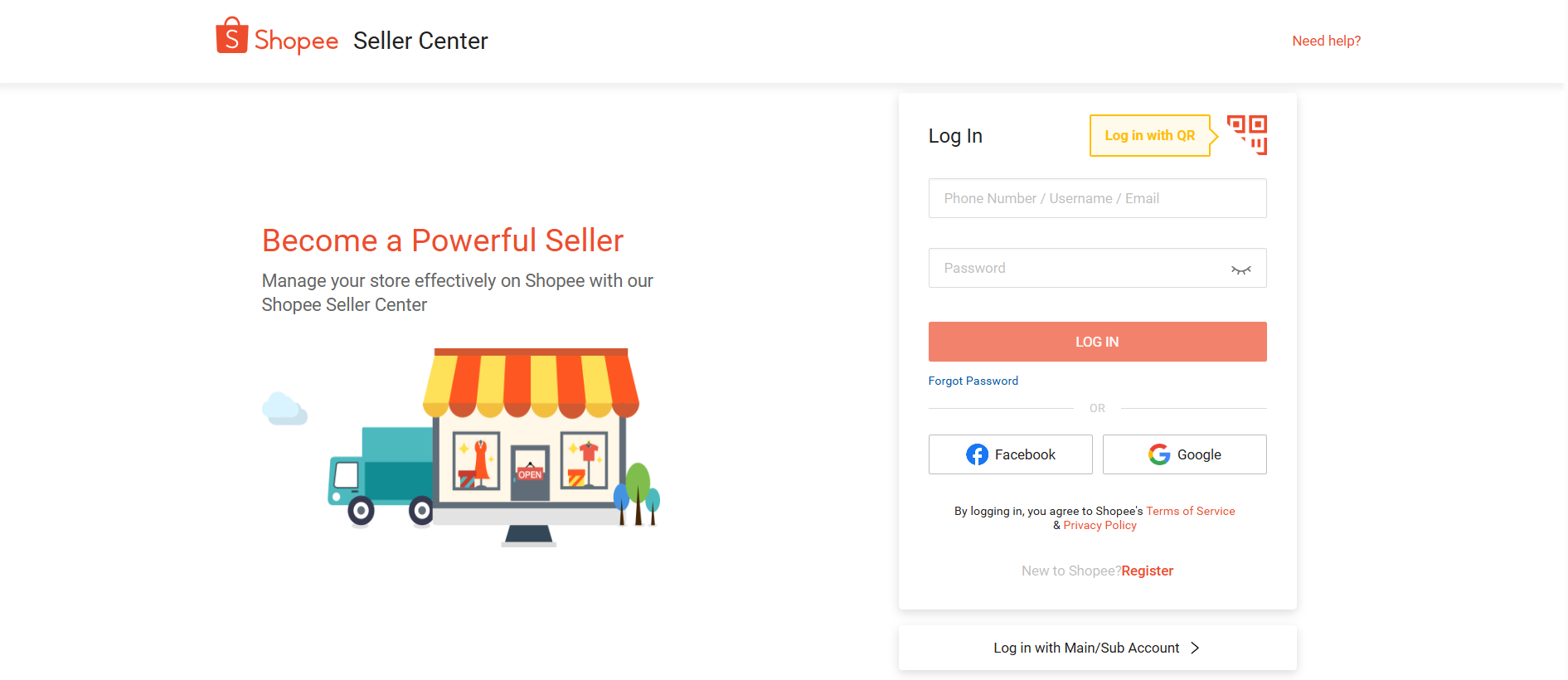
Lorem ipsum dolor sit amet, consectetur adipiscing elit. Ut elit tellus, luctus nec ullamcorper mattis, pulvinar dapibus leo.
Start from Seller Center rather than the buyer app if you are managing operational seller addresses. Go to your Shopee Seller Center and sign in using the account with permission to manage shop settings.
If you manage multiple stores or countries, confirm that you are in the correct shop before changing anything. Sellers who operate in more than one marketplace should be especially careful because an address update in one shop does not necessarily mean every marketplace account is updated.
Quick checks before continuing:
- The shop name is correct
- The marketplace or country is correct
- You are using an admin or owner-level account
- No one else on the team is editing shipping settings at the same time
- You have the final address approved by operations or warehouse staff
Step 2: Open the Address Management Area
Next, go to the area where Seller Center stores address details. In many Shopee Seller Center setups, this is found through a path similar to:
- Go to Shop Settings or Settings.
- Open Shipping or Shipping Settings.
- Select Address Management, My Address, or a similar address section.
- Choose Add a new address if you are creating a new location.
- Choose Edit if you are updating an existing seller address.
If you do not see the same menu labels, search within Seller Center for terms such as:
- Address
- My Address
- Address Management
- Shipping Address
- Pickup Address
- Return Address
- Shop Settings
Step 3: Add or Edit Your Seller Address
Now enter the address carefully. Treat this as an operational record, not just a form field.
Use the name of the person, warehouse, or department that can actually receive calls or parcels. If the courier calls and no one recognizes the contact name, pickup may fail. If returns arrive under a name no one knows, your receiving team may not process them quickly.
When entering the address:
- Use the correct country or region.
- Select the province, city, district, state, or local area from Shopee’s dropdowns when available.
- Enter the detailed street address exactly as couriers would recognize it.
- Include unit numbers, building names, office towers, warehouse gates, and floor numbers.
- Add the correct postal or ZIP code.
- Use a phone number that is active during pickup and delivery hours.
- Save only after reviewing every field.
Avoid vague address lines such as near main road, beside mall, or warehouse area unless there is a designated instruction field for landmarks. Shopee and logistics partners generally rely on structured address fields, so the formal address should come first.
Step 4: Assign the Address as Your Pickup Address
After adding the address, set it as the pickup address if this is where Shopee-supported logistics or your assigned courier should collect parcels.
This is the address that matters for outbound orders. If your staff prints waybills at one location but packs parcels at another, your pickup address should usually match the physical packing and handover location.
If you book pickups outside of Seller Center (for example, through a shipping platform like EasyParcel), make sure the pickup address saved in that platform matches the pickup address you assign in Shopee, so your team is not juggling two different ship-from locations.
Choose the pickup address based on these questions:
- Where are Shopee parcels packed each day?
- Where will the courier physically collect the parcels?
- Is someone available there during pickup windows?
- Can the location handle campaign volume?
- Does the contact person know how to release Shopee parcels?
- Are parcels staged in a visible, accessible area?
If you ship from multiple warehouses, check whether your Shopee setup, logistics option, or integration supports multiple pickup locations. If it does not, create a clear internal routing process so orders are not assigned to a warehouse that Shopee cannot pick up from.
Step 5: Assign the Correct Return Address
Next, set the address that should receive buyer returns. This may be the same as your pickup address, but it does not have to be.
Choose your return address based on where your team can inspect, record, and restock returned items. A good return address is not just reachable. It should be operationally ready.
Your return location should be able to:
- Receive parcels during normal delivery hours
- Identify Shopee returns separately from supplier deliveries
- Inspect item condition
- Match returned parcels to return/refund cases
- Update inventory after inspection
- Store damaged, incomplete, or disputed returns separately
- Escalate issues to customer service when needed
If your office cannot handle these tasks, do not use it as the return address just because it is your official business address. Returns should go where they can be processed.
Step 6: Set the Default Address if Required
Some Seller Center address screens allow or require one address to be marked as the default address. The default address may be used as the primary business, pickup, or fallback address depending on the local Shopee setup.
If all operations happen in one place, you may be able to mark the same address as:
- Default address
- Pickup address
- Return address
If your operation is split across locations, be careful. Do not assume default automatically means best for logistics. Review the available checkbox labels and assign each address intentionally.
A practical setup might look like this:
- Office address: default or administrative address
- Warehouse address: pickup address
- Returns department address: return address
If you are unsure which address Shopee will use for a specific shipment flow, create a small test order or consult Shopee Seller Center support before running high-volume sales.
Step 7: Save Your Changes and Review Them Immediately

Source: Pinterest
After saving, do not leave the page right away. Reopen the address list and confirm that the settings were applied correctly.
Check the following:
- The address appears in the address list
- The correct address is marked as pickup
- The correct address is marked as return
- The default address is correct if applicable
- The phone number is formatted correctly
- There are no typos in the postcode or city
- Old addresses are not still marked for active use
This review step is especially important when you are performing a Shopee change address task during a warehouse move, 3PL migration, or business expansion. Saving a new address does not always mean it has been assigned to the correct role.
Step 8: Update Your Marketplace Integration or Shipping System
If you use an order management system, ERP, WMS, shipping aggregator, accounting tool, or marketplace integration platform, update those records too. This is where many sellers make mistakes: they change the address in Shopee but forget that another system is still using the old warehouse address.
For example, if you manage Shopee shipments through EasyParcel, update your sender/pickup address profiles and any saved return address details there as well, so the address shown on labels and pickup bookings stays aligned with Seller Center.
Review every system that touches Shopee orders, including:
- Marketplace integration settings
- Order routing rules
- Warehouse profiles
- Shipping label templates
- Pickup booking tools (including EasyParcel, if you use it)
- Return management software
- Customer service macros
- Packing slips or invoices
- Internal SOP documents
- 3PL account settings
Your integration may not always pull address changes from Shopee automatically. In some setups, Shopee is the source of truth. In others, your ERP, WMS, or shipping platform may store its own sender and return address. Confirm the direction of sync before assuming the update is complete.
A simple rule works well: whenever you update your Shopee seller address, update your operational systems on the same day.
Managing Shopee orders becomes easier when shipments can be handled through one connected workflow. Sellers can save time by reducing repetitive steps when processing multiple orders. This is where EasyParcel comes in.
Simplify Shopee Shipping with EasyParcel Integration
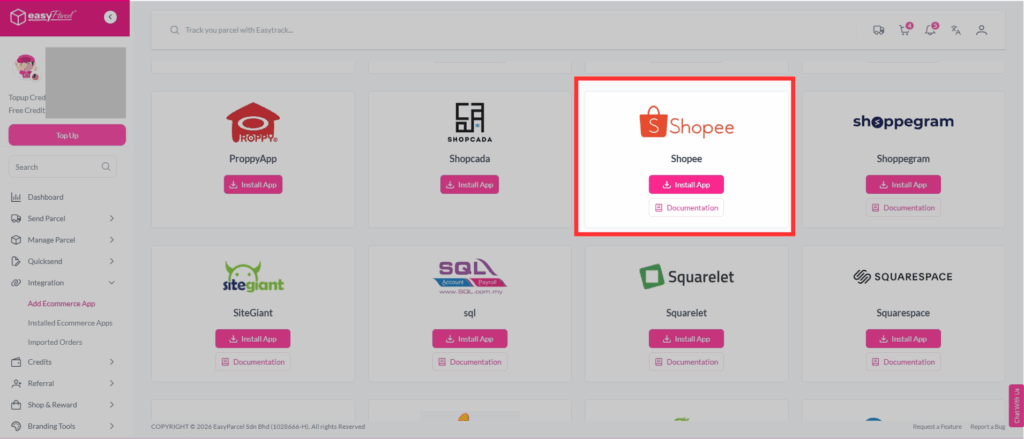
Managing Shopee orders becomes easier when shipments can be handled through one connected workflow. With Shopee integration on EasyParcel, sellers can sync their orders and manage shipping more efficiently.
You can click here to learn more about Shopee integration with EasyParcel.
How to Change Address in Shopee as a Seller
If you are searching for how to change address in Shopee from a seller perspective, the process is usually the same as setting the address for the first time: go to Seller Center, open the address management area, edit or add the new address, then assign it as pickup, return, or default.
Use this quick process:
- Log in to Seller Center.
- Select the correct shop.
- Go to Settings, Shop Settings, or Shipping.
- Open Address Management or My Address.
- Add the new address or edit the existing one.
- Save the address.
- Mark it as pickup, return, and/or default as needed.
- Remove or unassign old addresses if they should no longer be used.
- Update your marketplace integration and internal tools (including your EasyParcel address book, if applicable).
- Test the next few orders and return cases.
Do not change the address in the middle of active fulfillment without telling your operations team. If orders have already been arranged for shipment, changing address settings may not update every existing parcel. For buyer delivery details, Shopee help notes that changes after an order is placed are limited by timing and shipment status, and once the seller arranges shipment, delivery details may no longer be changeable through the normal flow.
Common Mistakes to Avoid
Using the registered office as the pickup point
Your registered office may be important for documentation, but it may not be the right place for parcel pickup. Use the actual fulfillment location.
Forgetting to set the return address
Some sellers add an address but do not mark it as the return address. This can create confusion when returns begin.
Keeping old addresses active
If you move warehouses, remove or unassign old addresses after confirming the new one is working. Old active addresses increase the chance of operational mistakes.
Using a phone number no one answers
Couriers often call when they cannot find the location or when pickup timing changes. Use a number monitored by someone responsible for Shopee parcels.
Updating Shopee but not your integration
Your Shopee address and your marketplace integration setup should match. If your integration still has the old sender or return address, your labels, routing, or internal reports may be wrong. The same goes for any shipping platform you use to fulfill orders, such as EasyParcel.
Changing settings during a campaign without testing
Address changes during peak campaigns can create avoidable problems. If possible, make changes before major sales events and validate the setup with normal order volume first.
Final Checklist for Shopee sellers
Before you consider the setup complete, confirm each item below:
- The pickup address is the real parcel handover location.
- The return address is where returned items can be inspected and processed.
- The contact name and phone number are correct.
- The postal code and local address fields are accurate.
- The right checkboxes or roles are selected in Seller Center.
- Old addresses are removed, edited, or unassigned where necessary.
- Your marketplace integration, ERP, WMS, or shipping software has been updated (including your EasyParcel sender/return profiles, if you use it).
- Your warehouse, customer service, and returns teams know about the change.
- The next few orders and returns have been checked for accuracy.
Setting your Shopee pickup and return address correctly helps keep fulfillment and returns running smoothly. Once everything is in place, EasyParcel can help simplify the next step of your Shopee shipping workflow with Shopee integration.
Ready to simplify your Shopee shipping? Sign up for FREE with EasyParcel and enjoy an RM10 discount coupon on your first delivery.
FAQs
1. What is a Shopee seller pickup address?
A Shopee seller pickup address is the location where the courier collects parcels from the seller. It should match the actual location where Shopee orders are packed and prepared for pickup.
2. What happens if my Shopee pickup address is incorrect?
An incorrect pickup address can cause the courier to arrive at the wrong location, resulting in a failed pickup, delayed handover, or the need to arrange another collection.
3. What is the difference between a Shopee seller address and a buyer delivery address?
A seller address is used for shop operations such as parcel pickup and returns. A buyer delivery address is where the customer’s order should be delivered. They are separate address settings and should not be confused.