Mask Sender Details EasyParcel NextGen: Protect Your Privacy

Mask Sender Details EasyParcel NextGen Protect Your Privacy

Running an online business from home has many advantages—low overhead, flexible hours, and the comfort of your own space. But every time you ship a parcel, your home address appears on the return label. For home-based sellers, freelancers, and privacy-conscious individuals, this is a significant concern.

Mask Sender Details on EasyParcel NextGen solves this problem. This feature lets you hide your personal return address and replace it with a professional, privacy-protected sender profile.

This guide explains what Mask Sender Details is, how to enable it, how to configure your privacy settings, and the benefits of protecting your personal information.

Table of Contents

What Is Mask Sender Details?

Mask Sender Details is a free feature on EasyParcel Next Gen that allows you to partially hide your address and phone number on the air waybill (AWB). It is designed to protect your privacy and ensure that the receiver only sees essential or masked contact information on the printed shipping label.

Key Details About This Feature:

  • Privacy Protection: Helps prevent the leakage of personal information, especially for online sellers who do not want to reveal their home address or personal phone number to customers.

Supported Couriers for Mask Sender Details

Park N Parcel logo
Park N Parcel
ninjavan-logo-fast-courier-service
Ninja Van
jnt-logo
J&T Express
tracxlogis
TracX Logis

How to Enable Mask Sender Details on EasyParcel Next Gen

1. Log in EasyParcel account. 

send-parcel-nextgen-step-1

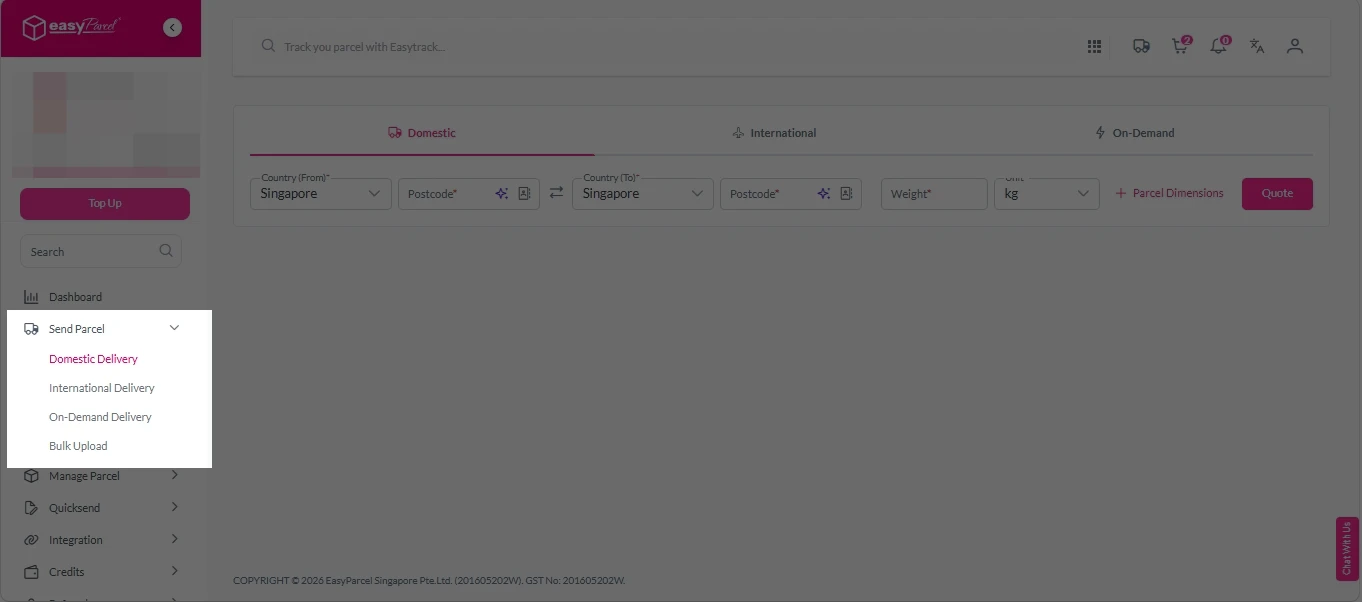
2. Under “Send Parcel”, choose either Domestic Delivery (for shipments within Singapore) or International Delivery (for shipments overseas).

Next gen- Send Parcel 1

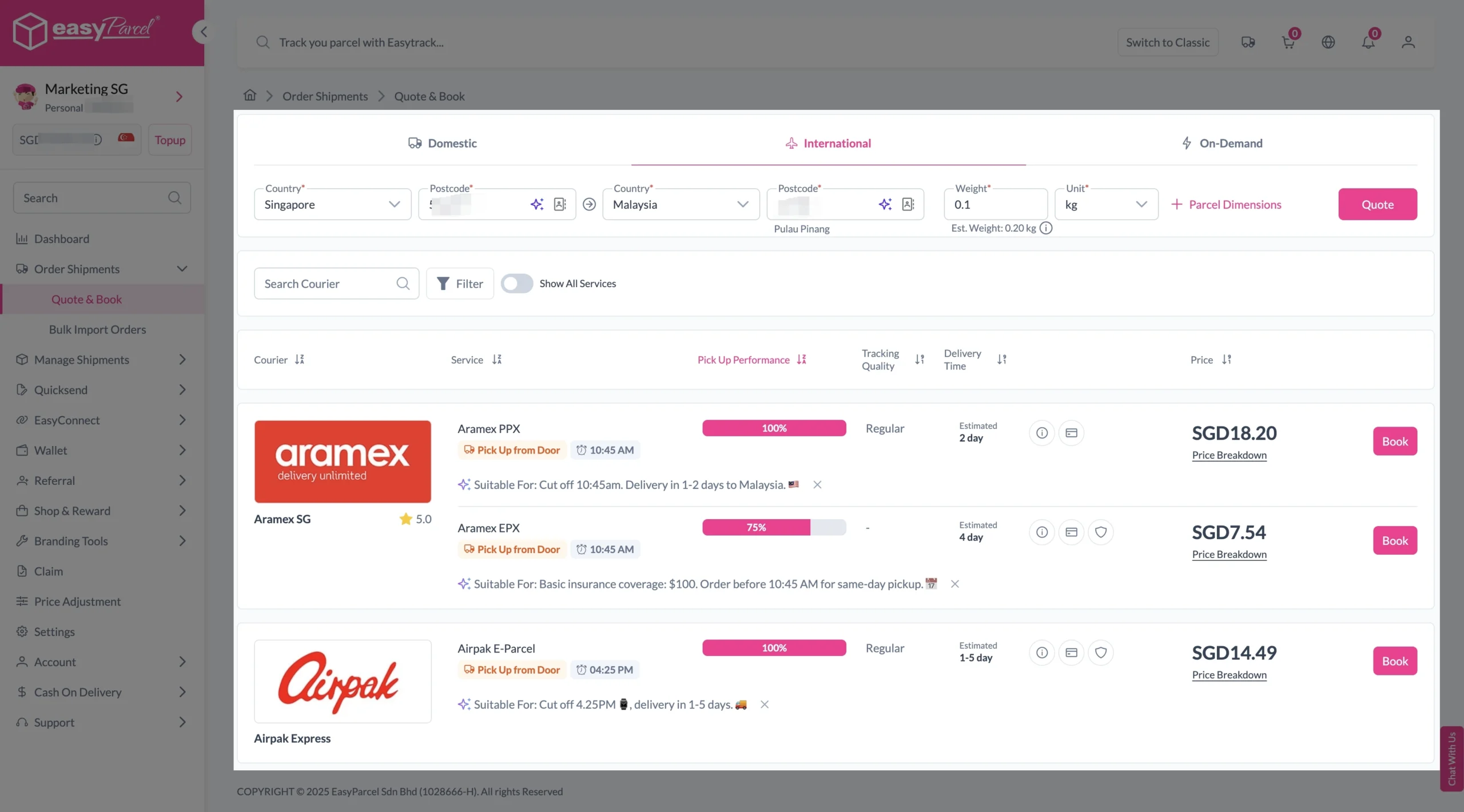
3. Enter details (sender country with postcode, destination country with postcode and parcel weight) and click on “Quote”. 

Choose your preferred courier and click “Book Now.”

send-parcel-nextgen-step-3-international

4. Fill in all details included Sender Details, Receiver Details, Parcel Details and Add-On Services. 
Sender and Receiver Details: 

send-parcel-nextgen-step-4

Parcel Details: 
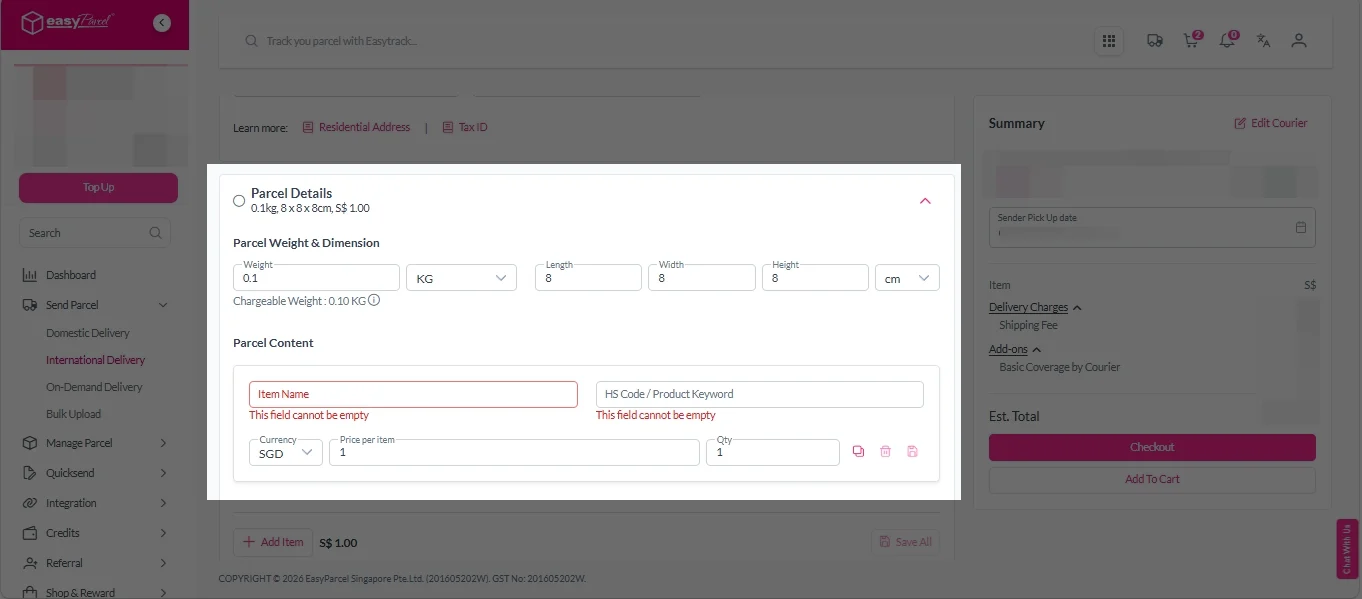
Enter the actual weight, dimension and content of your parcel. 
Parcel Content:
Fill in your item name. Then, choose your item category from the dropdown menu. The HS code will be auto generated based on your selection.

Note: Learn more about Smart HS Code.

International- Parcel Details

Add-On Services: 
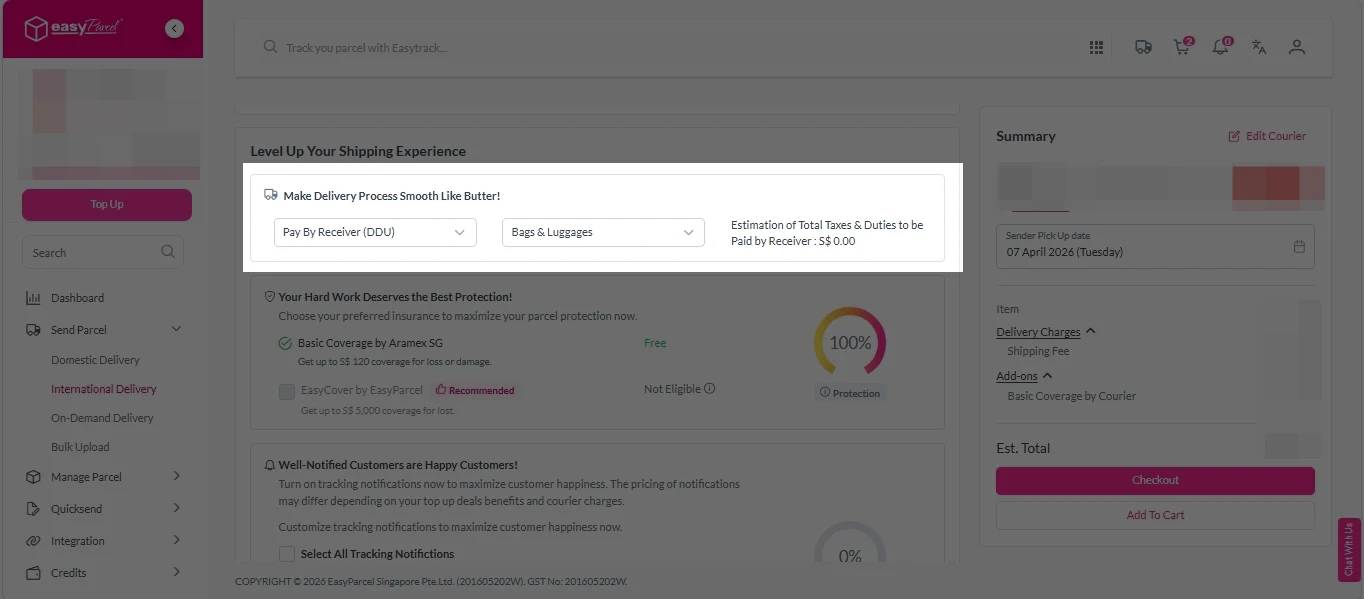
i.  Select your preferred duties payment option – Delivered Duty Paid (DDP) or Delivered Duty Unpaid (DDU)
Note: Learn more about DDP and DDU.

add on services 1

ii. Tick the box to add EasyCover for additional protection against loss.
Note: EasyCover availability depends on the courier selected. Learn more about EasyCover

add on services 2

iii. Choose your preferred notification channel – SMS, Email, or WhatsApp. Click “Preview” to see how it looks,  and click “Customise” to add brand message to the notification.
Note: Learn more about Customise Branding Servcies

add on services 3

iv. Tick the “Mask Sender Details” checkbox. EasyParcel Next Gen will automatically hide your sender information based on your saved privacy settings.
Note: Mask Sender Details only available for certain couriers. Find out what courier is available for Mask Sender Details.  

v. Tick the “Custom AWB” checkbox. EasyParcel Next Gen will apply your saved AWB template automatically. After completing all details, click on “Checkout” button. 
Note: Custom AWB is only available for certain couriers. Find out which couriers support Custom AWB

custom awb 1

5. Double check all the details and click on “Pay Now” to make payment. 

send-parcel-nextgen-step-5

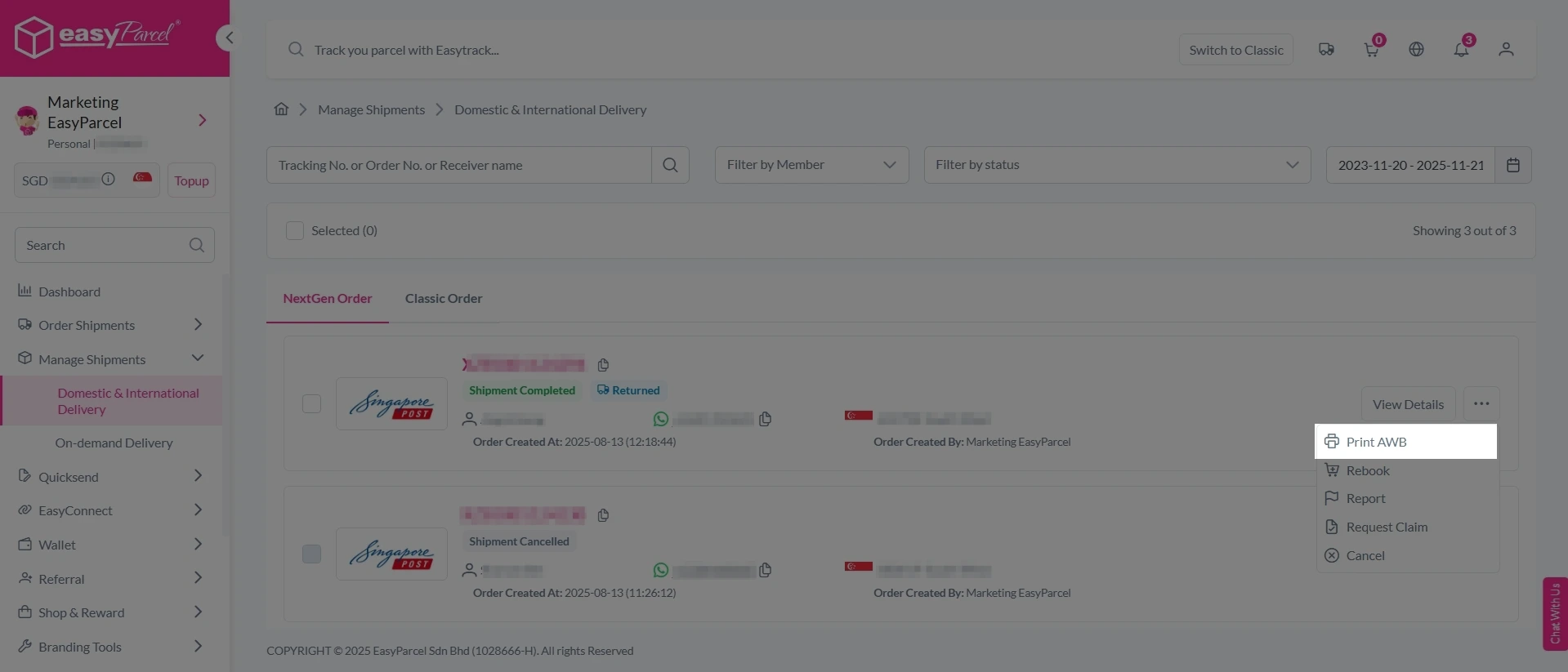
6. Download and print Air Waybill (AWB). 

Single AWB

1. Click the three dots icon next to the shipment.
2. Select “Print AWB” from the dropdown menu.
3. A PDF file will automatically download and save.

send-parcel-nextgen-step-6

1. Tick the “Selected” checkbox to choose all your orders.
2. A menu will appear at the bottom of the screen.
3. Click “AWB” to download all AWBs in bulk.

download AWB

Ship Safely, Hide Your Personal Info.

Mask Sender Details hides your information on every shipment—perfect for home-based sellers and privacy-conscious shippers.

How to Set Masking Options (Privacy Settings)

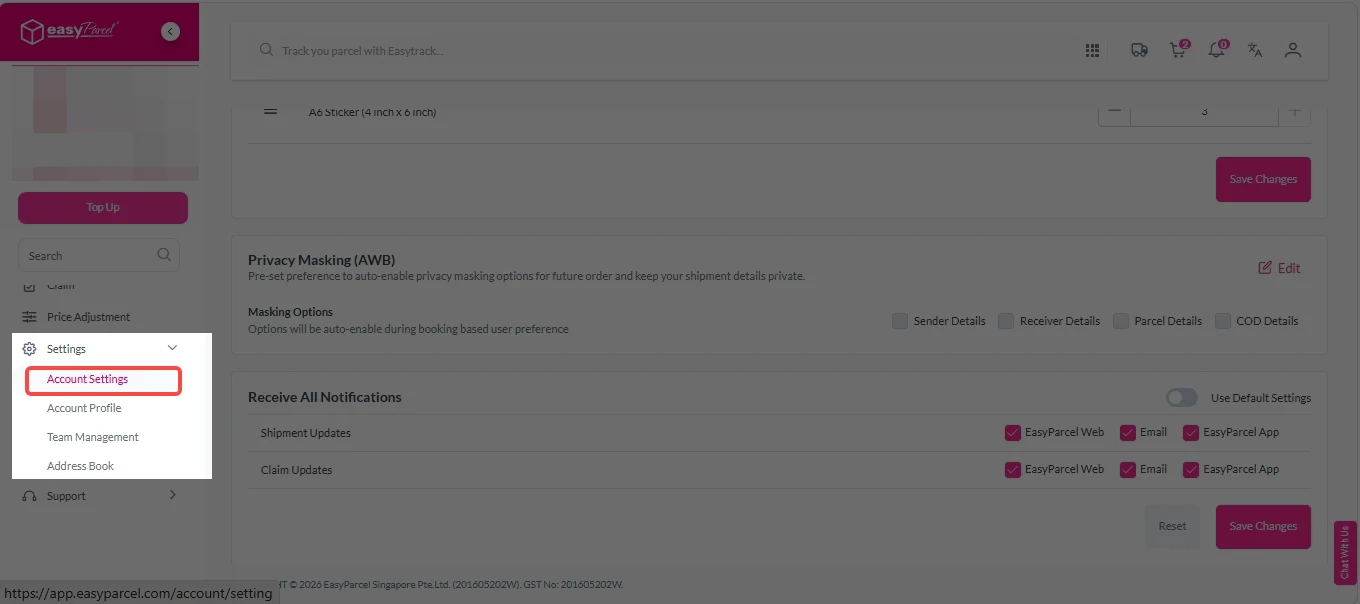
1. Under “Settings”, click on Account Settings.

Mask Sender Details 2

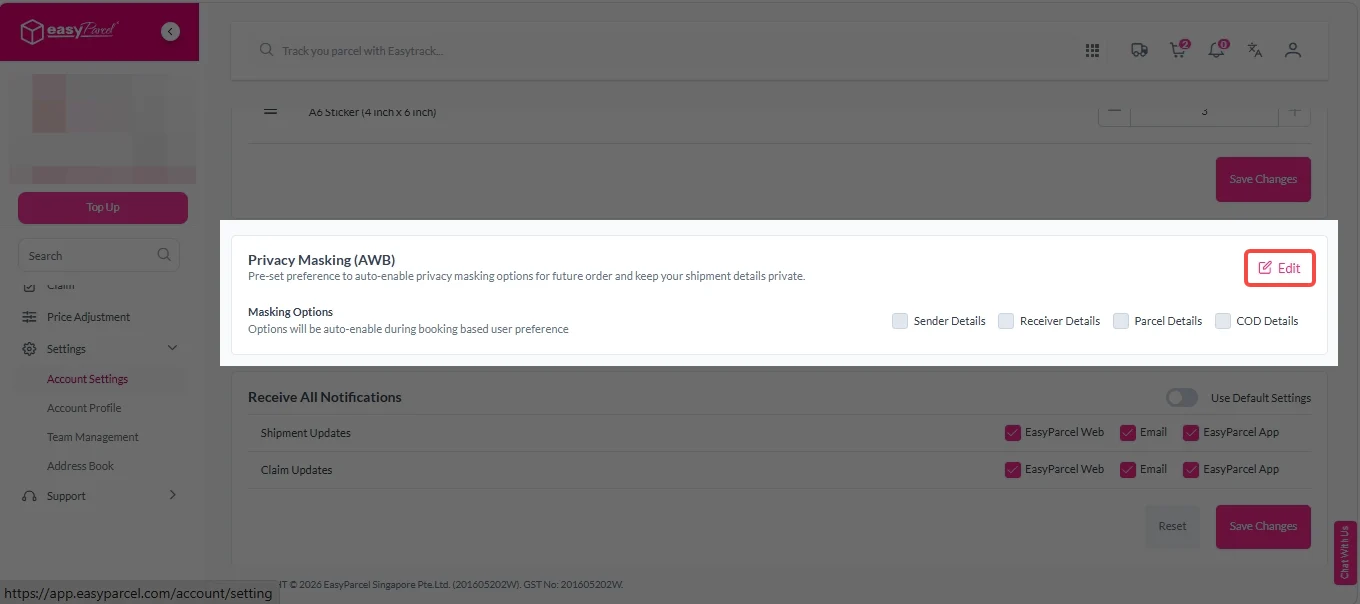
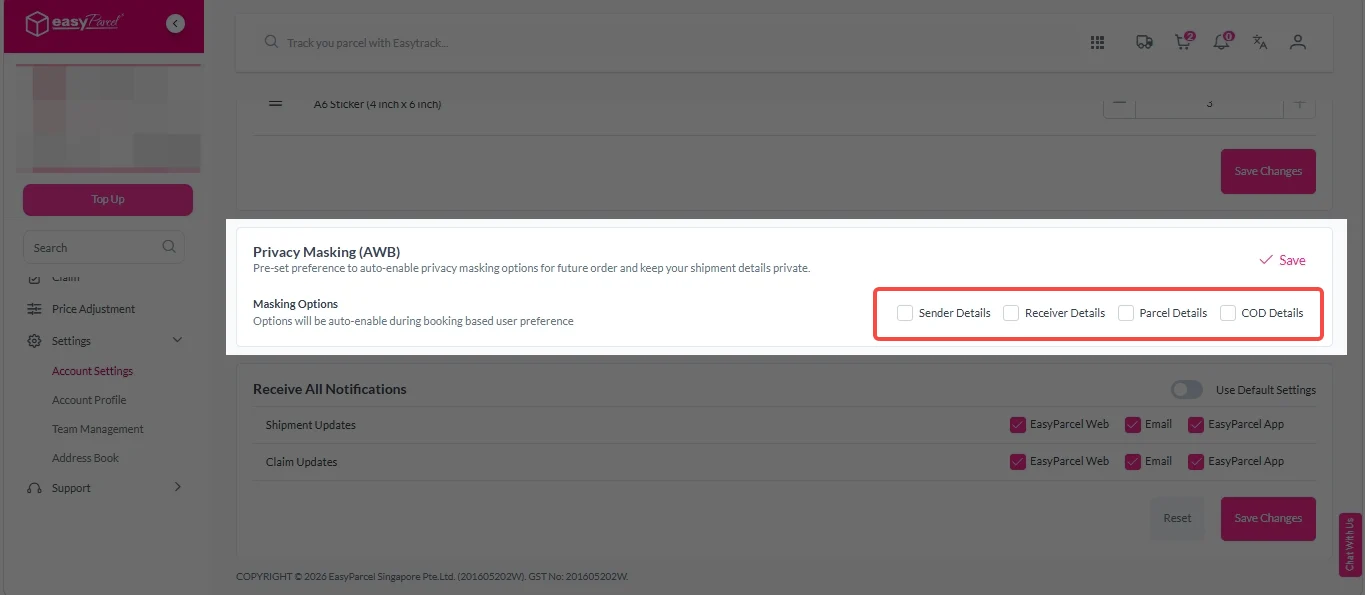
2. Under “Privacy Masking (AWB)”, click “Edit”.

Mask Sender Details 3

3. Tick the boxes to select which details you want to hide:

  • Sender Details – Hide your name and address
  • Receiver Details – Mask recipient information
  • Parcel Details – Conceal parcel contents description
  • COD Details – Hide Cash on Delivery information
Mask Sender Details 4

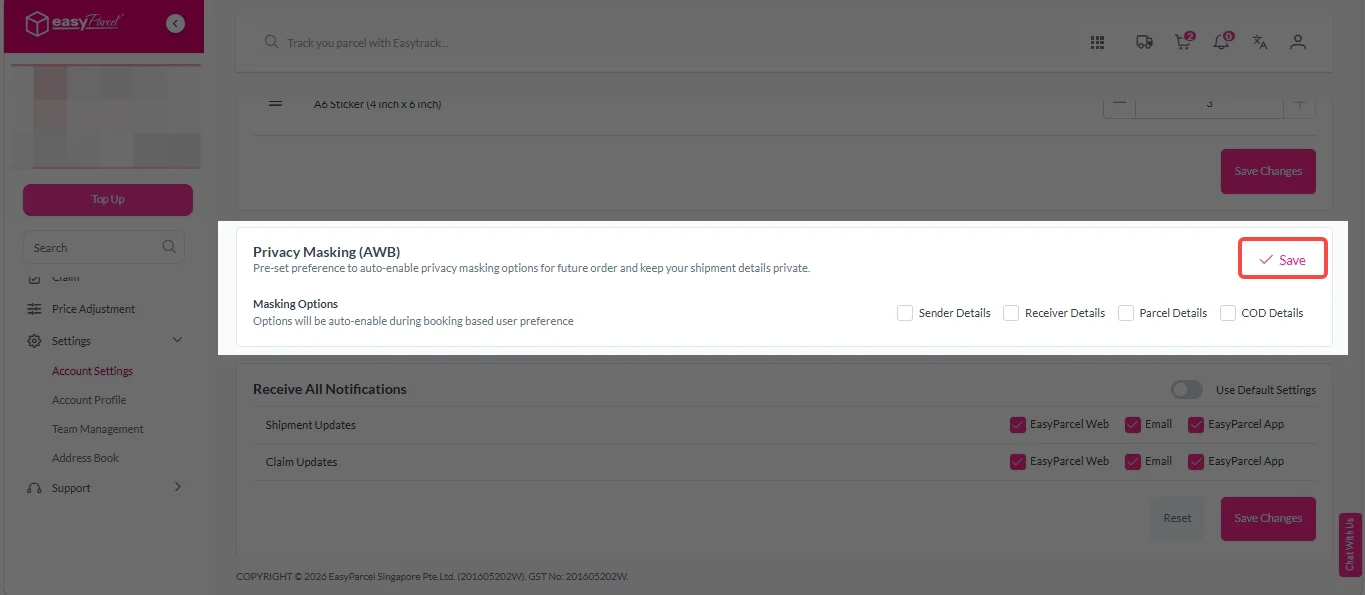
4. Click “Save” to apply your privacy settings.

Mask Sender Details 5

Benefits of EasyParcel Next Gen Mask Sender Details

Privacy Protection

Prevents your personal address and phone number from being exposed to customers, keeping your home location confidential.

Safety & Security

Reduces the risk of phishing, scams, and unwanted contact. Since your real contact details are hidden, scammers and automated bots cannot target your personal information.

Professional Image

Hides your residential address on the airway bill, presenting a cleaner, more professional appearance without exposing your home location.

Frequently Asked Question (FAQs)

What is the meaning of sender details?
Sender details refer to the information of the person sending the parcel, including name, address, phone number, and email.
How to protect my privacy when shipping parcel?
Use Mask Sender Details on EasyParcel Next Gen to hide your personal information on the airway bill.
🚨 Campaign Spotlight 🚨

Boost Your Rezeki with up to 500,000 Reward Points + S$2,888 Bonus Credits!

Celebrate the festive season with rewards designed to help your business grow stronger and bigger this Raya! 💚✨ With the Raya Power Boost, when you top up, you’ll earn up to S$2,888 Bonus Credits and 500,000 Reward Points, depending on your top-up amount. Don’t miss out — this exclusive Raya Power Boost runs only until 31st March 2026, 11:59PM!

Join 1.5 Million Happy Customers & Start Saving

Create your free account today and receive S$6 shipping coupon to start saving from your very first parcel. Compare courier rates, book in minutes, and start saving immediately.
×