


A Harmonized System (HS) code is a standardized number used to classify goods in international trade. It helps customs authorities determine applicable duties, taxes and import requirements for your shipment.
This blog explains what HS codes are, why they matter, and how EasyParcel’s Smart HS Code helps you find a suitable HS code for your shipment.
Table of Contents
What Is a Harmonized System Code?
A harmonized system code is a standardized 6-digit number used to classify goods in international trade. The system is developed and maintained by the World Customs Organization (WCO).
|
Aspect
|
Detail
|
|---|---|
|
Full name
|
Harmonized Commodity Description and Coding System
|
|
Developed by
|
World Customs Organization (WCO)
|
|
Number of digits
|
6 digits (international standard)
|
|
Countries using it
|
200+ countries worldwide
|
|
Global trade coverage
|
Over 98% of traded goods
|
|
Update frequency
|
Every 5 years (2022 was last major update)
|
The Harmonized System provides a common international framework for classifying goods. However, countries and regions may extend the 6-digit HS code for their own tariff and regulatory requirements. In Singapore, HS codes are extended to 8 digits under the ASEAN Harmonized Tariff Nomenclature (AHTN).
Why the Harmonized System Code Matters for Your Business
Reason #1: Determines Customs Duties and Taxes
Your HS code helps customs authorities determine the applicable tariff treatment, duties, taxes and import requirements for your goods. Different product classifications may be subject to different tariff treatments.
|
Scenario
|
Consequence
|
|---|---|
|
Correct code
|
Helps determine the applicable tariff treatment
|
|
Incorrect code
|
May overpay or underpay duties
|
|
Intentional or incorrect misclassification
|
May result in penalties, additional duties or other customs action, depending on the circumstances
|
Reason #2: Avoids Customs Delays
Incorrect HS code classification may result in additional customs checks, processing delays or other complications. Providing accurate product information and an appropriate HS code can help support smoother customs processing.
Reason #3: Ensures Regulatory Compliance
Certain products require special permits, licenses, or certificates. The HS code helps customs authorities identify whether specific controls or regulatory requirements may apply to your goods.
Reason #4: Qualifies for Trade Agreements
Free trade agreements may provide preferential tariff treatment for eligible goods. The HS code helps identify the applicable product classification, while other requirements such as rules of origin and supporting documents may also apply.
Common Harmonized System Code Mistakes
|
Mistake
|
Consequence
|
Prevention
|
|---|---|---|
|
Using an incorrect or incomplete HS code
|
May result in customs queries or processing delays
|
Check that the HS code matches the actual goods
|
|
Ignoring material differences
|
Silk and polyester scarves may have different classifications and tariff treatments
|
Check the product's material and composition before classifying
|
|
Misclassifying bundles
|
Different items in a shipment may require separate classifications
|
Provide accurate descriptions and classifications for each item where required
|
|
Using outdated classification information
|
HS nomenclature is periodically updated, and classifications may change
|
Check the latest applicable HS classification
|
|
Using overly generic descriptions
|
Vague descriptions may make accurate classification and customs processing more difficult
|
Provide a clear and specific product description
|
Get Your HS Code in Seconds
Select your item category, enter your product description – Smart HS Code auto-generates the correct code instantly, free for all EasyParcel users.

How to Find the Right Harmonized System Code
Searching for the right harmonized system code manually takes time. You need to browse tariff databases, understand chapter structures, and verify country extensions. One mistake can cause customs delays or fines.
The easy solution: EasyParcel Smart HS Code
Instead of manual lookup, let EasyParcel do the work for you.
How Smart HS Code Works
During Shipment
1. Login to your EasyParcel account.

2. Click on “Send Parcel”, select “International Delivery” on the drop-down menu.
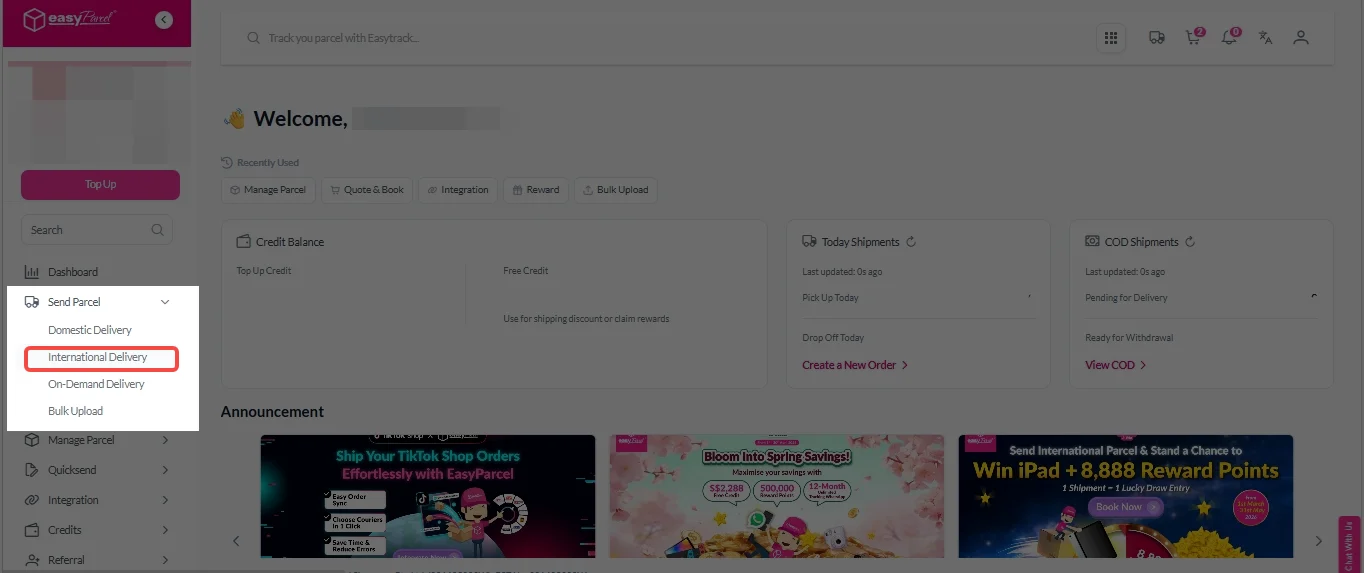
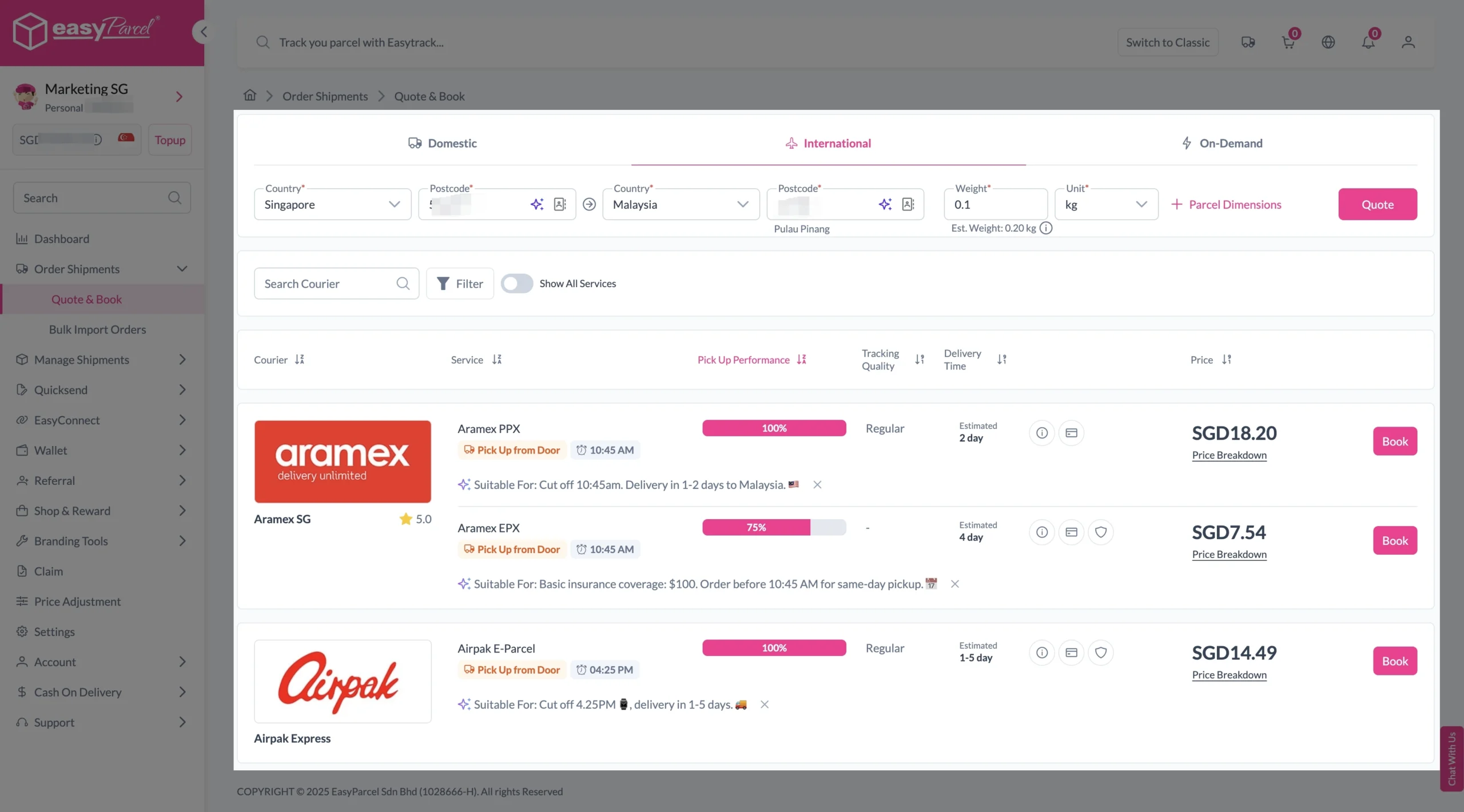
3. Enter origin country with postcode, destination country with postcode and parcel weight. Then, click on “Quote” button. A list of courier rates will appear below, as shown in the image.
4. Fill in all details included Sender Details, Receiver Details, Parcel Details and Add-On Services.
Sender and Receiver Details:

Parcel Details:
Enter the actual weight, dimension and content of your parcel.
Parcel Content:
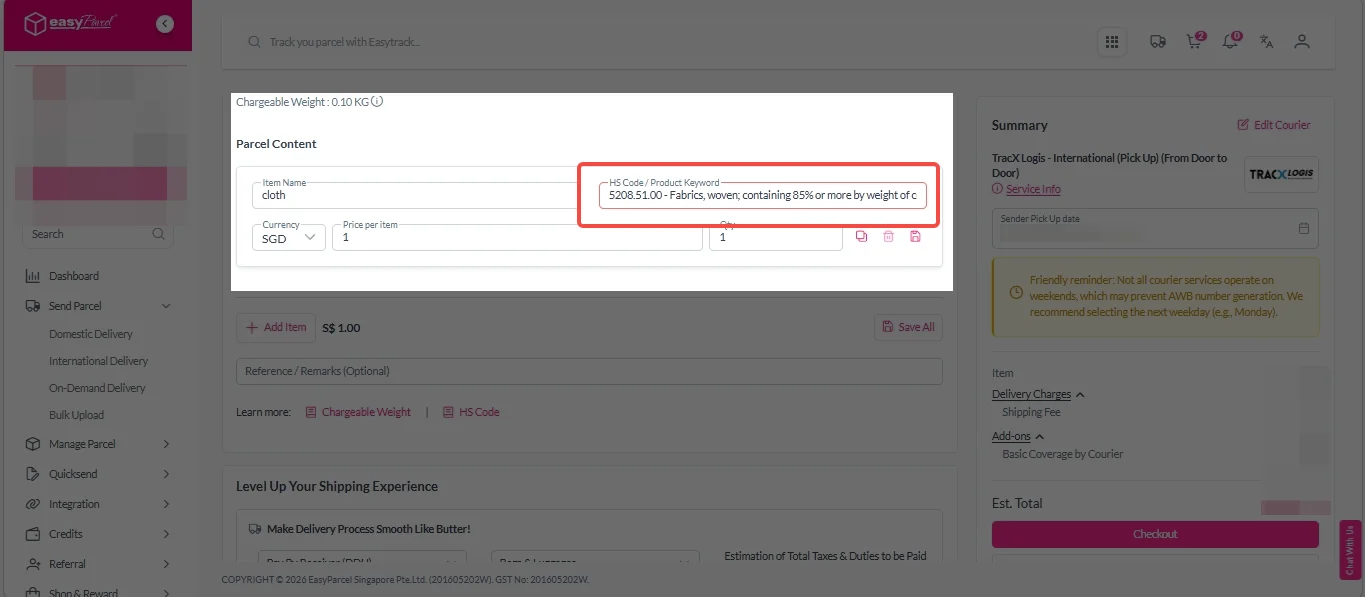
i. Fill in your item name.
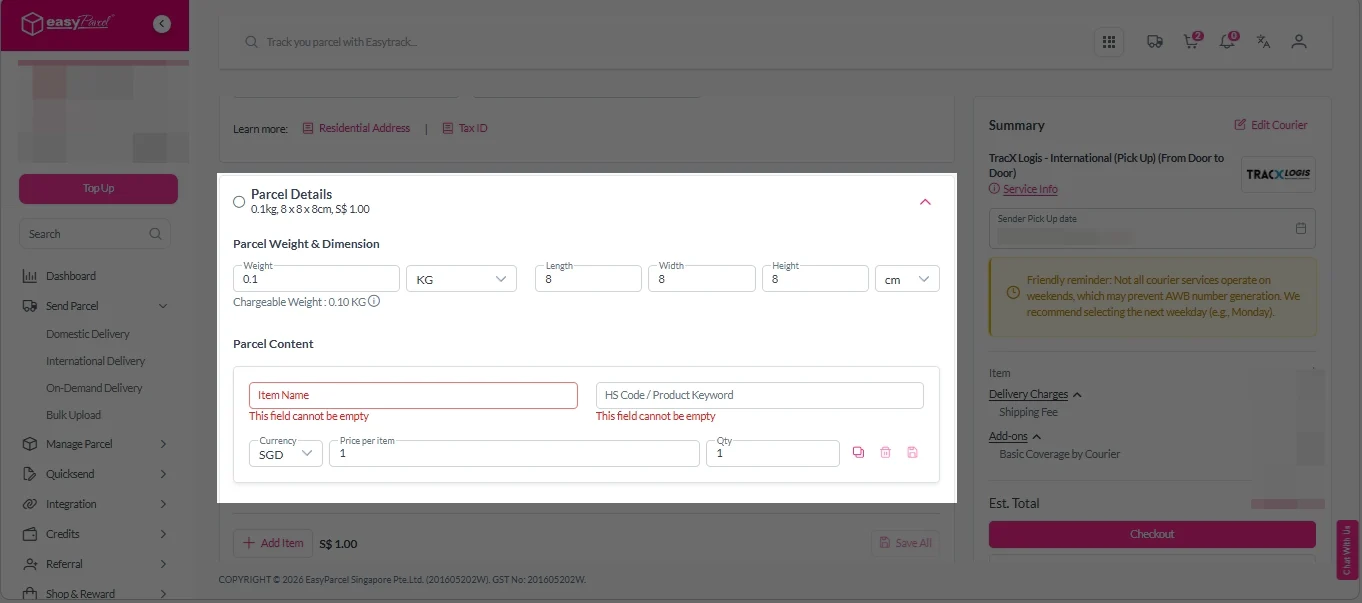
ii. Choose your item category from the dropdown menu.
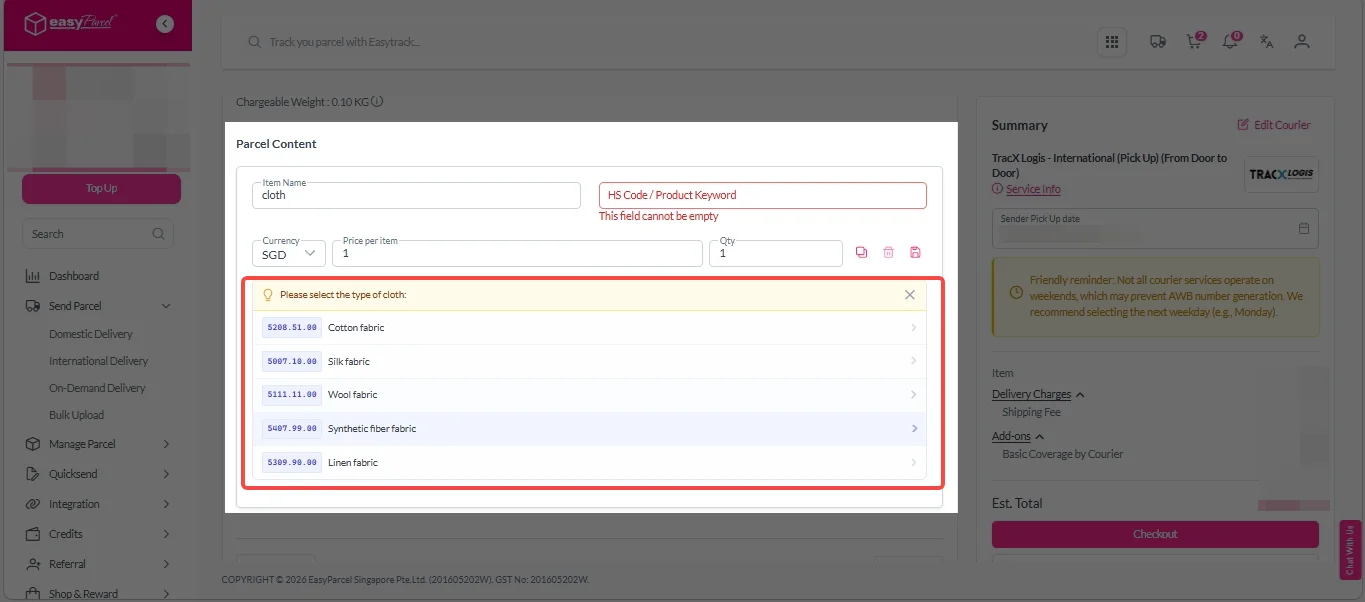
iii. Smart HS Code automatically generates the accurate HS code for you.
Add-On Services:
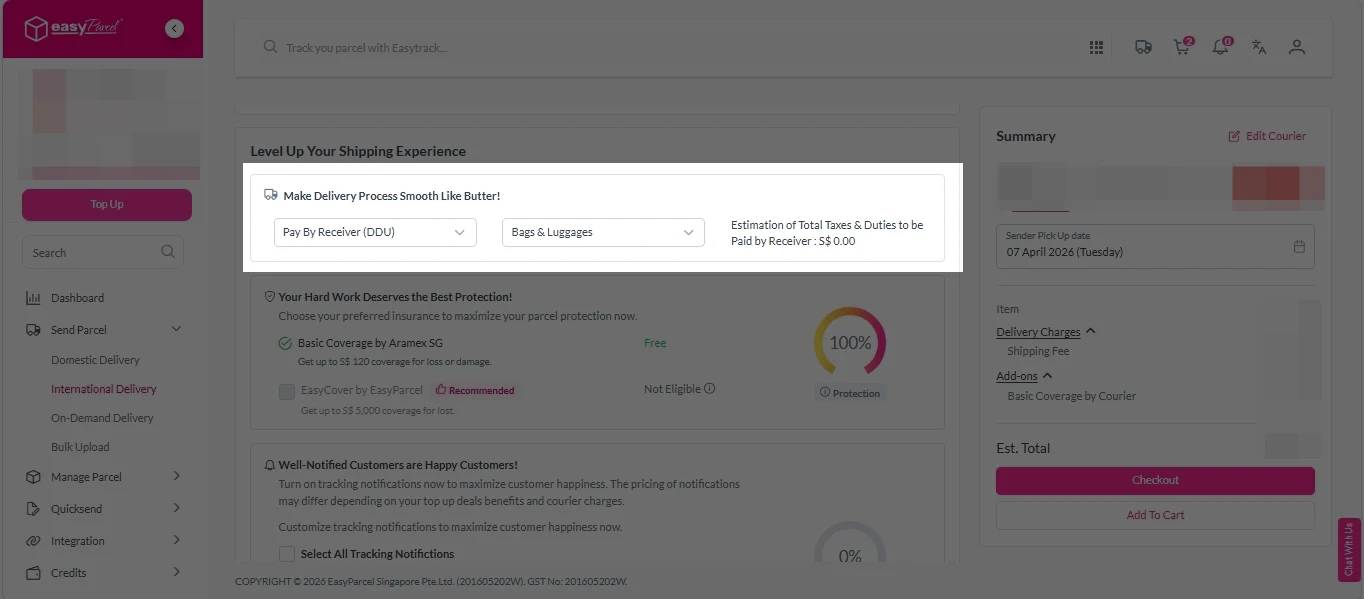
i. Select your preferred duties payment option – Delivered Duty Paid (DDP) or Delivered Duty Unpaid (DDU).
Note: Learn more about DDP and DDU.
ii. Tick the box to add EasyCover for additional protection against loss.
Note: EasyCover availability depends on the courier selected. Learn more about EasyCover.

iii. Choose your preferred notification channel – SMS, Email, or WhatsApp. Click “Preview” to see how it looks, and click “Customise” to add brand message to the notification.
Note: Learn more about Customise Branding Servcies.

iv. Tick the “Mask Sender Details” checkbox. EasyParcel Next Gen will automatically hide your sender information based on your saved privacy settings.
Note: Mask Sender Details only available for certain couriers. Find out what courier is available for Mask Sender Details.

v. Tick the “Custom AWB” checkbox. EasyParcel Next Gen will apply your saved AWB template automatically.
Note: Custom AWB is only available for certain couriers. Find out which couriers support Custom AWB.

5. Double-check all details and click “Checkout”.
6. Double check all details and click “Pay Now” to proceed.

7. Download and print Air Waybill (AWB).
Single AWB
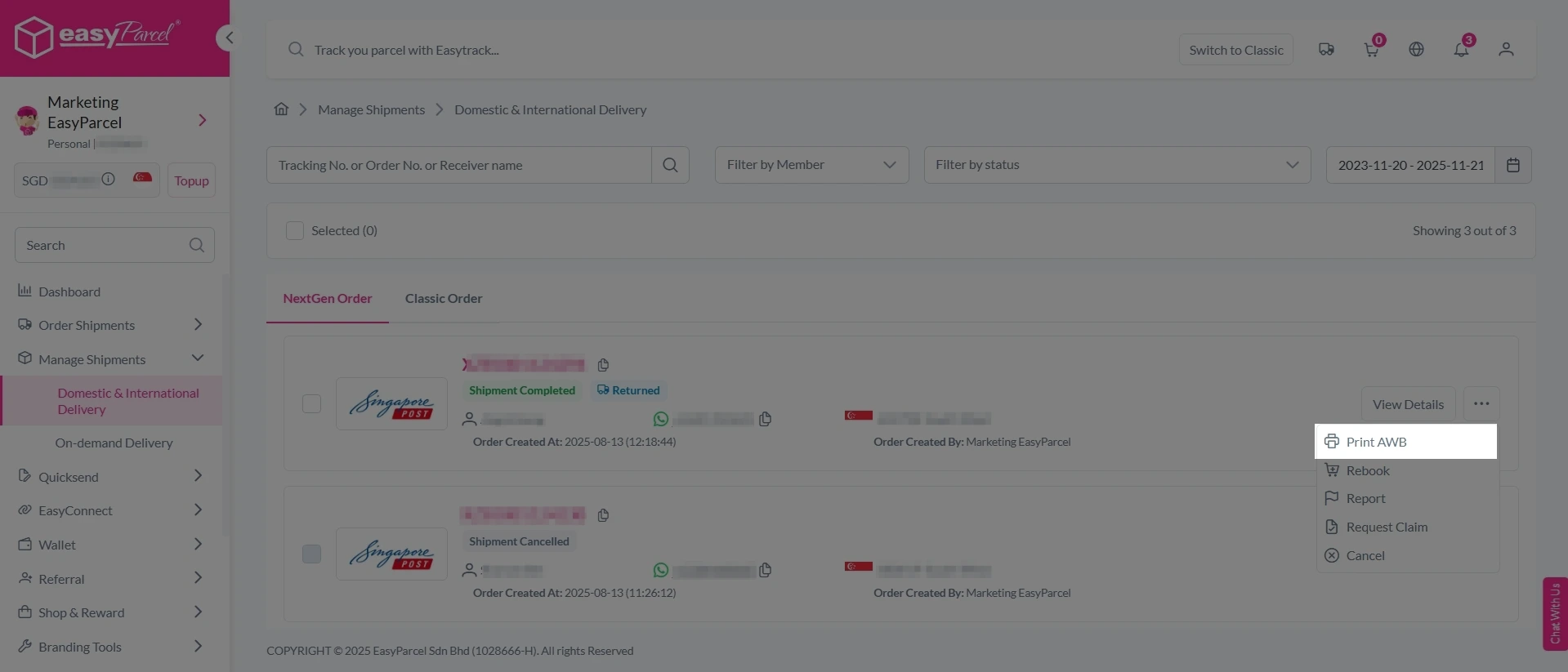
1. Click the three dots icon next to the shipment.
2. Select “Print AWB” from the dropdown menu.
3. A PDF file will automatically download and save.
Bulk Downloads AWB
1. Tick the “Selected” checkbox to choose all your orders.
2. A menu will appear at the bottom of the screen.
3. Click “AWB” to download all AWBs in bulk.

Using HS Code Finder
Step 1: Login your EasyParcel Account.
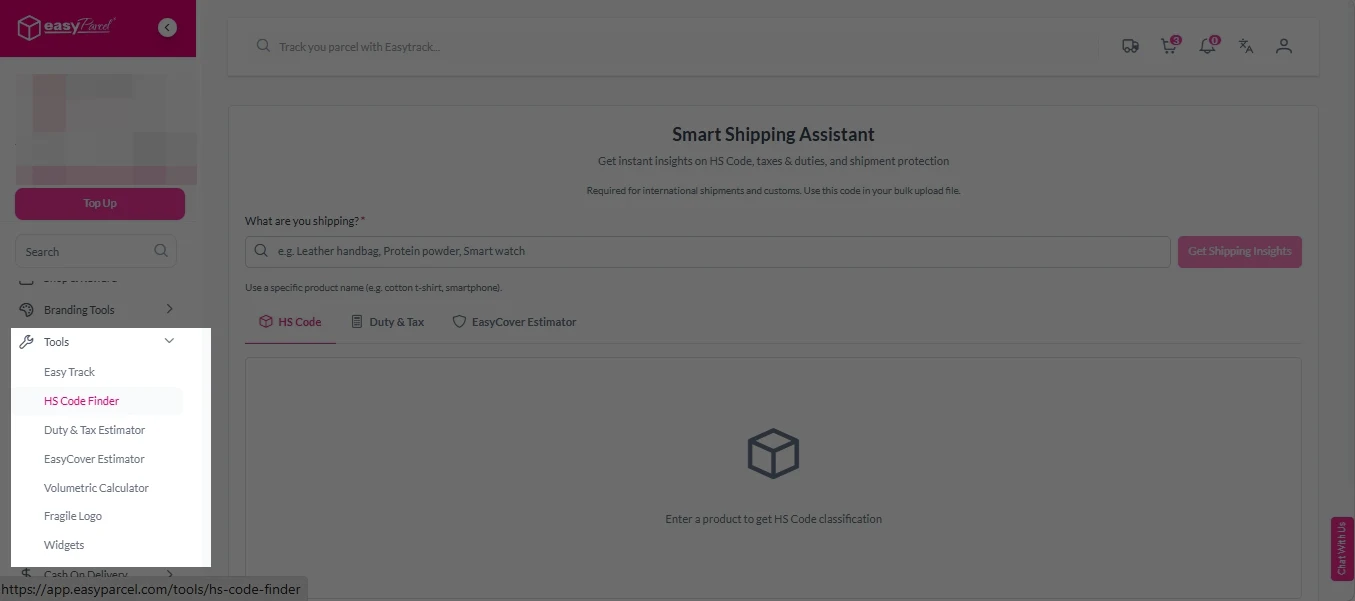
Step 2: Under “Tools”, click on “HS Code Finder“.
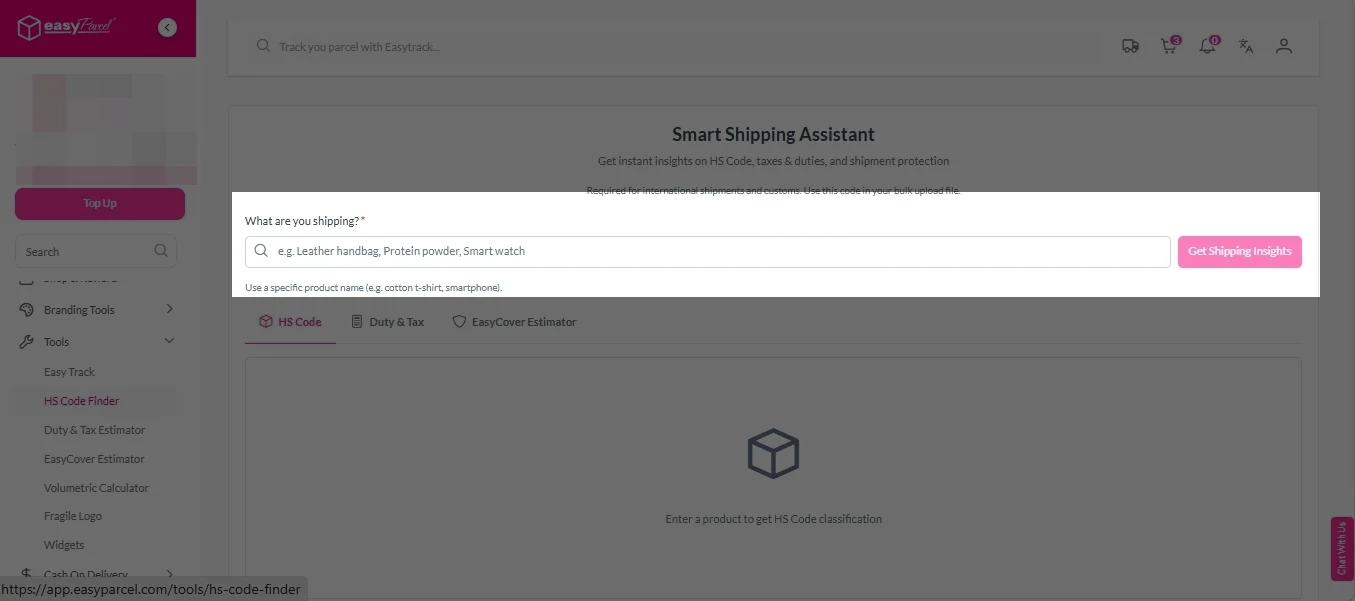
Step 3: Fill in the specific product name (e.g. cotton t-shirt, smartphone).
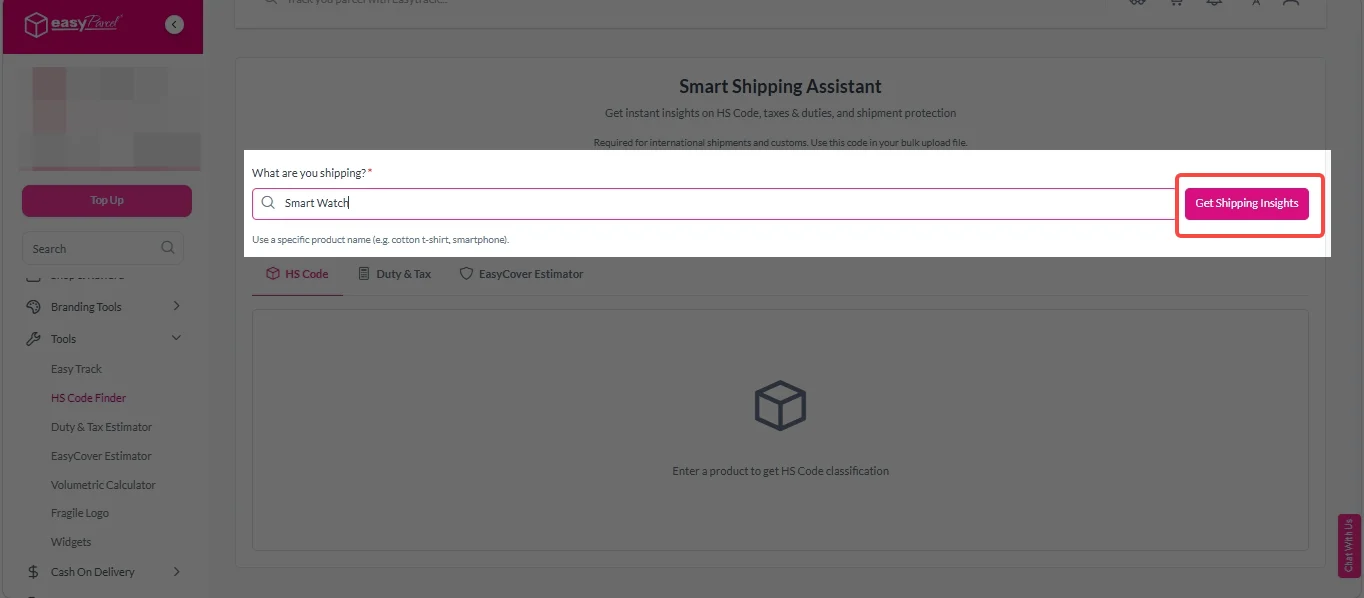
Step 4: Click on “Get Shipping Insights” button.
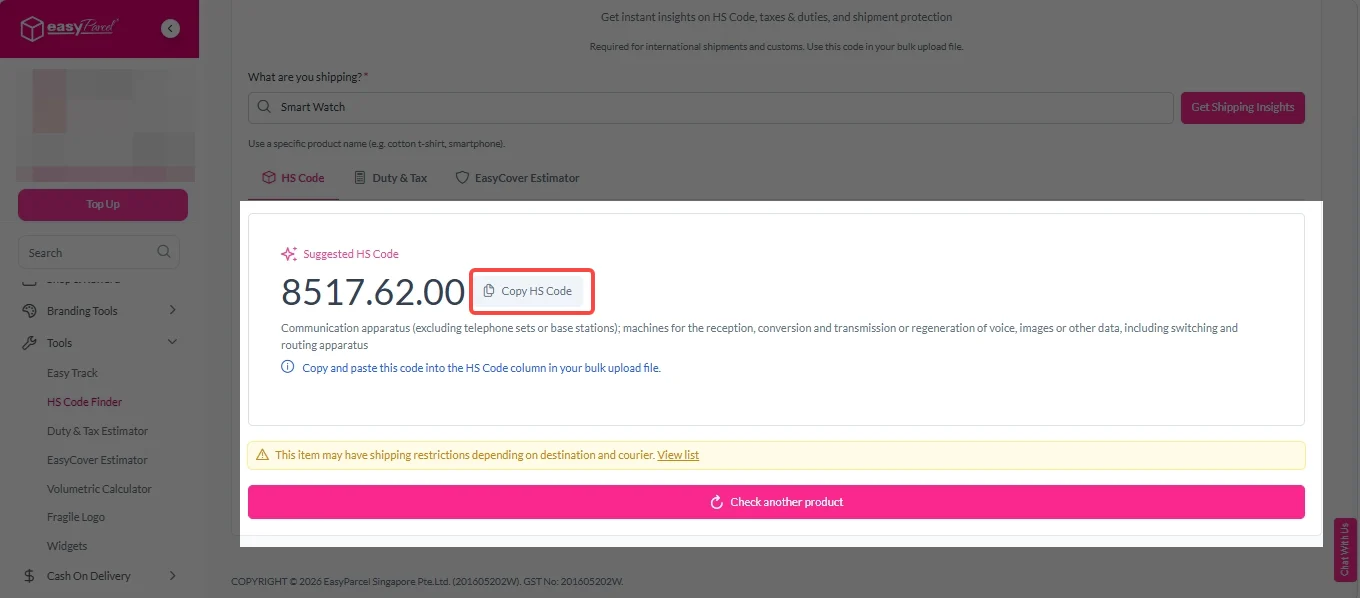
Step 5: You will see a suggested HS Code. Click on “Copy HS Code” button to copy.
Benefits of Using Smart HS Code
No manual searching
Stop browsing tariff databases – get instant results
Reduces errors
Auto-generated codes are more accurate than guessing
Avoids delays
Correct codes = faster customs clearance = happier customers






