Singapore
 Thailand
 Indonesia
Running a business means finding simple ways to make every order easier to manage. As more customers prefer shopping and making purchases online, businesses need a convenient way to collect orders without creating extra work. This is where an online order form can help.
Instead of going back and forth with customers through messages, an online order form brings important information such as product choices, customer details, delivery information, and payment into one place.
In this guide, we will explore what an online order form is, the different types available, how it works, and why it is important for businesses.
Contents
What Is an Online Order Form?
An online order form is a digital form that allows customers to place orders by filling in their details, selecting products or services, and making payment. Once the order is submitted, the business receives the order details for processing and fulfilment.
For example, a home-based bakery can use an online order form to let customers choose a cake flavour, select the cake size, add personalised messages, provide delivery details, and make payment. The bakery then receives all the information in one place and can prepare the order accordingly.
6 Common Types of Online Order Forms
There are several types of online order forms, depending on what a business sells or offers.
1. Product Order Forms
Product order forms allow customers to browse available products, select the items they want, choose quantities, and enter their personal and delivery details.
2. Food Order Forms
Food order forms are designed for businesses that sell meals, snacks, drinks, or other food items. Customers can select their preferred items, choose quantities, add special requests, and provide pickup or delivery details.
3. Custom Order Forms
Custom order forms are suitable for personalised or made-to-order products. Customers can provide specific details about what they want, such as their preferred size, colour, design, name, or other requirements.
4. Service Order Forms
Service order forms allow customers to request a service and provide the information needed to complete it. Customers can select the type of service they need, choose a preferred date or time, and provide their contact or location details.
5. Booking and Reservation Forms
Booking and reservation forms allow customers to reserve a specific date, time, or service. Customers can provide their personal details and select an available booking slot.
6. Subscription Order Forms
Subscription order forms are used for products or services that customers receive regularly. Customers can select a subscription plan, choose their preferred options, and provide their payment and contact details.
What Information Should Be Included in Online Order Form?
A well-designed online order form should collect all the important information needed to process an order smoothly.
1. Customer Information
Start with basic customer details so the business can identify the buyer and contact them when necessary. The form can include:
- Full name
- Email address
- Phone number
2. Product or Service Details
The form should clearly show what customers can order. Depending on the business, customers may need to select:
- Product or service name
- Size or colour
- Quantity
- Product variations
- Add-ons or additional options
3. Delivery Information
If the order requires delivery, collect the information needed to send the order to the correct location. This can include:
- Delivery address
- Postcode
- City and state
- Delivery instructions
4. Payment Information
Include a secure payment option so customers can complete their purchases conveniently. Depending on the payment system, businesses may offer options such as:
- Online banking
- QR payment
- E-wallets
5. Special Instructions
Add a section where customers can leave additional notes or requests. This is useful for customised orders, specific product requirements, or delivery instructions that are not covered in the standard form fields.
Why Online Order Form Important for Businesses?
Makes Ordering Easier
Customers can place orders online without needing to contact the business through phone calls or messages. This creates a faster and more convenient ordering experience.
Saves Time and Reduces Manual Work
Businesses can collect customer and order information in one place instead of manually recording details from different messages or platforms.
Keeps Orders Organised
An online order form helps businesses collect important information in a structured format, making it easier to review, manage, and process orders.
Reduces Order Mistakes
By using clear fields and dropdown menus, businesses can reduce missing or incorrect information when collecting product, customer, and delivery details.
Online Order Form vs Online Store: What’s the Difference?
Online order form and online store both help businesses accept orders online, but they serve different purposes. Here are the key differences between the two:
| Aspect | Online Order Form | Online Store |
| Main Purpose | Collects customer orders and information | Provides a complete online shopping experience |
| Product Display | Usually shows selected products or services | Offers product catalogues with detailed listings |
| Payment | Customers may pay before or after submitting the order, depending on the setup | Usually includes integrated payment options at checkout |
| Shopping Cart | Usually not available | Commonly includes a shopping cart |
| Best For | Simple orders, bookings, registrations, and customised requests | Businesses selling multiple products online |
How Does an Online Order Form Work?
1. Seller Creates an Online Order Form

Source: Pinterest
The seller creates an online order form with the products or services available for customers to order. The form can include product details, prices, product options, delivery information, and payment methods. Then, the seller share the form link with customers.
2. Customers Fill in Their Details and Select Products

Customers open the form and enter their details, such as their name, phone number, email address, and delivery address. They can also choose the products or services they want and select options such as quantity, size, or colour.
3. Customers Make Payment

Source: Pinterest
After choosing their products, customers complete the payment using the available payment methods, such as online banking, QR payments or e-wallets.
4. Customers Submit the Order

Source: Pinterest
Customers check their order details and submit the completed form. The order information is then sent to the business for processing.
5. Seller Receives and Processes the Order

Source: Pinterest
The seller receives the order details and prepares the items for fulfilment. The team can check the order, prepare the products, and arrange the delivery.
6. Order Is Delivered

Source: Pinterest
Once the order is ready, the seller arranges for the parcel to be delivered to the customer’s address. Customers may also receive tracking information to check their parcel delivery status.
After receiving an online order, the next step is usually to arrange the delivery. But who says businesses need to spend time manually booking each parcel one by one?
How Does EasyParcel's QuickSend Help With Online Orders?
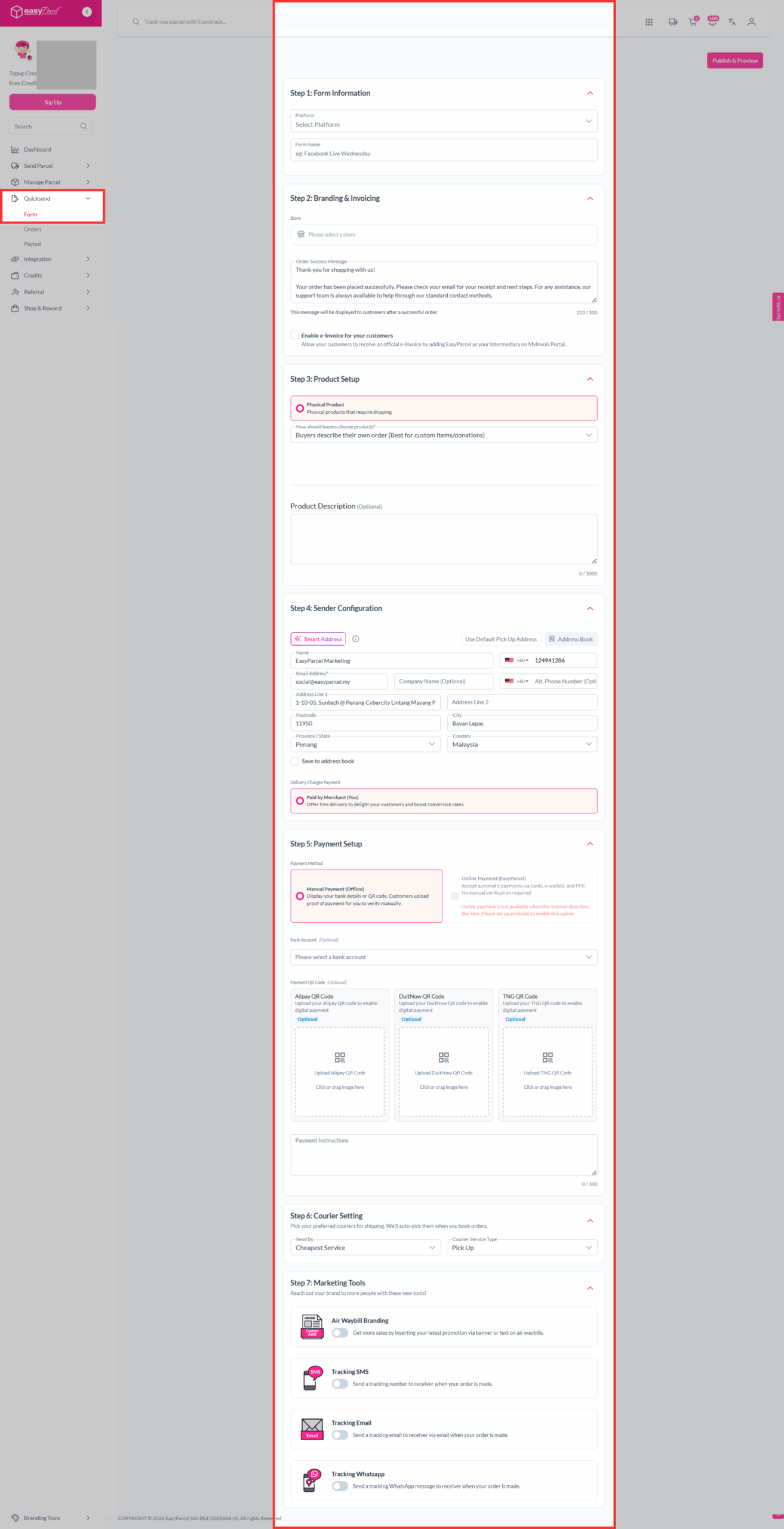
EasyParcel’s QuickSend helps you simplify the journey from receiving an order to arranging delivery. You can create an order form and share the link with customers, allowing them to enter their order information. Once the details are collected, you can just simply manage the shipment through EasyParcel without manually entering every customer’s information.
You may click here to learn more about EasyParcel’s QuickSend.
An online order form is a simple and practical way for businesses to collect customer orders, product details, delivery information, and payments in one place. It can save time, keep orders organised, and make the buying process more convenient for customers.
Ready to simplify the way you manage online orders and deliveries? Sign up for FREE today and enjoy a RM10 discount coupon on your first delivery with EasyParcel!
FAQ about Online Order Form
1. How does an online order form work?
Customers fill in the required information, select the products or services they want, and make payment before submitting the order form. The business then receives the order and processes it for fulfilment and delivery.
2. What should an online order form include?
An online order form should include product or service details, quantity, customer name, contact information, delivery address, payment options, and any special instructions.
3. Is an online order form suitable for small businesses?
Yes. An online order form is a simple and affordable way for small businesses to collect customer orders without needing to build a complete e-commerce website.
Can customers make payments through an online order form?
Yes. Depending on the platform and payment options available, customers may be able to pay using online banking, credit or debit cards, e-wallets, or other digital payment methods.