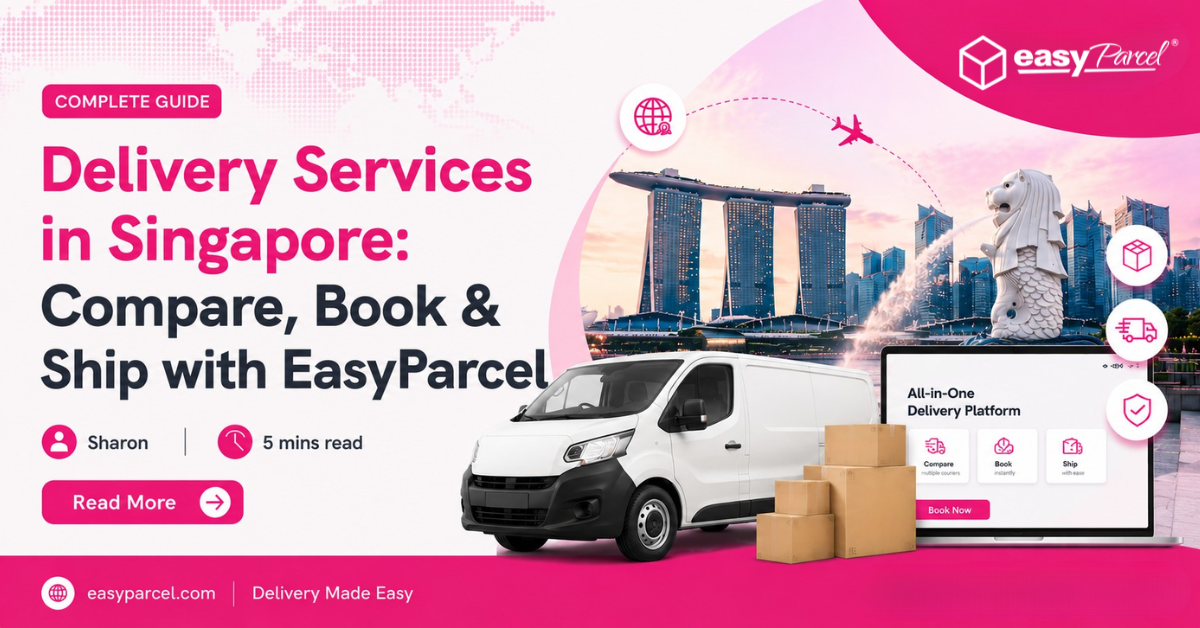
Delivery Services in Singapore: Compare, Book & Ship with EasyParcel

Delivery-Services-in-Singapore-Compare-Book-and-Ship-with-EasyParcel

Delivery Made Easier: 4 Ways to Send with EasyParcel

Need to make a delivery, but not sure which service to choose?

Maybe you’re sending a customer order across Singapore. Maybe an urgent parcel needs to arrive today. Or perhaps your next customer is in Malaysia, Australia or even the United States.

Different deliveries need different solutions.

Instead of being limited to one courier, EasyParcel lets you compare delivery options and book the service that suits each shipment.

You can choose from four main types of delivery:

📦 Domestic Delivery
🌎 International Delivery
⚡ On-Demand Delivery
🌐 Global Delivery

Here’s how each one works.

Table of Contents

1. Domestic Delivery

Best for: Sending parcels within Singapore

Domestic delivery is the everyday option for sending parcels from one Singapore address to another.

It’s suitable for:

  • eCommerce orders
  • Personal parcels
  • Documents
  • Gifts
  • Business shipments
  • Regular customer orders

EasyParcel currently lets users compare 10+ domestic courier services in Singapore.

Instead of checking courier websites individually, simply enter your:

Origin → Destination → Parcel Weight

and compare the available rates and services.

Why Choose Domestic Delivery?

multiple-order-at-once

Multiple courier choices

Compare available local courier services.

icon- Doorstep Pick-Up& Drop-Off Options​

Free Doorstep Pickup

Eligible shipments can be collected from your location without requiring a trip to a courier outlet.

courier-rate-comparison

Pickup & Drop-Off Options

Choose the available fulfilment method that works for you.

parcel-tracking-easytrack

EasyTrack

Track your parcel from pickup through successful delivery.
EasyParcel’s domestic service currently includes free doorstep pickup and real-time parcel tracking.

2. International Delivery

Best for: Sending from Singapore to overseas destinations

Have a customer, friend or family member overseas?

Choose International Delivery.

EasyParcel currently supports international shipping to 220+ destinations, with multiple courier services available for comparison.

International delivery can be used for:

  • Overseas eCommerce orders
  • Business samples
  • Documents
  • Gifts
  • Personal parcels
  • Commercial goods

You can compare available international courier services based on your destination, rate and delivery time before booking.

Helpful Features for International Delivery

hs-code-icon

Find HS Codes Faster

Enter your product name to get a suggested HS Code for customs preparation.

calculator

Estimate Import Costs

Estimate potential duties and taxes before sending an international shipment.

custom-duty-tax

Choose How Duties Are Paid

Selected services allow you to choose between duty-unpaid and duty-paid shipping options.

parcel-protection

Extra Parcel Protection

Add optional EasyCover for eligible shipments, covering loss only up to S$5,000, subject to eligibility and applicable terms.

EasyParcel also supports free doorstep pickup for eligible international shipments.

3. On-Demand Delivery

Best for: Urgent and same-day deliveries

Sometimes you can’t wait until tomorrow.

That’s where On-Demand Delivery comes in.

It is designed for urgent local shipments where speed matters more than standard delivery.

For example:

🎂 Cake that needs to reach a customer today
📄 Urgent document for a client
🎁 Last-minute gift
🛍️ Customer order needed within hours
🔑 Forgotten item that needs to be sent immediately

EasyParcel works with on-demand providers including Lalamove, GrabExpress, uParcel and pandago, depending on service availability.

When Should You Choose On-Demand?

Use it when:

Urgency > Lowest Shipping Cost

If the parcel isn’t urgent, standard domestic delivery may provide better value.

4. Global Delivery

Best for: Shipping from anywhere to anywhere

International delivery typically starts with a shipment from Singapore.

But what if your parcel isn’t starting here?

That’s where Global Delivery comes in.

EasyParcel’s Global Delivery is designed to support shipments between different countries without requiring Singapore to be the origin. EasyParcel describes this service as shipping between global destinations without origin restrictions.

For example:

Malaysia → Australia
Taiwan → Singapore
United States → Singapore
Japan → Malaysia

This can be particularly useful for businesses operating across multiple countries.

Why Book Delivery Through EasyParcel?

EasyParcel is a shipping platform, not a courier company.

That distinction matters.

Instead of providing only one delivery service, EasyParcel lets you compare different available courier options before deciding.

compare

Find a Better-Fit Delivery

EasyParcel currently advertises instant rate comparison across 60+ couriers for domestic and international deliveries.

compare-rate

Compare Rates & Delivery Times

See available delivery rates and estimated delivery times before booking. This helps you decide whether price or speed matters more for each shipment.

icon- Doorstep Pick-Up& Drop-Off Options​

Let the Courier Come to You

Eligible domestic and international services provide free doorstep pickup, reducing the need to travel to a courier outlet.

track-parcel

Track Every Delivery

Monitor your parcel journey from pickup until successful delivery in one place.

custom-sms-branding

Keep Your Receiver Updated

Enable Tracking SMS, Email or WhatsApp notifications so recipients can receive shipment information automatically.

Delivery Solutions for Online Sellers

If you’re running an online store, delivery isn’t something you do once.

You may need to fulfil 10, 50 or hundreds of orders regularly.

EasyParcel provides additional tools to simplify the process.

boxes-bulk-shipping

Book Up to 1,000 Shipments

Upload shipments in bulk instead of booking every parcel manually.

templates

Upload Orders Your Way

Upload shipments in bulk instead of booking every parcel manually.

ecommerce-integration

Connect Your Online Store

Sync orders from supported platforms such as:
Shopify | WooCommerce | Amazon | Wix | eBay | Shopee | Lazada | TikTok Shop | BigSeller | Squarespace & more
This helps reduce repetitive order entry as your business grows.

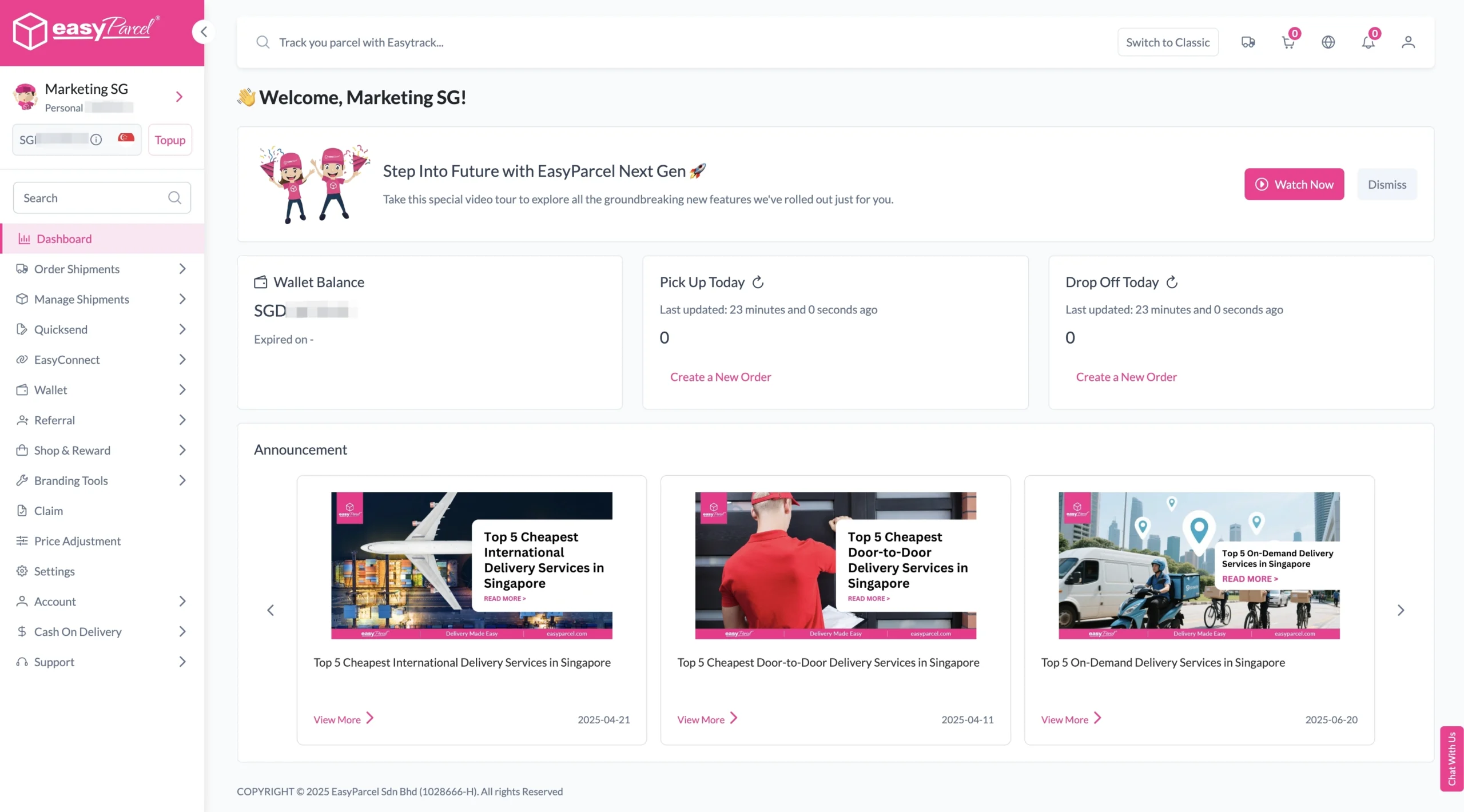
Ready to Make Your Next Delivery?

Whether you’re sending one personal parcel or hundreds of customer orders, start by comparing the available options.

How to Book Parcel Delivery with EasyParcel

Step 1: Login your EasyParcel account. 

send-parcel-nextgen-step-1

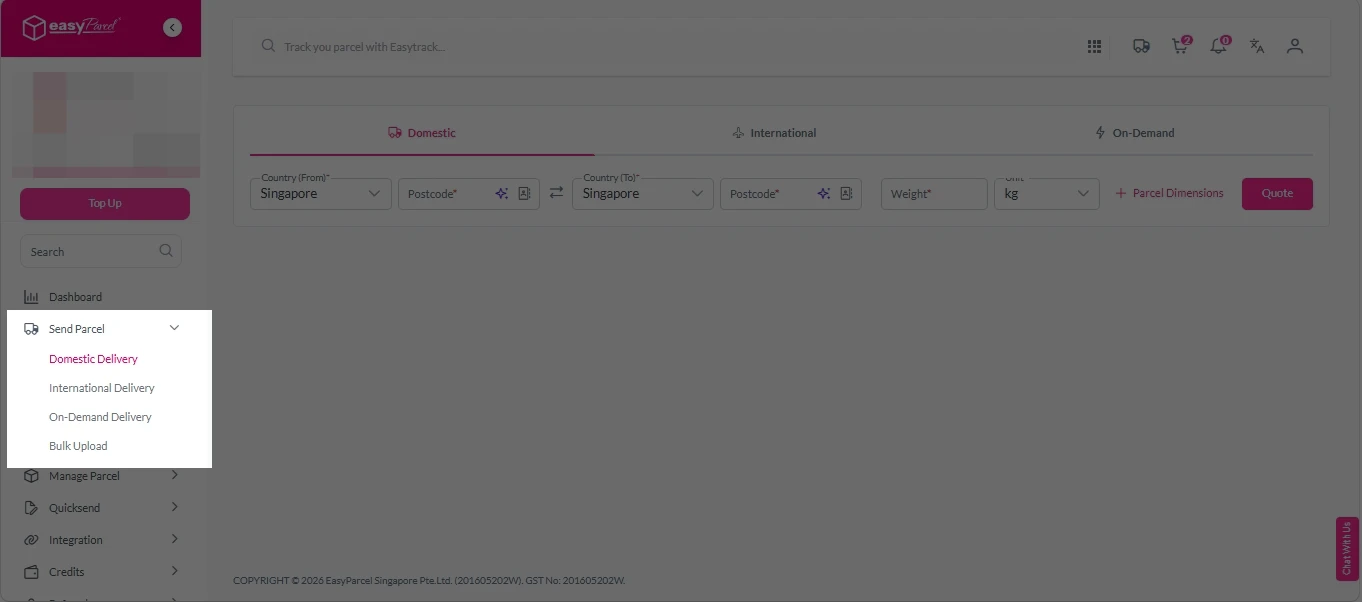
Step 2: Under “Send Parcel”, choose either Domestic Delivery (for shipments within Singapore) or International Delivery (for shipments overseas). 

Next gen- Send Parcel 1

Step 3: Enter Shipment Details. 

Domestic Delivery

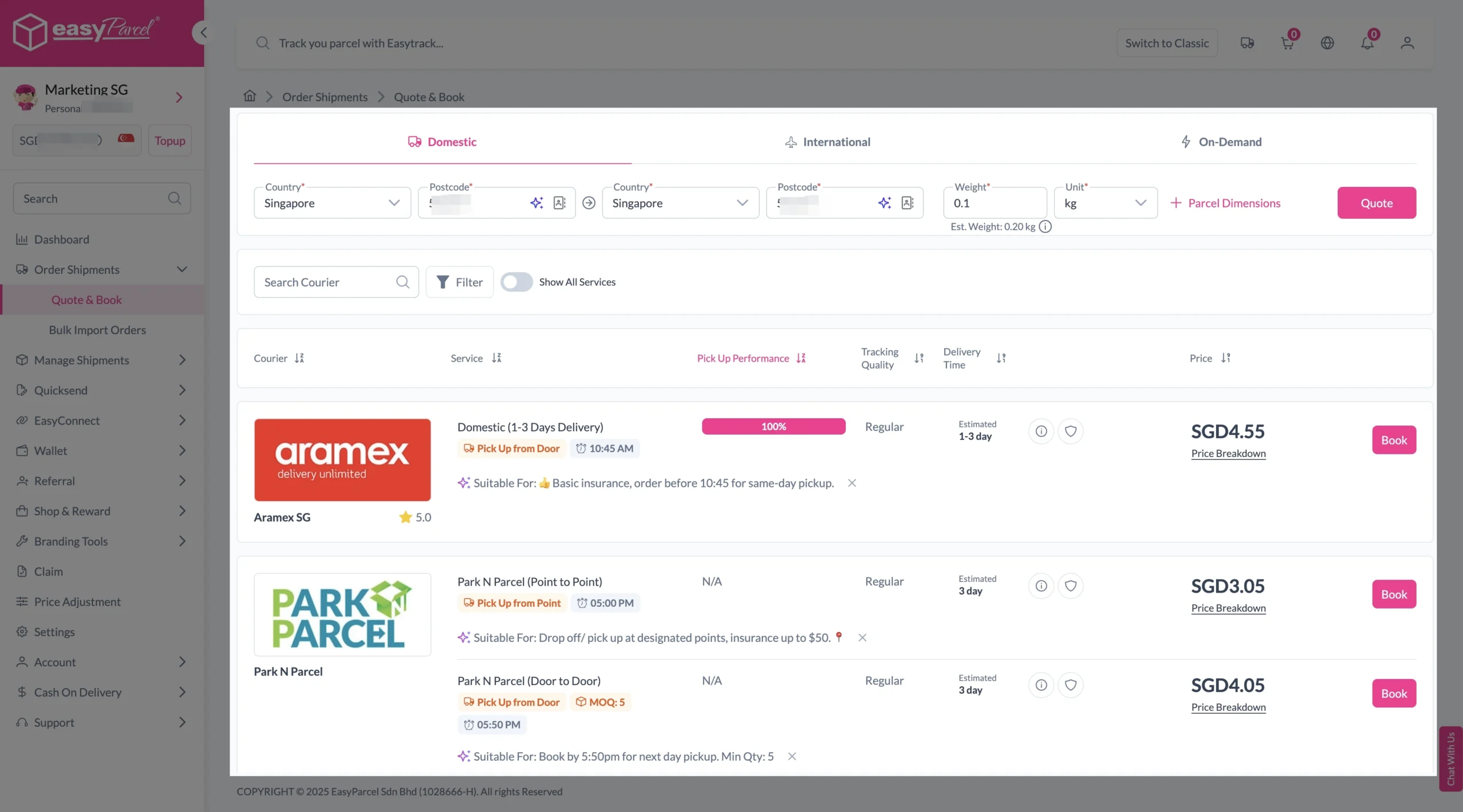
1. Fill in the origin and destination postcode.
2. Provide the parcel weight.
3. (Optional) Add parcel dimensions for a more accurate shipping rate.
4. Click the “Quote” button.
5. A list of courier rates will appear below, as shown in the image.
6. Choose your preferred SingPost service and click “Book Now.”

send-parcel-nextgen-step-3-domestic

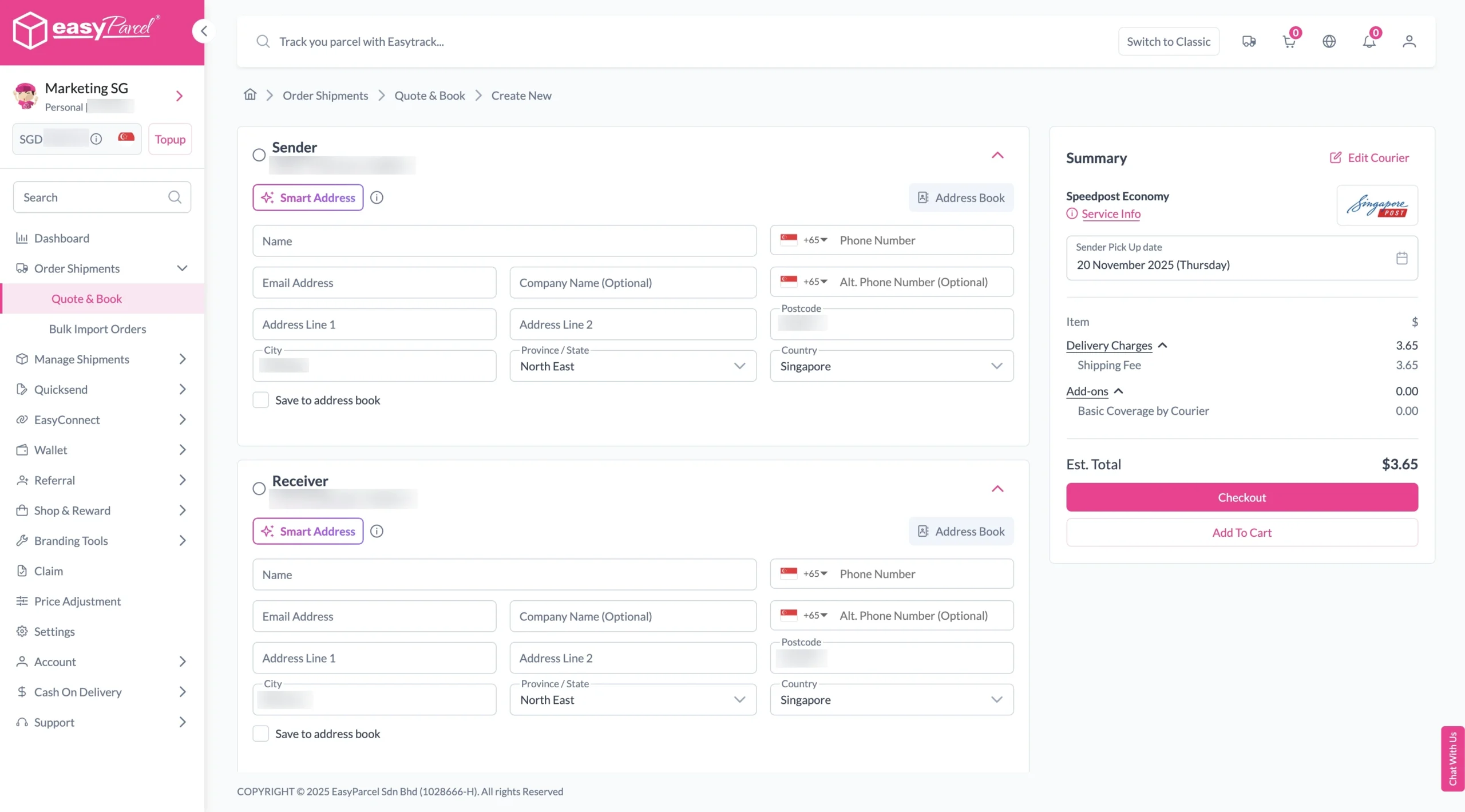
7. Fill in all details included Sender Details, Receiver Details, Parcel Details and Add-On Services.
Sender and Receiver Details: 

send-parcel-nextgen-step-4

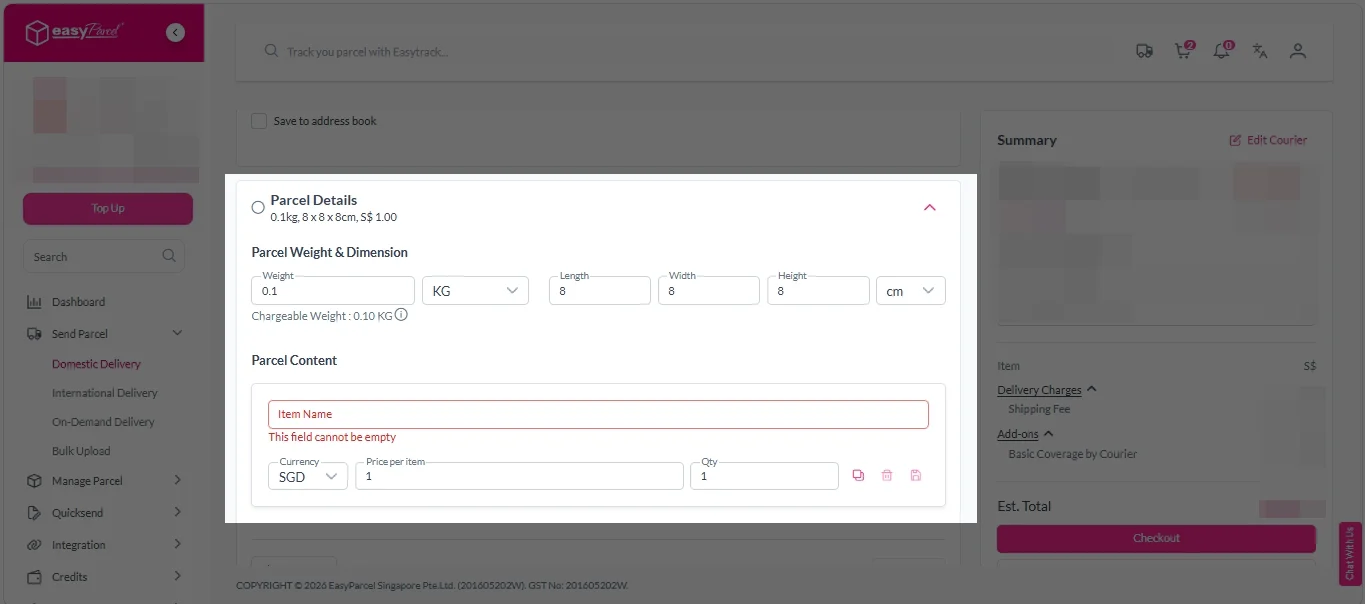
Parcel Details: 
Enter the actual weight, dimension and content of your parcel. 
Parcel Content:
Fill in your item name, price per item, and quantity. 

Domestic delivery - parcel details

Add-On Services: 
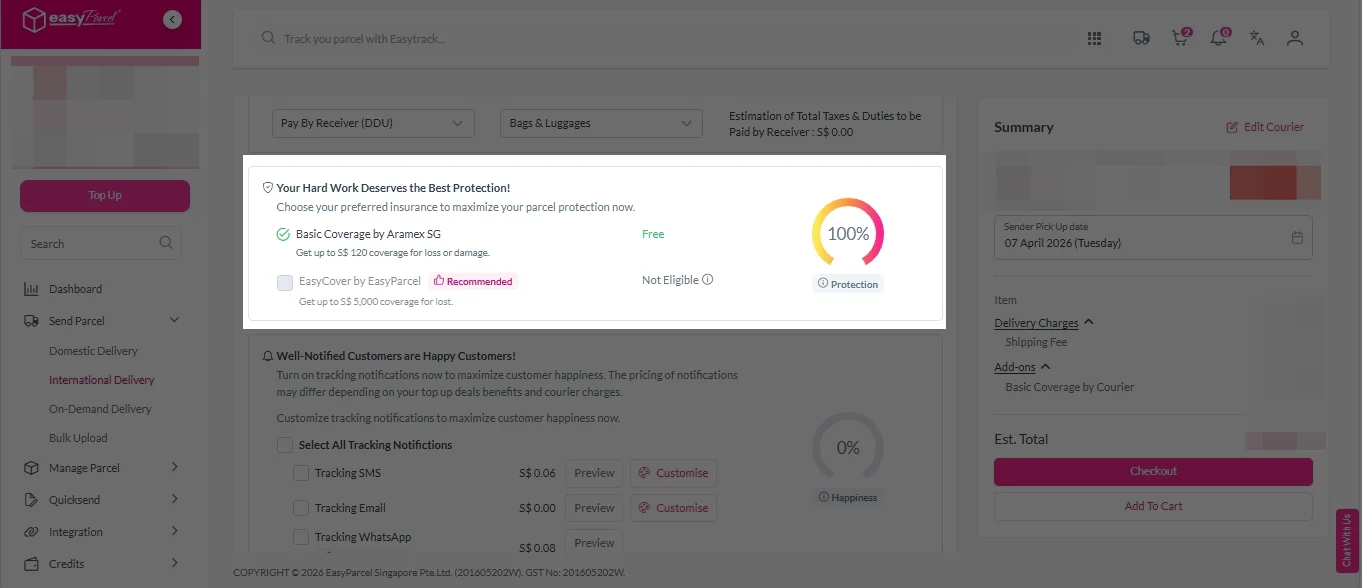
i. Tick the box to add EasyCover for additional protection against loss.
Note: EasyCover availability depends on the courier selected. Learn more about EasyCover

add on services 2

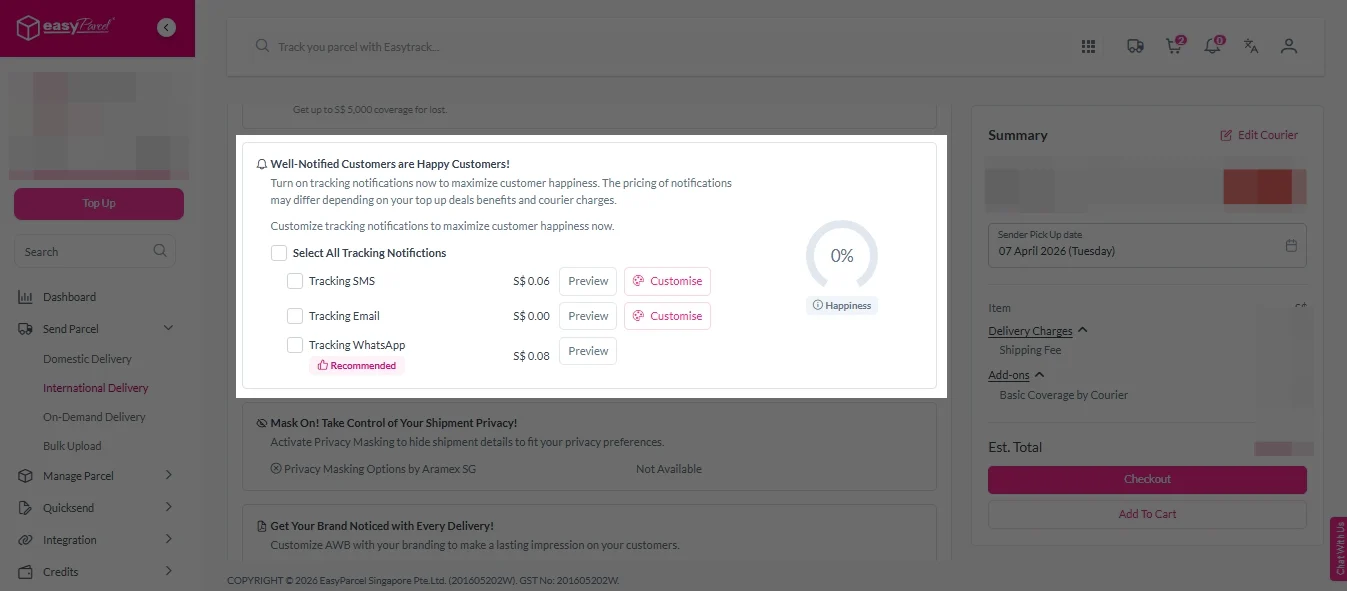
ii. Choose your preferred notification channel – SMS, Email, or WhatsApp. Click “Preview” to see how it looks,  and click “Customise” to add brand message to the notification.
Note: Learn more about Customise Branding Servcies

add on services 3

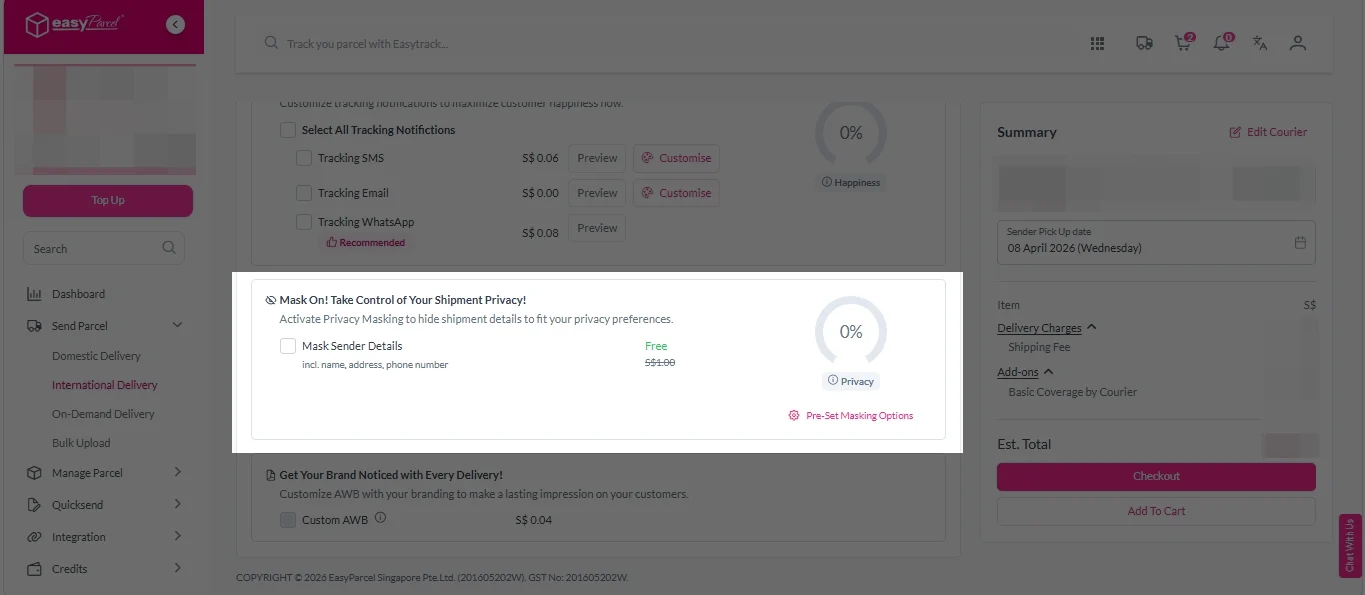
iii. Tick the “Mask Sender Details” checkbox. EasyParcel Next Gen will automatically hide your sender information based on your saved privacy settings
Note: Mask Sender Details only available for certain couriers. Find out what courier is available for Mask Sender Details.

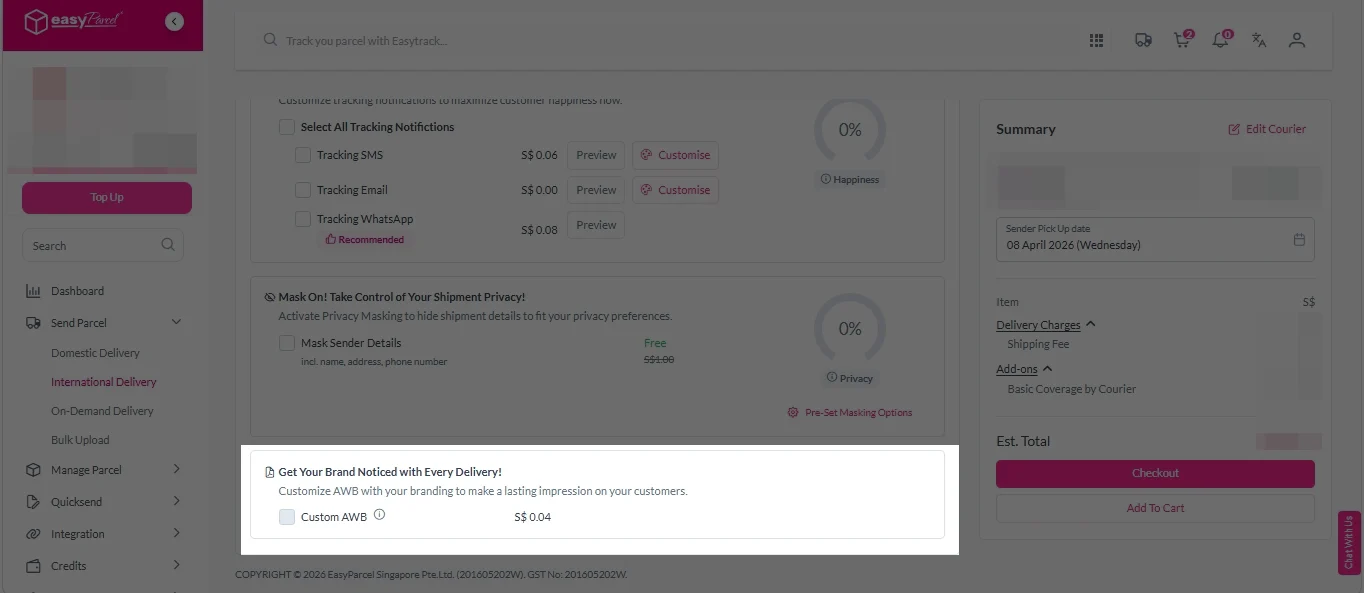
iv. Tick the “Custom AWB” checkbox. EasyParcel Next Gen will apply your saved AWB template automatically. 
Note: Custom AWB is only available for certain couriers. Find out which couriers support Custom AWB

custom awb 1

8. Double check all details and click on “Checkout”. 

send-parcel-nextgen-step-4

1. Fill in the origin postcode.
2. Enter the destination country and postcode.
3. Provide the parcel weight.
4. (Optional) Add parcel dimensions for a more accurate shipping rate.
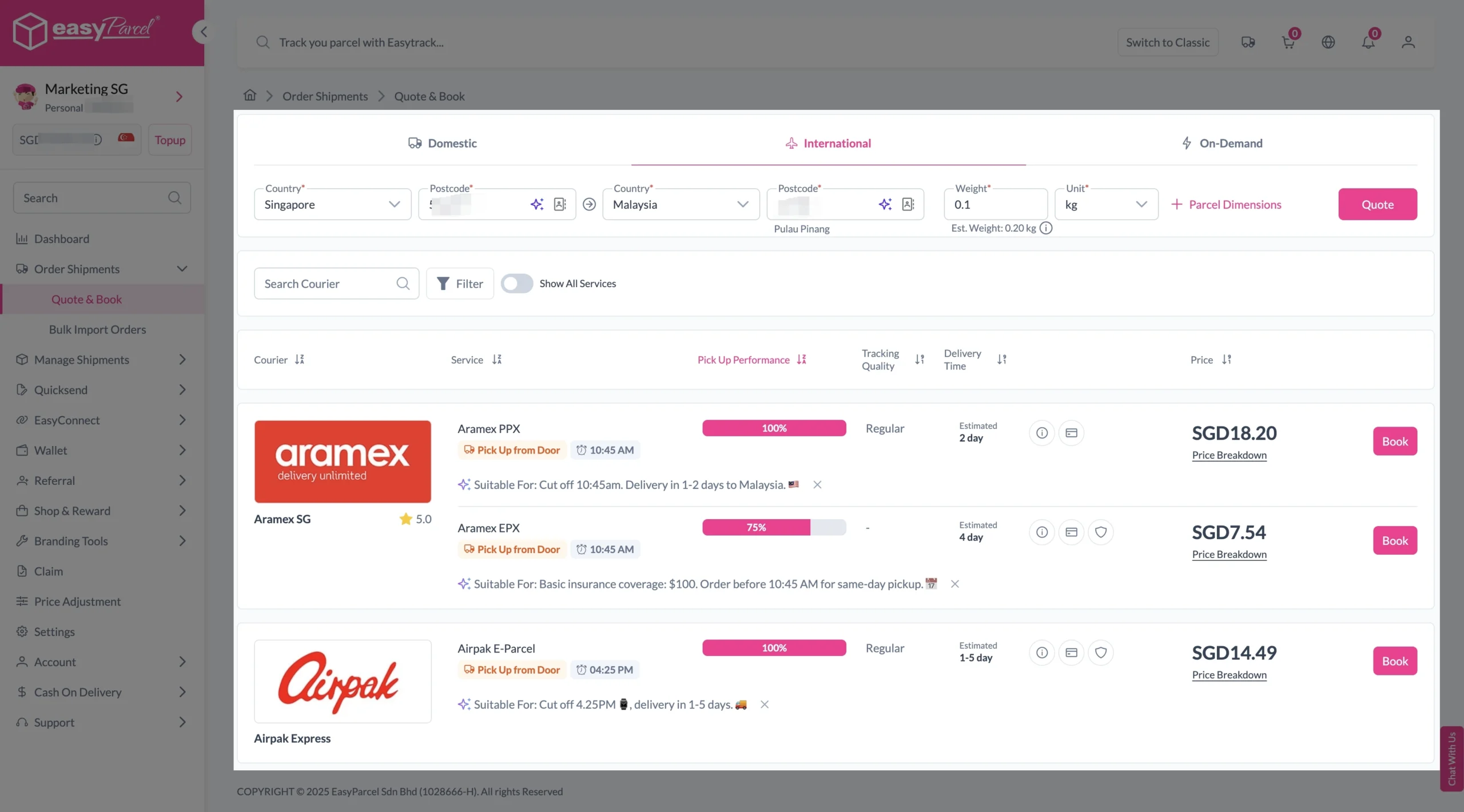
5. Click the “Quote” button.
6. A list of courier rates will appear below, as shown in the image.
7. Choose your preferred SingPost service and click “Book Now.”

send-parcel-nextgen-step-3-international

8. Fill in all details included Sender Details, Receiver Details, Parcel Details and Add-On Services.
Sender and Receiver Details: 

send-parcel-nextgen-step-4

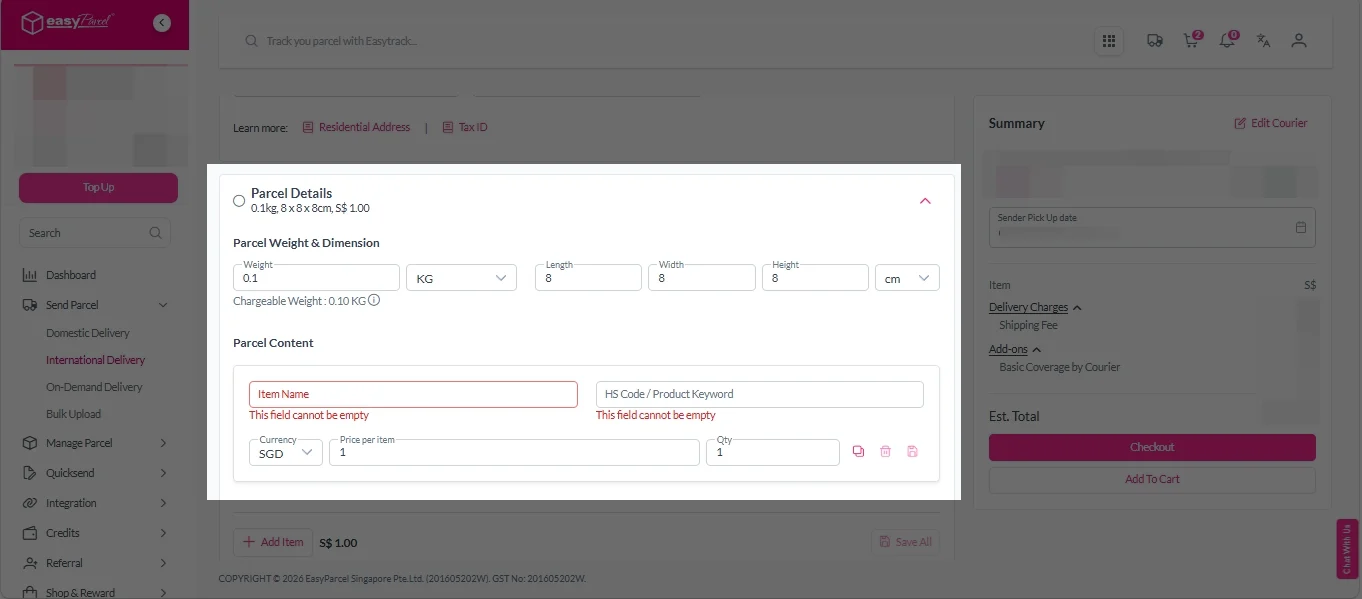
Parcel Details: 
Enter the actual weight, dimension and content of your parcel. 
Parcel Content:
Fill in your item name. Then, choose your item category from the dropdown menu. The HS code will be auto generated based on your selection.

Note: Learn more about Smart HS Code.

International- Parcel Details

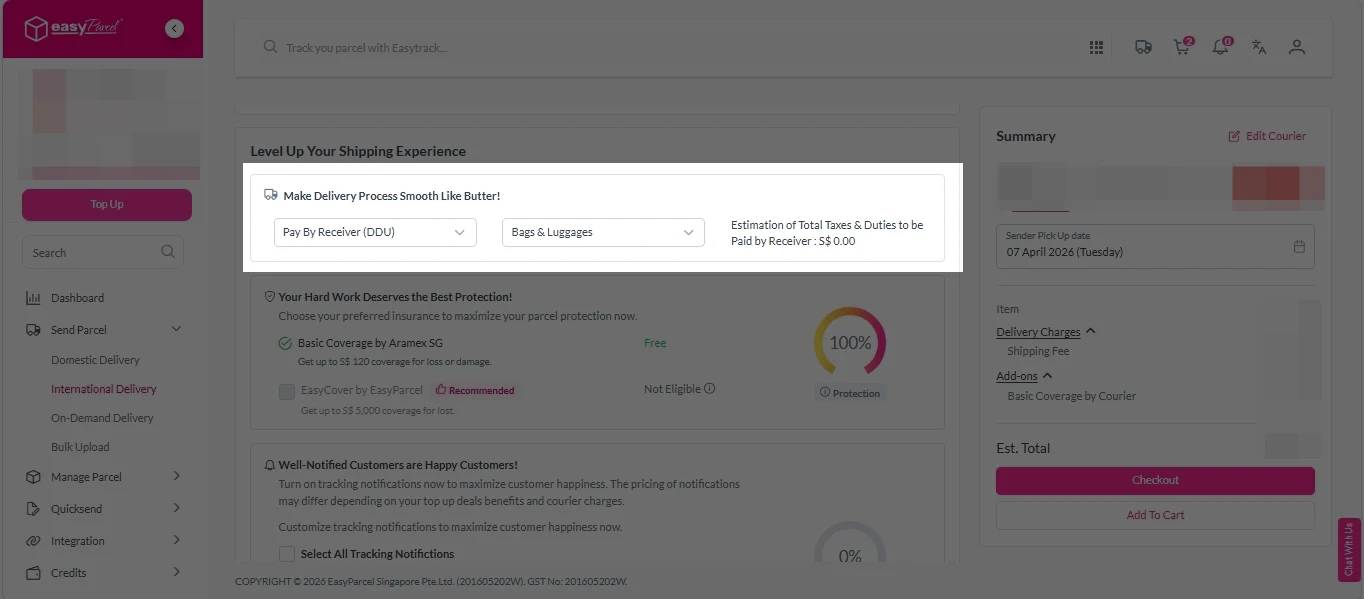
Add-On Services: 
i.  Select your preferred duties payment option – Delivered Duty Paid (DDP) or Delivered Duty Unpaid (DDU)
Note: Learn more about DDP and DDU.

add on services 1

ii. Tick the box to add EasyCover for additional protection against loss.
Note: EasyCover availability depends on the courier selected. Learn more about EasyCover

add on services 2

iii. Choose your preferred notification channel – SMS, Email, or WhatsApp. Click “Preview” to see how it looks,  and click “Customise” to add brand message to the notification.
Note: Learn more about Customise Branding Servcies

add on services 3

iv. Tick the “Mask Sender Details” checkbox. EasyParcel Next Gen will automatically hide your sender information based on your saved privacy settings
Note: Mask Sender Details only available for certain couriers. Find out what courier is available for Mask Sender Details.

v. Tick the “Custom AWB” checkbox. EasyParcel Next Gen will apply your saved AWB template automatically. 
Note: Custom AWB is only available for certain couriers. Find out which couriers support Custom AWB

custom awb 1

9. Double check all details and click on “Checkout”. 

send-parcel-nextgen-step-4

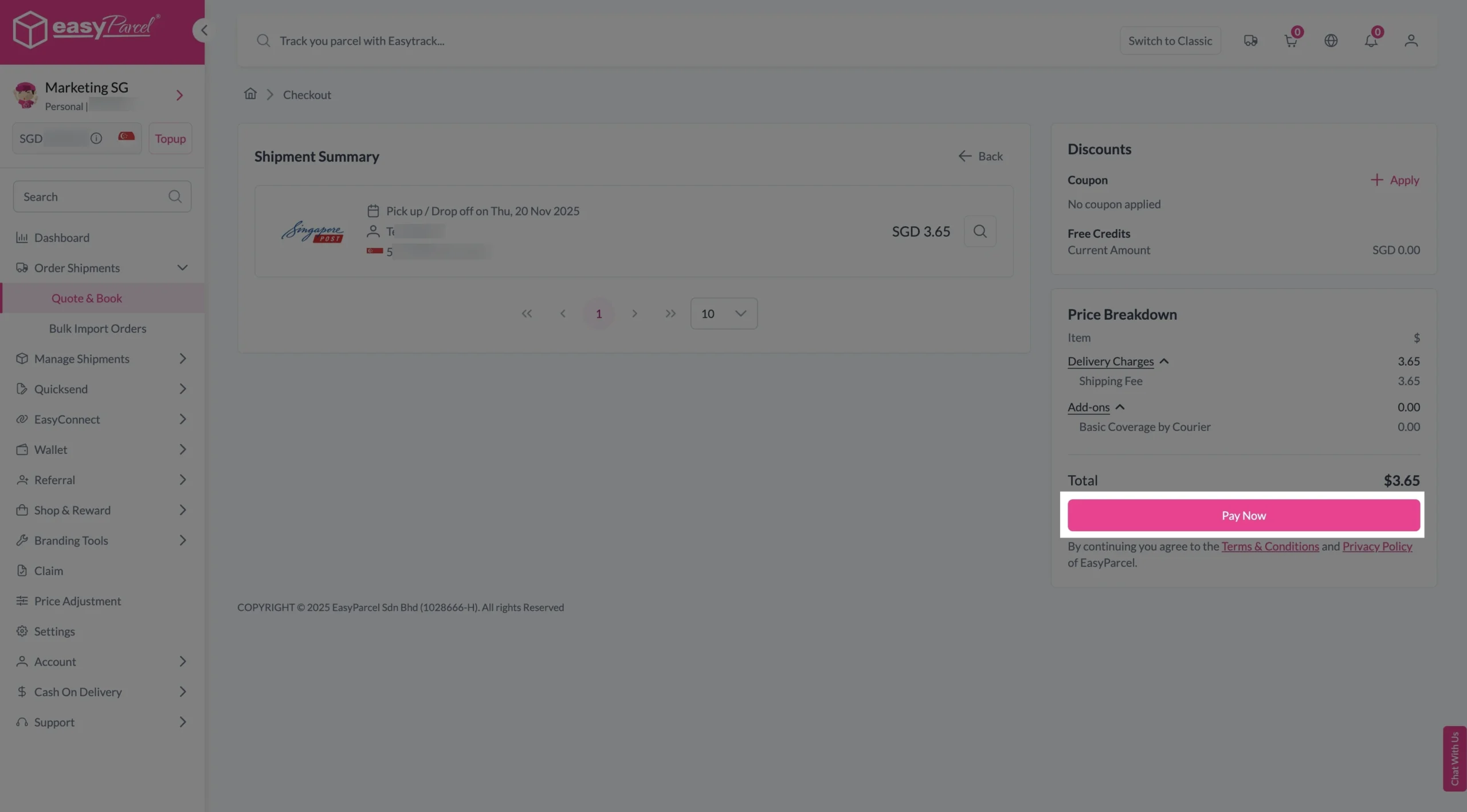
Step 4: Double check all the details and click on “Pay Now” to make payment. 

send-parcel-nextgen-step-5

Step 5: Your shipment has been booked successfully.
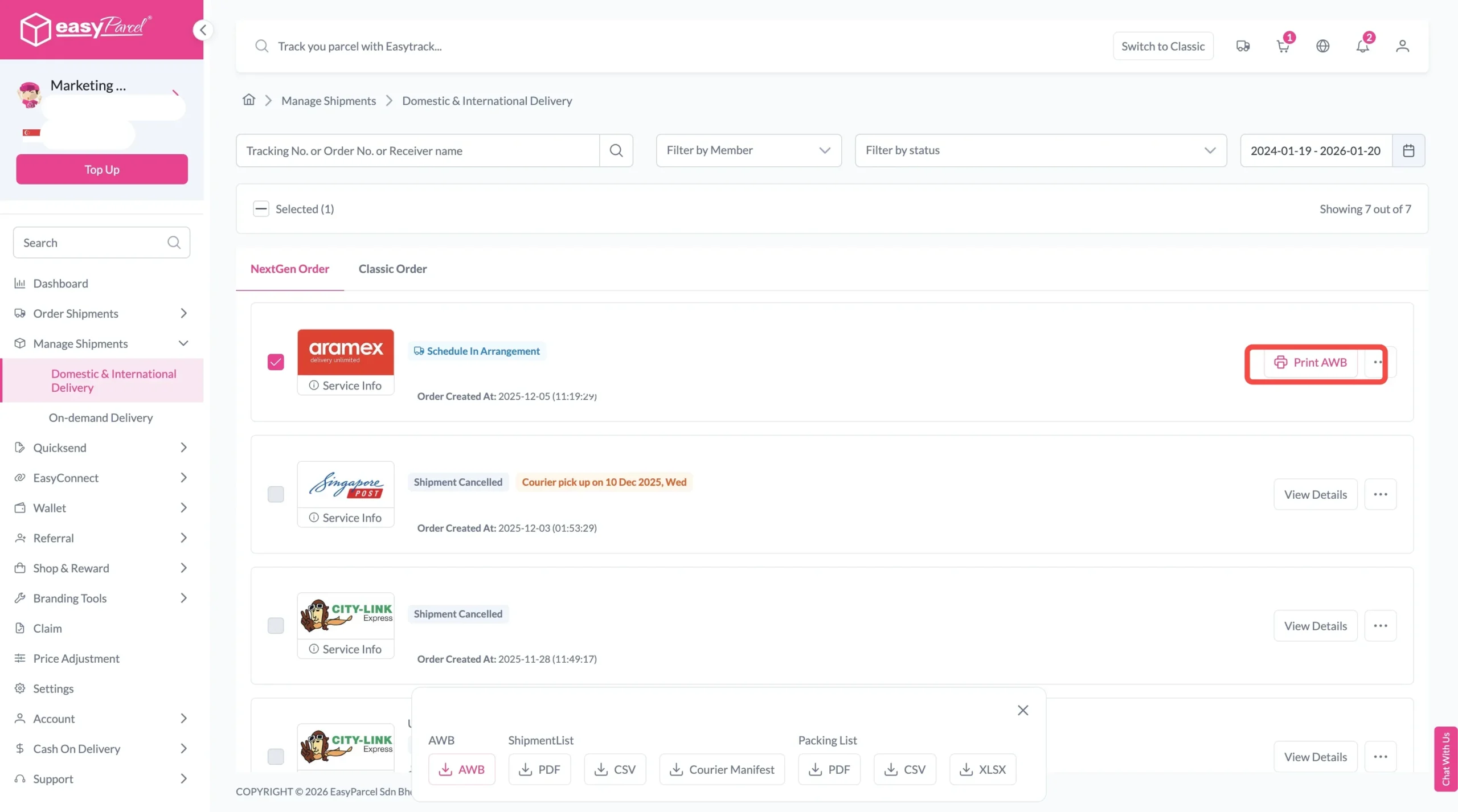
To download and print AWB, you can go to “Manage Shipments”. 

Single AWB
  1. Click the three dots icon next to the shipment.
  2. Select “Print AWB” from the dropdown menu.
  3. A PDF file will automatically download and save.
download AWB (2)

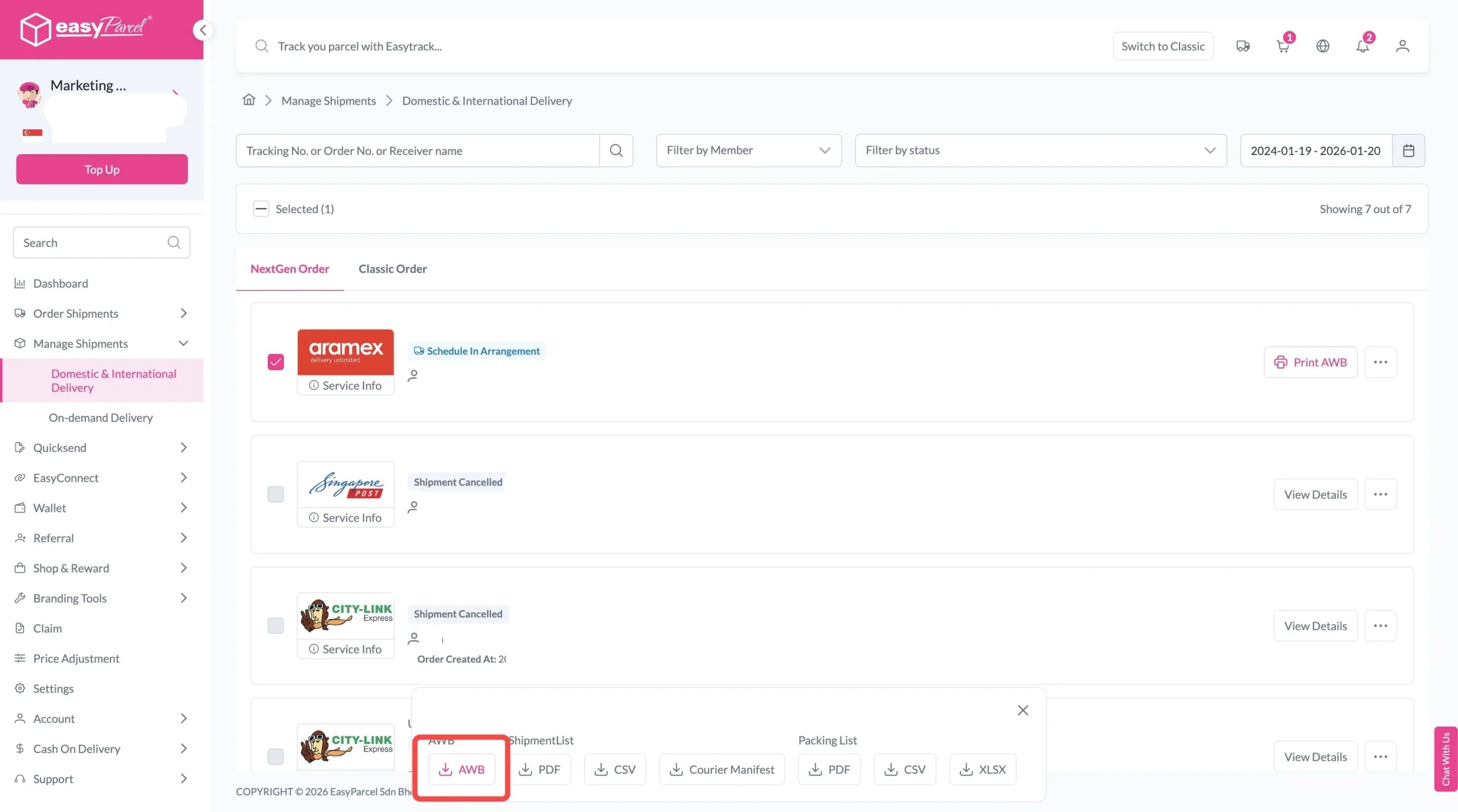
For bulk downloads AWB:

  1. Tick the “Selected” checkbox to choose all your orders.
  2. A menu will appear at the bottom of the screen.
  3. Click “AWB” to download all AWBs in bulk.
download AWB

Final Thoughts

There isn’t one delivery service that’s right for every parcel.

If you’re shipping within Singapore, choose Domestic Delivery. If you’re sending overseas, use International Delivery. For urgent local orders, consider On-Demand Delivery. And when your shipment needs to move between countries outside the usual Singapore-origin flow, explore Global Delivery.

With EasyParcel, you can compare multiple courier services rather than being tied to a single provider—making it easier to find the right balance between shipping cost, delivery speed and convenience for every shipment.

Frequently Asked Question (FAQs)

What types of delivery services does EasyParcel offer?
EasyParcel offers four main delivery options: Domestic Delivery for shipments within Singapore, International Delivery for parcels sent from Singapore overseas, On-Demand Delivery for urgent local shipments, and Global Delivery for shipments between supported countries.
How do I choose the right delivery service?
Consider your parcel's origin, destination, size, budget and required delivery speed. Domestic Delivery is suitable for regular Singapore shipments, International Delivery for overseas parcels, On-Demand Delivery for urgent local shipments, and Global Delivery for supported shipments between different countries.
Can I compare different courier delivery services on EasyParcel?
Yes. EasyParcel is a shipping platform that lets you compare available courier services based on shipping rates, estimated delivery times and service options. This helps you choose a suitable courier without checking multiple courier websites individually.
Does EasyParcel offer same-day delivery?
Yes. EasyParcel provides On-Demand Delivery options for urgent local shipments in Singapore. Depending on availability and shipment requirements, you may find services from providers such as Lalamove, GrabExpress, pandago and uParcel.
Can I arrange doorstep pickup for my delivery?
Yes. Free doorstep pickup is available for eligible domestic and international courier services on EasyParcel. Pickup availability and conditions depend on the selected courier, service, location and shipment details.
Can I send parcels internationally with EasyParcel?
Yes. EasyParcel provides International Delivery for parcels sent from Singapore to supported overseas destinations. You can compare available international courier rates and estimated delivery times before choosing a service.
What is the difference between International Delivery and Global Delivery?
International Delivery is suitable for sending parcels from Singapore to overseas destinations. Global Delivery supports eligible shipments between different countries, allowing businesses and senders to arrange deliveries where Singapore does not necessarily have to be the shipment origin.
How can I track my delivery with EasyParcel?
You can use EasyTrack to monitor your shipment from pickup until successful delivery. EasyParcel also provides optional Tracking SMS, Email and WhatsApp notifications to help keep recipients updated on their shipments.
How do I book a delivery with EasyParcel?
Choose your delivery type and enter your shipment details to compare available courier services. Select an eligible pickup or drop-off option, complete payment, print the Air Waybill where required, prepare your parcel for pickup or drop-off, and track the shipment through EasyTrack.

Join 1.5 Million Happy Customers & Start Saving

Create your free account today and receive S$6 shipping coupon to start saving from your very first parcel. Compare courier rates, book in minutes, and start saving immediately.
×