Have parcels ready to send but don’t want to carry them to a courier outlet?
A parcel pickup service lets you book your delivery online and have an eligible courier collect the parcel directly from your home, office, warehouse or other supported pickup address.
For online sellers and businesses handling multiple orders, this can save considerable time compared with travelling to a drop-off point for every shipment.
With EasyParcel, you can compare available courier services and choose pickup or drop-off options based on your shipment.
Here’s how parcel pickup works and which couriers you can look out for.
Table of Contents
What Is Parcel Pickup?
Parcel pickup means a courier collects your shipment from a specified address before transporting it through its delivery network.
Instead of:
Book → Travel to Drop-Off Point → Queue → Hand Over Parcel
You can choose:
Book Online → Prepare Parcel → Courier Picks Up → Track Delivery
This is particularly useful for:
- eCommerce sellers
- Home-based businesses
- SMEs
- Bulk shippers
- Office deliveries
- Individuals sending heavy parcels
Courier Services with Parcel Pickup on EasyParcel Singapore
Important: Courier and pickup availability can vary according to your origin, destination, postcode, parcel weight, dimensions and selected service. The easiest way to confirm is to enter your shipment details into EasyParcel and check the pickup options displayed for your quote.
Need a Courier to Pick Up Your Parcel?
Local Parcel Pickup in Singapore
Sending within Singapore?
You can compare local courier services based on price, delivery speed and pickup availability.
For example, depending on your shipment, available options may include SPX Express, J&T Express, Ninja Van, TracX Logis and SingPost/Speedpost services.
This is useful for online sellers because you don’t necessarily need to use the same courier for every parcel.
You can compare first and choose a suitable service for each shipment.
International Parcel Pickup from Singapore
Parcel pickup isn’t limited to domestic delivery.
If you’re shipping overseas, eligible international courier services can also collect parcels from supported Singapore addresses.
Depending on your destination, EasyParcel may provide international services from couriers such as:
FedEx | UPS | Aramex | SF Express | SingPost | TracX Logis
This means you can prepare your international shipment at home or at work and arrange collection instead of travelling to a courier branch.
Pickup vs Drop-Off: Which Should You Choose?
Both options have advantages.
| Parcel Pickup | Parcel Drop-Off | |
|---|---|---|
| Courier comes to you | ✓ | – |
| No trip to courier point | ✓ | – |
| Good for multiple parcels | ✓ | ✓ |
| Send on your own schedule | Depends on collection arrangement | ✓ |
| Convenient for heavy parcels | ✓ | Less convenient |
| Available for every service | No | No |
Choose Pickup If…
You have multiple, bulky or regular shipments and want to reduce trips to courier outlets.
Choose Drop-Off If…
You prefer bringing the parcel to a nearby point yourself or the selected service doesn’t provide collection for your shipment.
How to Book Parcel Pickup with EasyParcel
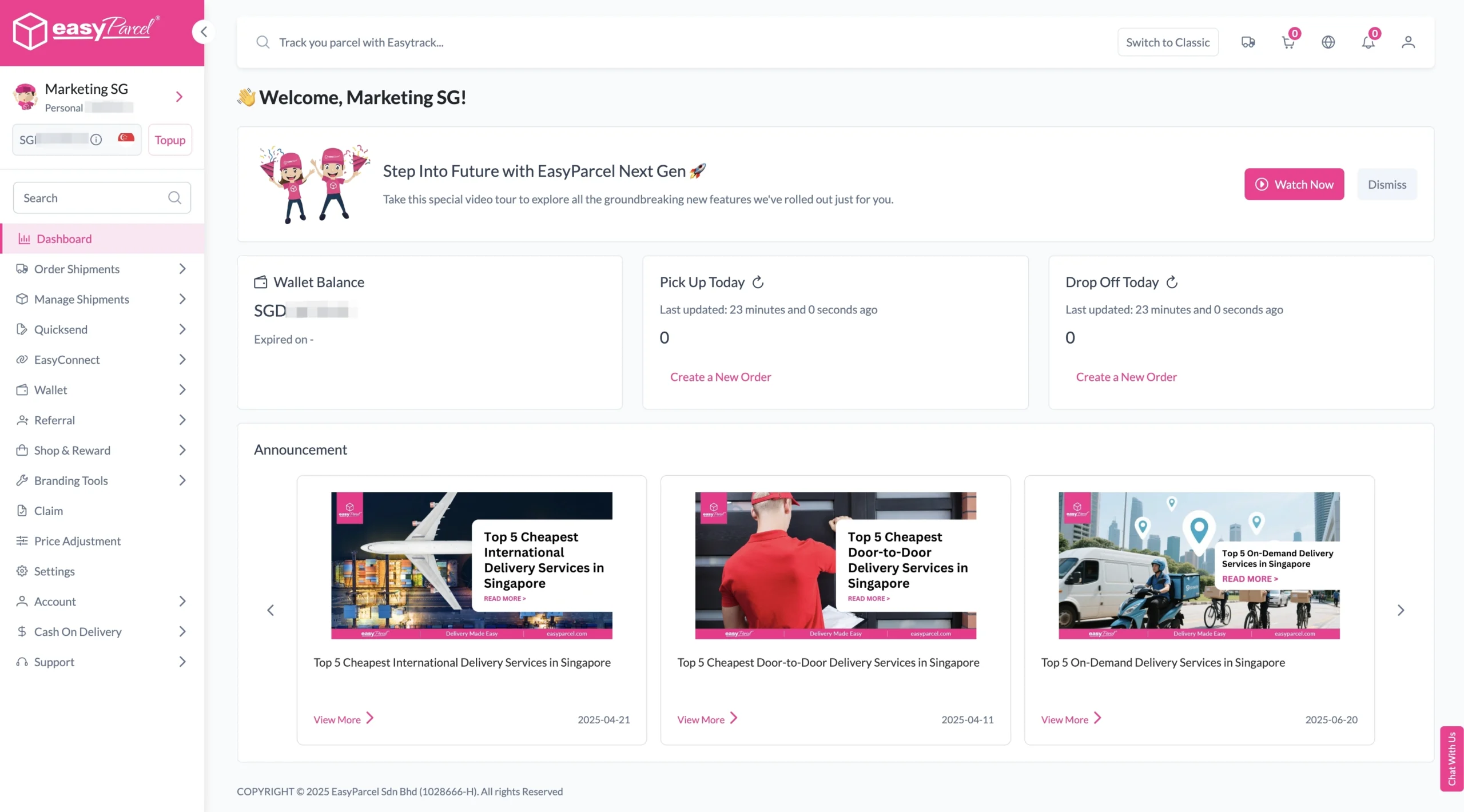
Step 1: Login your EasyParcel account.
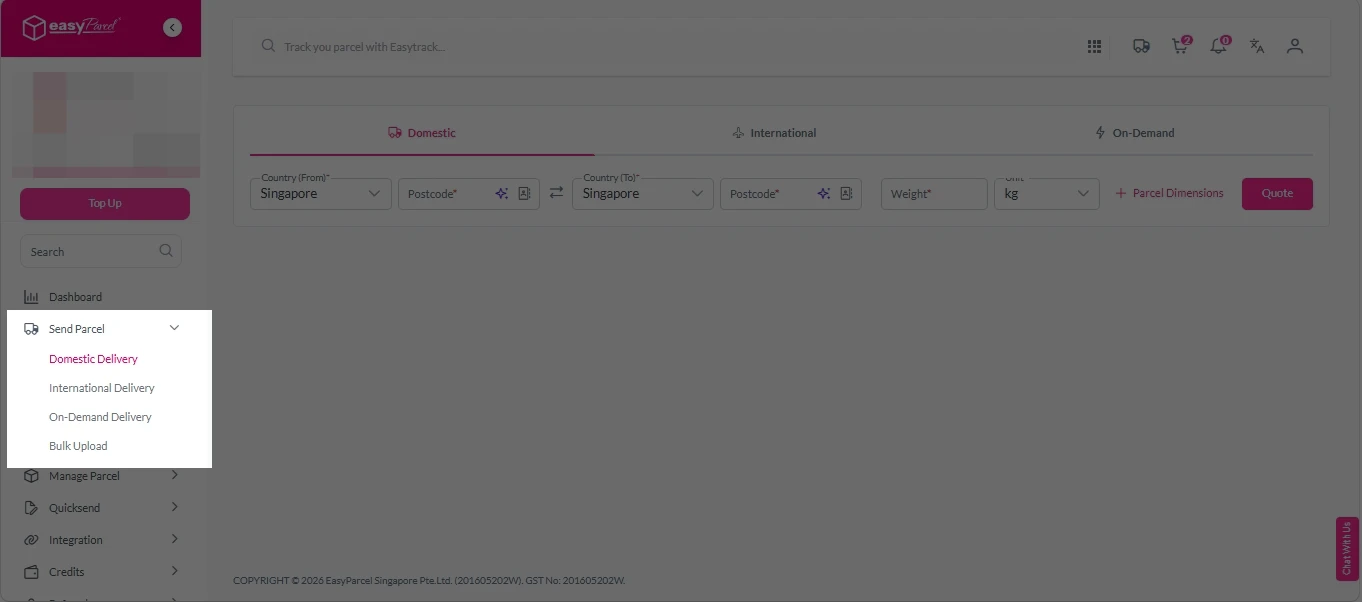
Step 2: Under “Send Parcel”, choose either “Domestic Delivery“ (for shipments within Singapore) or “International Delivery“ (for shipments overseas).
Step 3: Enter Shipment Details.
Domestic Delivery
1. Fill in the origin and destination postcode.
2. Provide the parcel weight.
3. (Optional) Add parcel dimensions for a more accurate shipping rate.
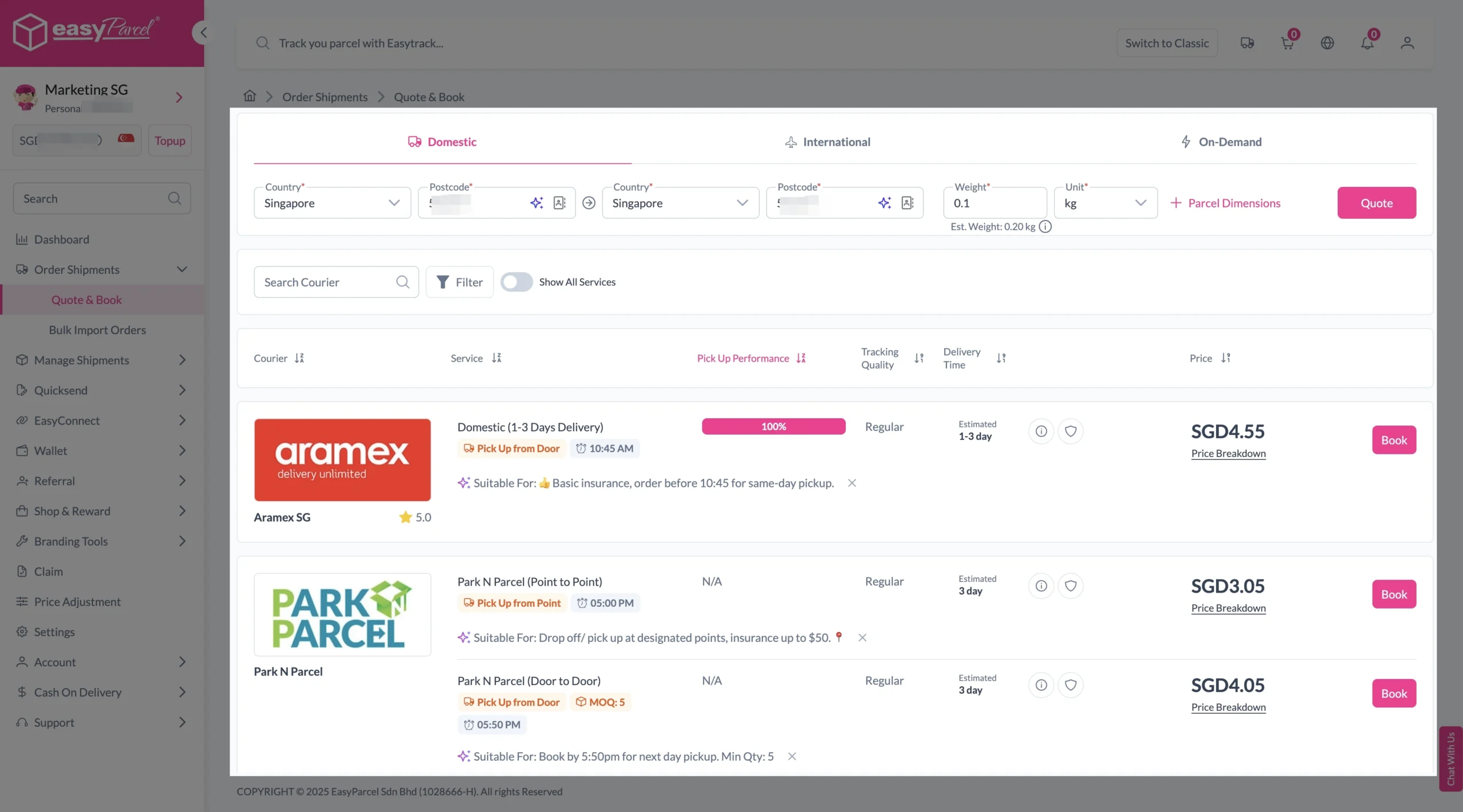
4. Click the “Quote” button.
5. A list of courier rates will appear below, as shown in the image.
6. Choose your preferred SingPost service and click “Book Now.”
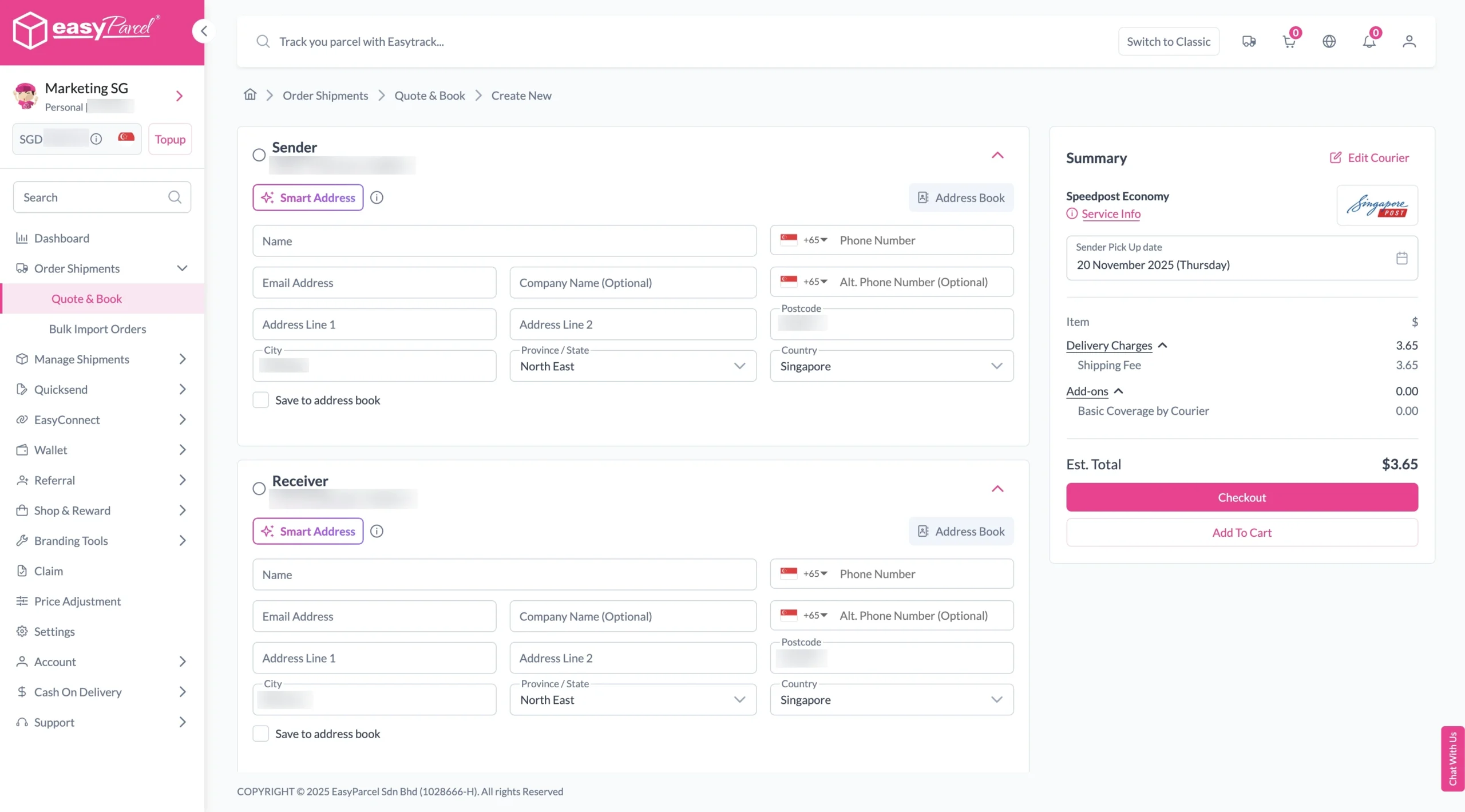
7. Fill in all details included Sender Details, Receiver Details, Parcel Details and Add-On Services.
Sender and Receiver Details:
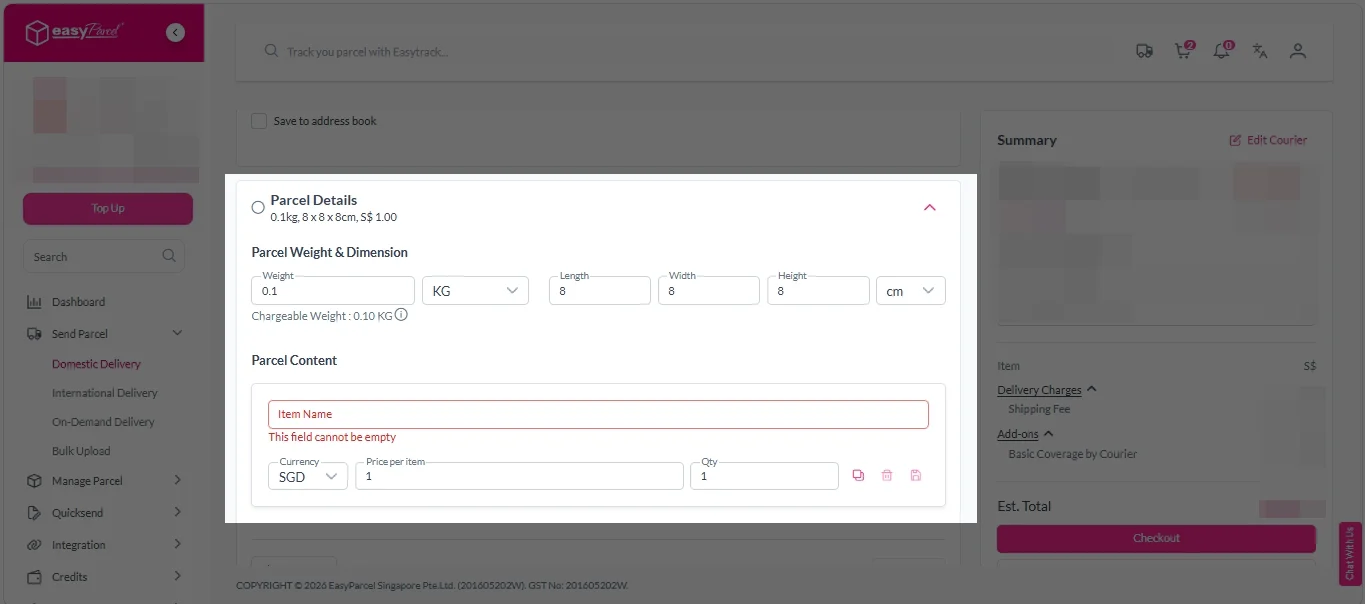
Parcel Details:
Enter the actual weight, dimension and content of your parcel.
Parcel Content:
Fill in your item name, price per item, and quantity.
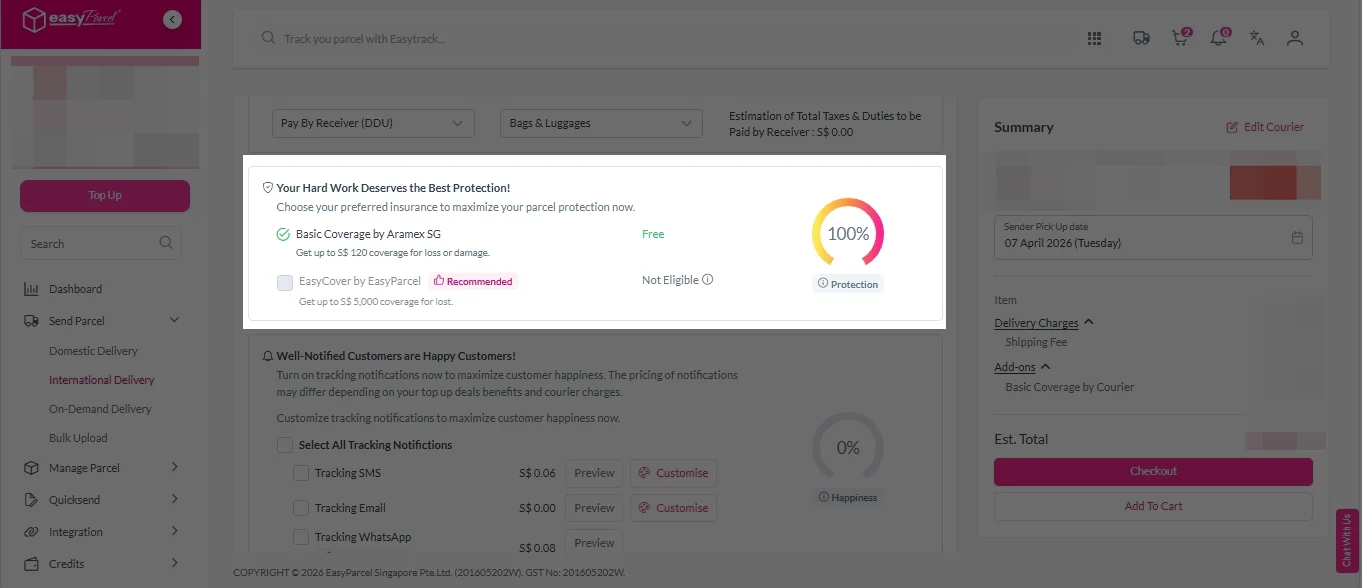
Add-On Services:
i. Tick the box to add EasyCover for additional protection against loss.
Note: EasyCover availability depends on the courier selected. Learn more about EasyCover.
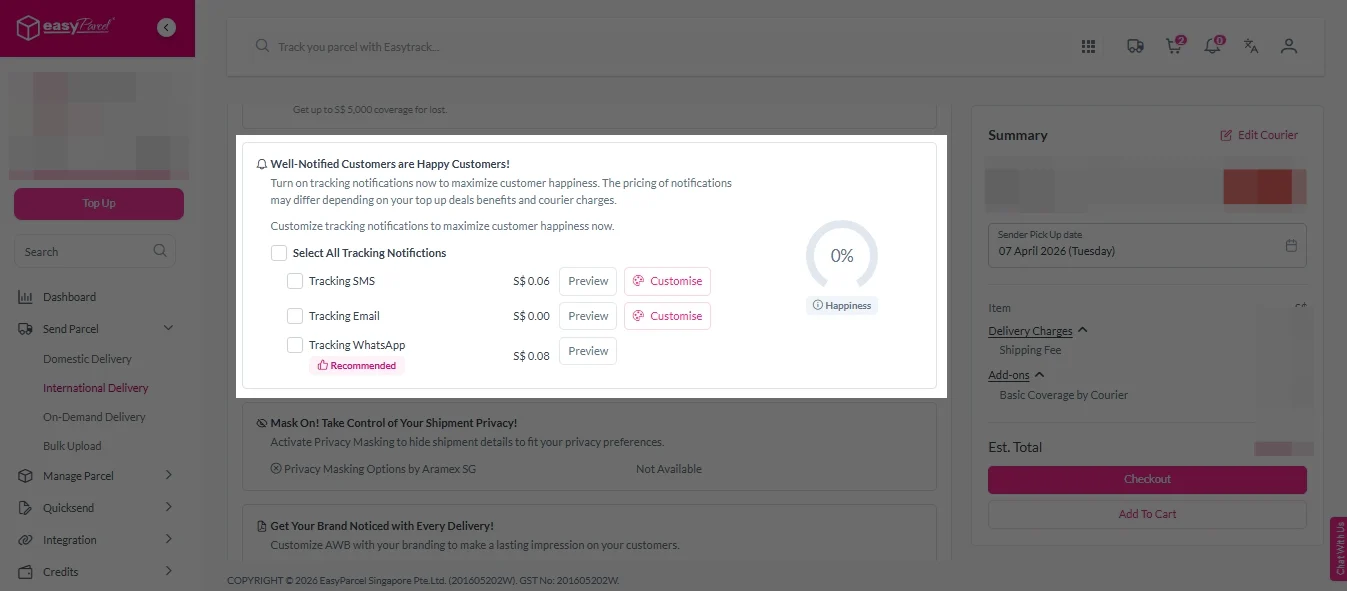
ii. Choose your preferred notification channel – SMS, Email, or WhatsApp. Click “Preview” to see how it looks, and click “Customise” to add brand message to the notification.
Note: Learn more about Customise Branding Servcies.
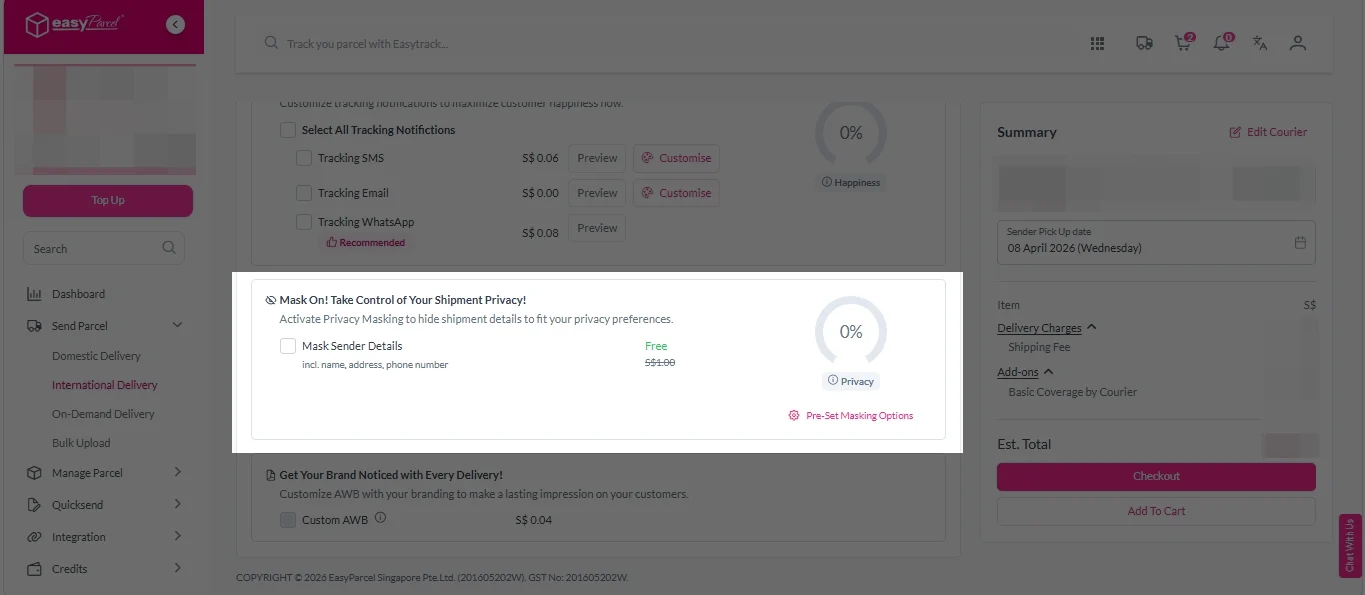
iii. Tick the “Mask Sender Details” checkbox. EasyParcel Next Gen will automatically hide your sender information based on your saved privacy settings.
Note: Mask Sender Details only available for certain couriers. Find out what courier is available for Mask Sender Details.
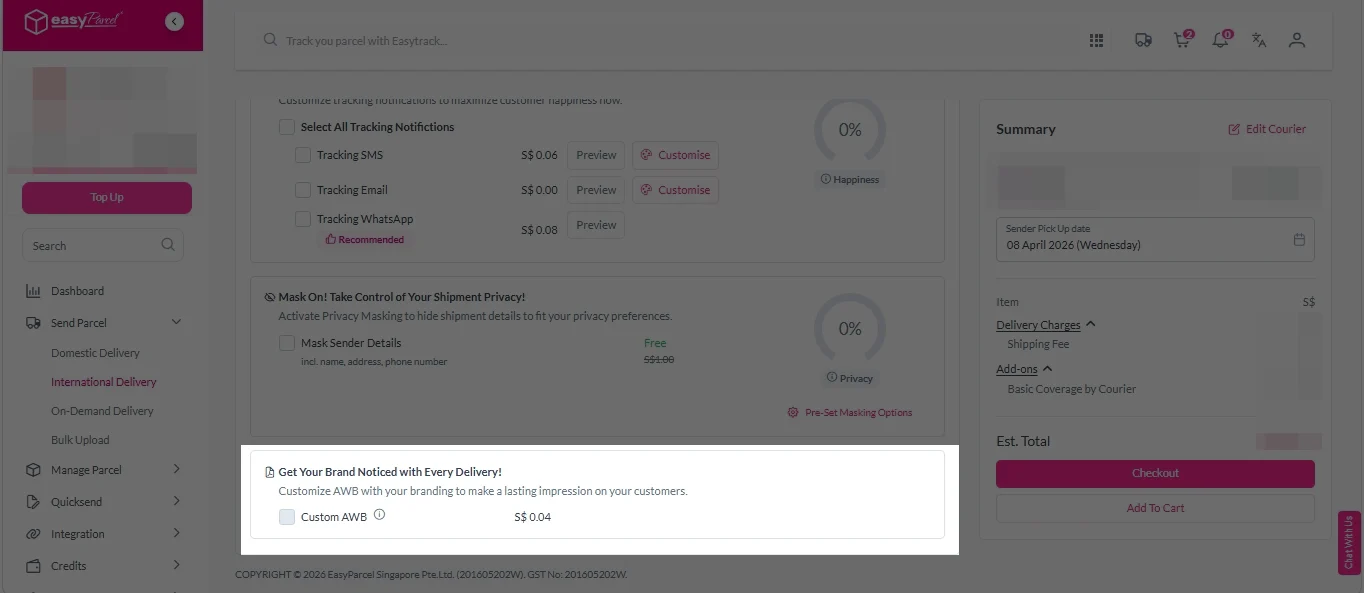
iv. Tick the “Custom AWB” checkbox. EasyParcel Next Gen will apply your saved AWB template automatically.
Note: Custom AWB is only available for certain couriers. Find out which couriers support Custom AWB.
8. Double check all details and click on “Checkout”.
International Delivery
1. Fill in the origin postcode.
2. Enter the destination country and postcode.
3. Provide the parcel weight.
4. (Optional) Add parcel dimensions for a more accurate shipping rate.
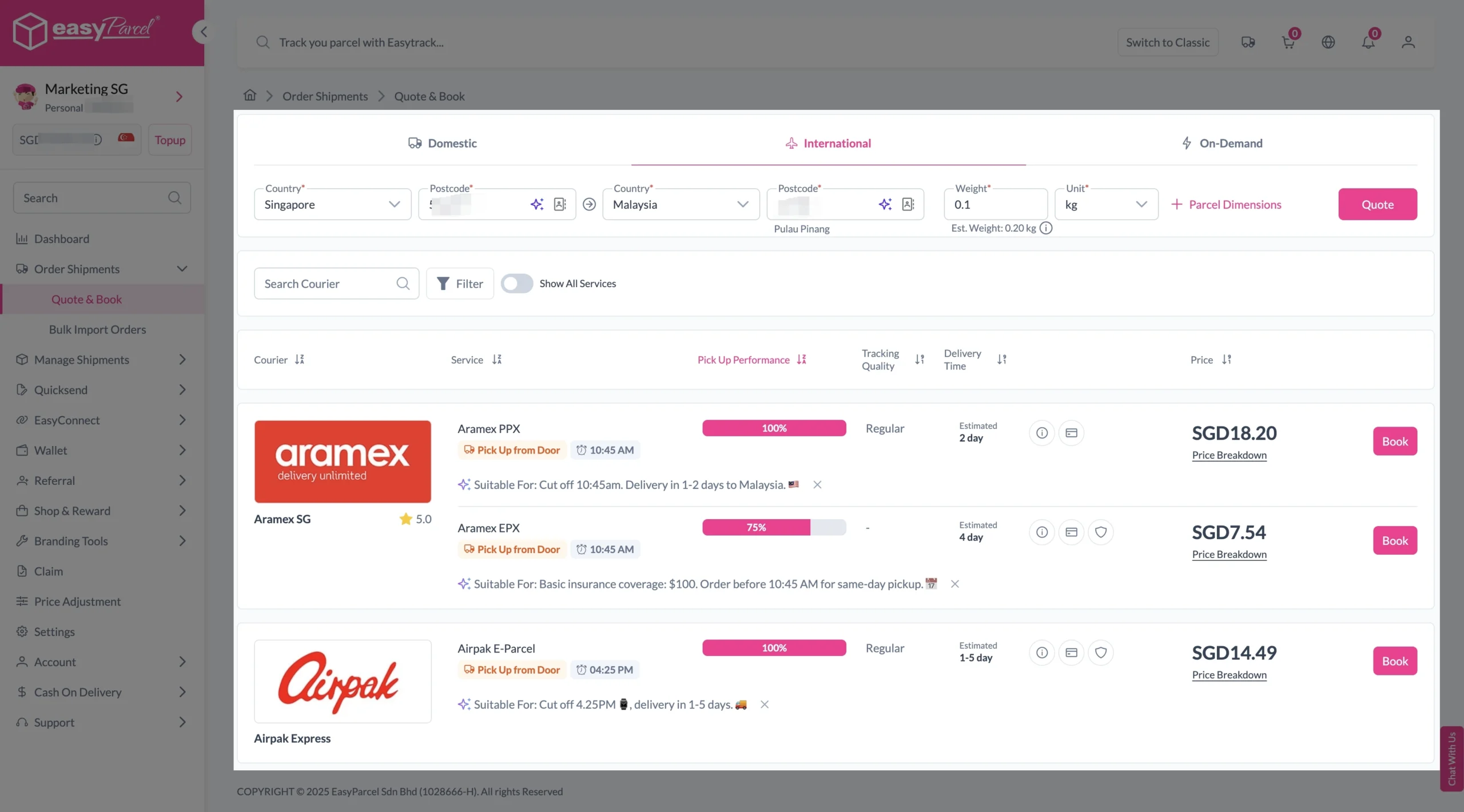
5. Click the “Quote” button.
6. A list of courier rates will appear below, as shown in the image.
7. Choose your preferred SingPost service and click “Book Now.”
8. Fill in all details included Sender Details, Receiver Details, Parcel Details and Add-On Services.
Sender and Receiver Details:
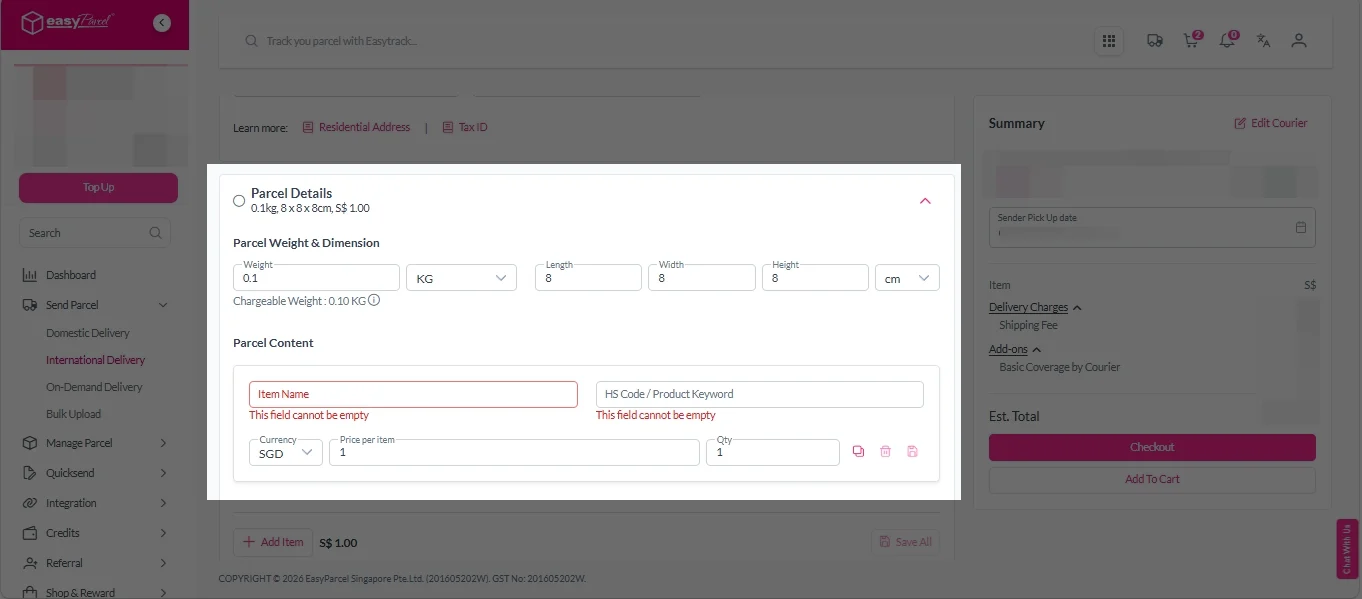
Parcel Details:
Enter the actual weight, dimension and content of your parcel.
Parcel Content:
Fill in your item name. Then, choose your item category from the dropdown menu. The HS code will be auto generated based on your selection.
Note: Learn more about Smart HS Code.
Add-On Services:
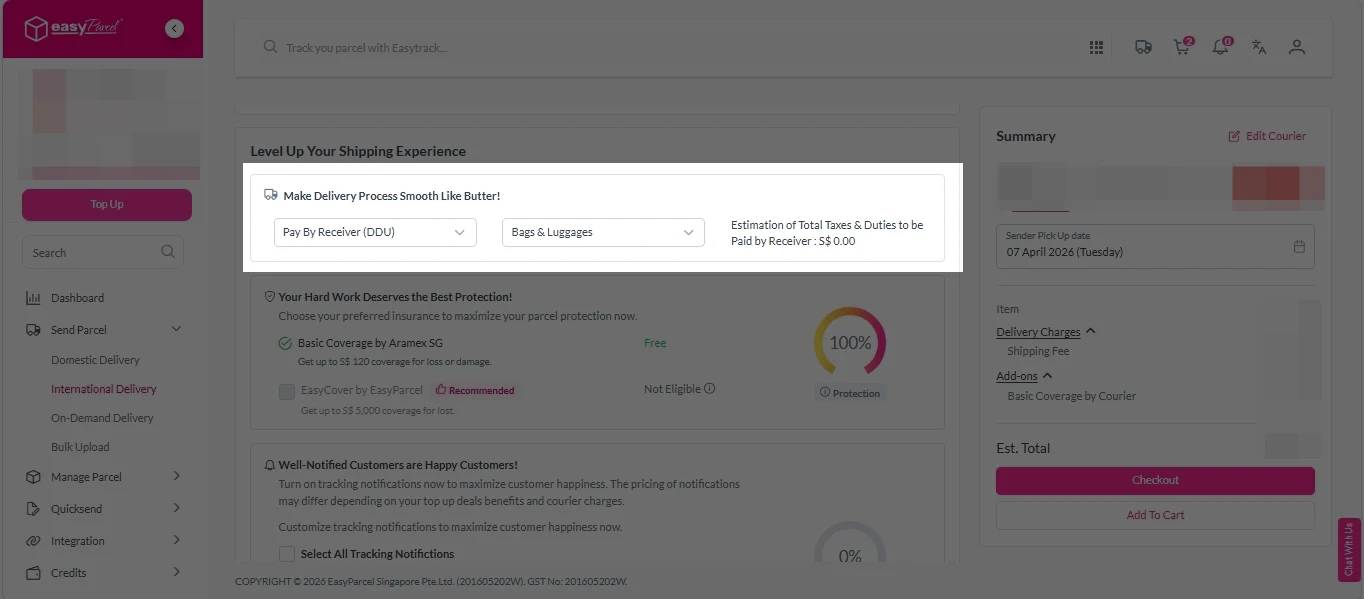
i. Select your preferred duties payment option – Delivered Duty Paid (DDP) or Delivered Duty Unpaid (DDU).
Note: Learn more about DDP and DDU.
ii. Tick the box to add EasyCover for additional protection against loss.
Note: EasyCover availability depends on the courier selected. Learn more about EasyCover.
iii. Choose your preferred notification channel – SMS, Email, or WhatsApp. Click “Preview” to see how it looks, and click “Customise” to add brand message to the notification.
Note: Learn more about Customise Branding Servcies.
iv. Tick the “Mask Sender Details” checkbox. EasyParcel Next Gen will automatically hide your sender information based on your saved privacy settings.
Note: Mask Sender Details only available for certain couriers. Find out what courier is available for Mask Sender Details.
v. Tick the “Custom AWB” checkbox. EasyParcel Next Gen will apply your saved AWB template automatically.
Note: Custom AWB is only available for certain couriers. Find out which couriers support Custom AWB.
9. Double check all details and click on “Checkout”.
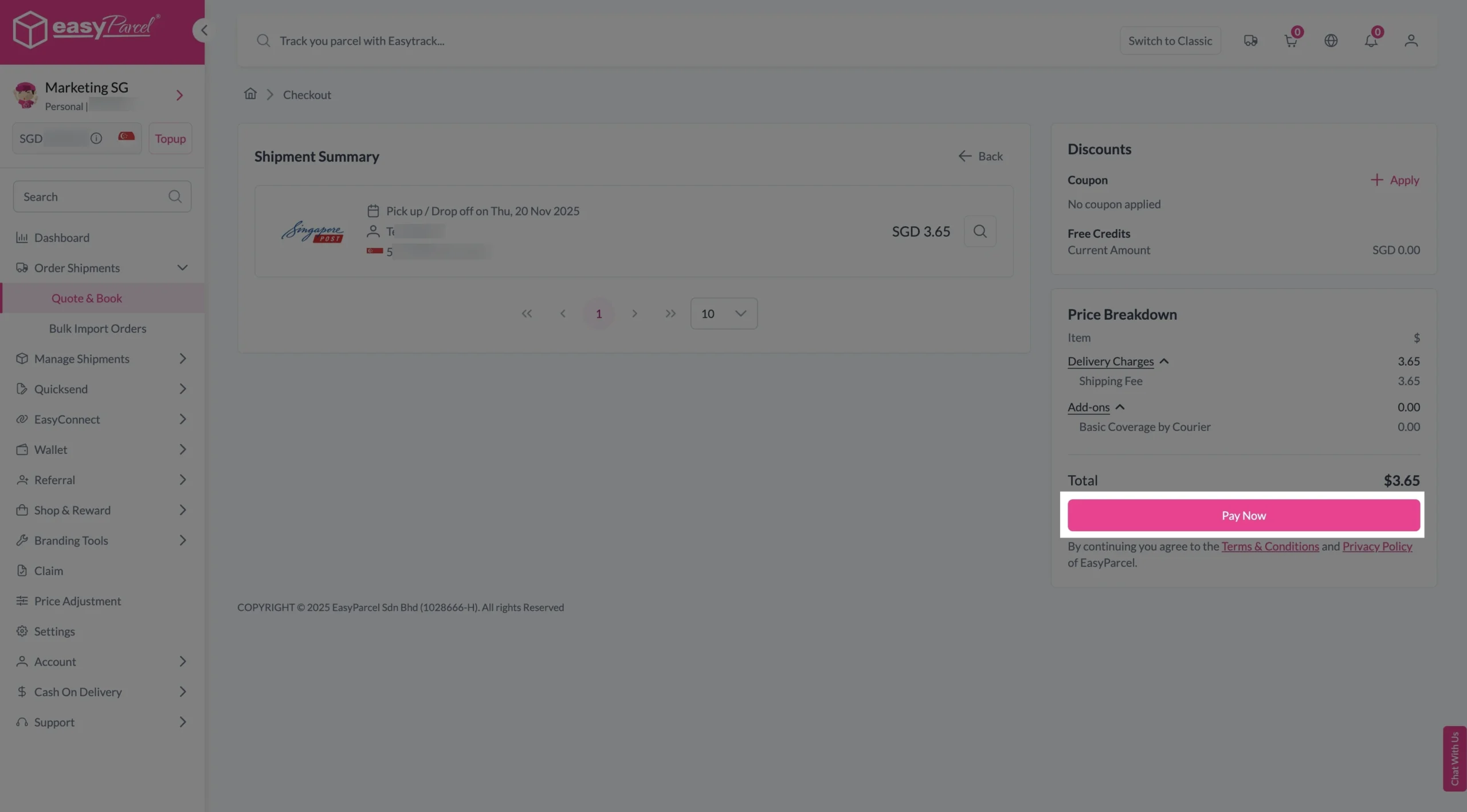
Step 4: Double check all the details and click on “Pay Now” to make payment.
Step 5: Your shipment has been booked successfully.
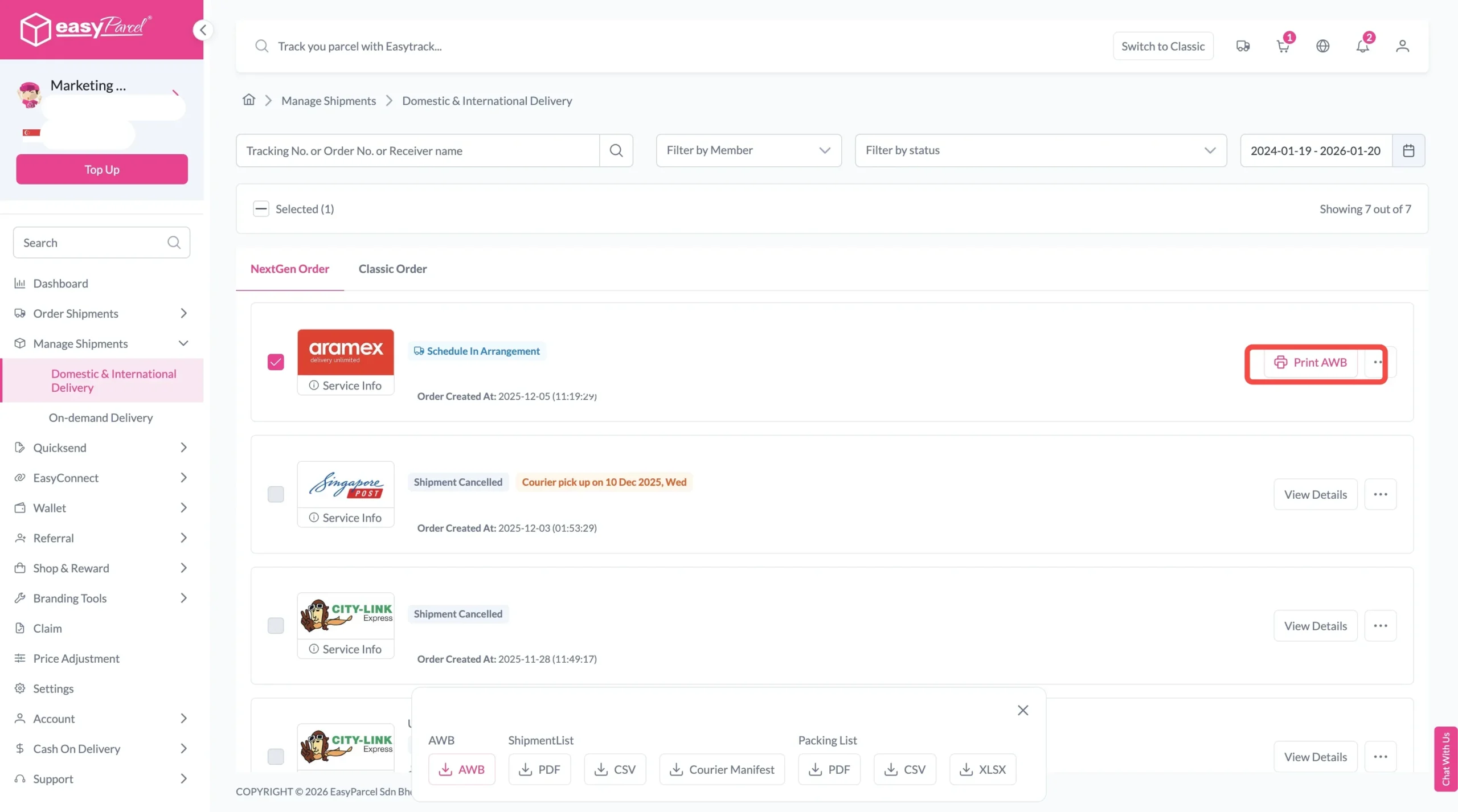
To download and print AWB, you can go to “Manage Shipments”.
Single AWB
- Click the three dots icon next to the shipment.
- Select “Print AWB” from the dropdown menu.
- A PDF file will automatically download and save.
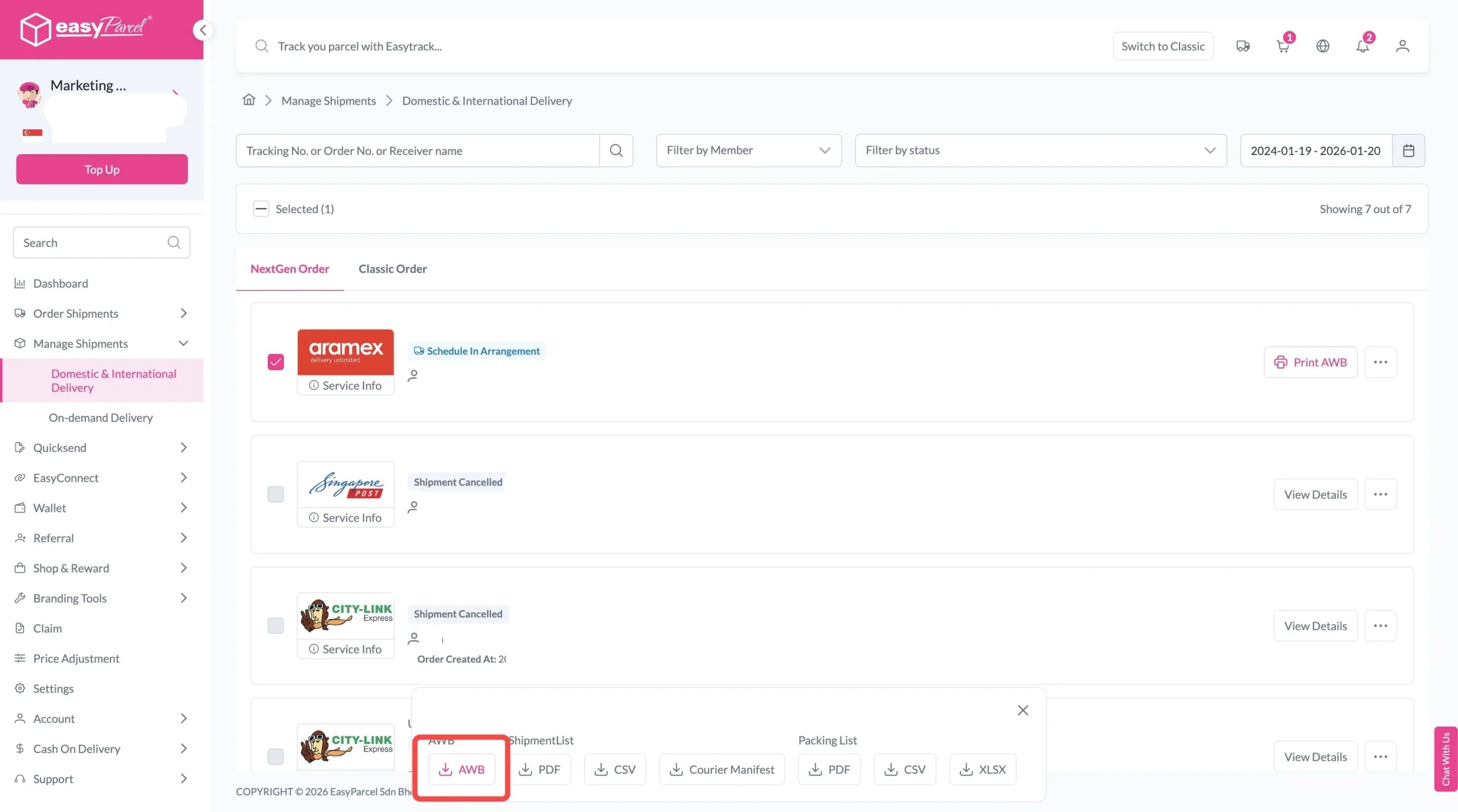
Bulk AWB
For bulk downloads AWB:
- Tick the “Selected” checkbox to choose all your orders.
- A menu will appear at the bottom of the screen.
- Click “AWB” to download all AWBs in bulk.
Why Book Parcel Pickup Through EasyParcel?
The biggest benefit isn’t simply having a courier come to your doorstep.
It’s being able to compare before you book.

Compare Rates & Delivery Times
See available shipping rates and estimated delivery durations before deciding which courier suits your needs.

Book Up to 1,000 Shipments
Upload up to 1,000 shipments at once and choose single or multiple pickup addresses—particularly useful for high-volume sellers.

Fill Addresses Faster
Paste the full recipient information and let Smart Address automatically populate the relevant address fields.

Track Every Shipment
Monitor your parcels from pickup until successful delivery in one place.

Extra Protection for Eligible Parcels
Add optional EasyCover for eligible shipments, covering loss only up to S$5,000, subject to applicable terms.
Convenient Doorstep Pickup
Choose eligible pickup services and let the courier collect parcels from your supported address.
Final Thoughts
A parcel pickup service is a convenient option when you want to send parcels without travelling to a courier outlet—especially if you’re running an online business or handling multiple shipments.
Through EasyParcel, you can compare available courier services and identify eligible doorstep pickup options based on your actual shipment.
Simply compare courier services → choose pickup → complete payment → print your AWB → prepare the parcel → let the courier collect it → track your shipment.
It turns parcel delivery into something you can manage without leaving your home or workplace.
Malaysia
Thailand
Indonesia