Postage Rates SingPost in EasyParcel

Postage-Rates-SingPost-in-EasyParcel

What are the SingPost postage rates and services available on EasyParcel in 2026?

SingPost offers 6 delivery services through EasyParcel: Speedpost Economy (from SGD 2.95, 3 working days), Speedpost Standard (from SGD 4.15, 1 working day), Speedpost Priority (from SGD 12.75, same working day), and SingPost E-Saver (from SGD 2.65, 1 business day) for local parcels. For international shipping, Speedpost Priority International (from SGD 26.50) and Speedpost Express International (from SGD 29.28) are available, with delivery times varying by destination. Booking SingPost via EasyParcel unlocks discounted rates, free doorstep pickup, and optional EasyCover parcel protection against loss.

Compare SingPost Services & Postage Rates

Features
Speedpost Economy speedpost-economy-singpost
Speedpost Standard speedpost-standard-singpost
Speedpost Priority speedpost-priority-singpost
SingPost E-Saver SingPost-domestic-delivery-fast-courier-service
Priority International speedpost-priority-international
Express International Speedpost Express International
Delivery Duration
3 working days
1 working day
Within Same Working Day
1 working day
Depends on destination
Max Weight
30 KG
30 KG
30 KG
30 KG
30 KG
30 KG
Max Dimension
300 cm
300 cm
300 cm
300 cm
200 cm
200 cm
Price From
S$2.95
S$4.15
S$12.75
S$2.65
S$26.50
S$29.28

Explore more  to get more SingPost SpeedPost  Delivery details.

Why Book SingPost Services via EasyParcel?

Using SingPost services through EasyParcel brings additional convenience and cost-effectiveness to your shipping:

tracking-parcel

Parcel Tracking

Easily keep track of up to 15 parcels or EasyParcel tracking numbers at the same time using EasyTrack.
Convenient-Pickup-and-Drop-off

Free Door-Step Pick Up

Enjoy advantage of the convenience free door-step parcel pickup, helping your business save time and avoid transport hassles.

parcel-protection

Extra Parcel
Protection

Protect your parcels against loss with EasyCover, a extra parcel protection to give you extra peace of mind.

Link your eCommerce platform with EasyParcel

Seamless Integration and Booking

Automatically fill in sender and receiver details for quicker, error-free bookings, helping to streamline your shipping process.

all-in-one-platform

All In One Shipping Platform

Manage all your shipments effortlessly all in one shipping platform for multiple couriers.

compare-couriers

Compare Courier Options Easily

Access and quote, compare rates from over 60+ courier services instantly to choose the best shipping option for your business.

How to Book a SingPost Shipment via EasyParcel

Step 1: Login your EasyParcel account. 

send-parcel-nextgen-step-1

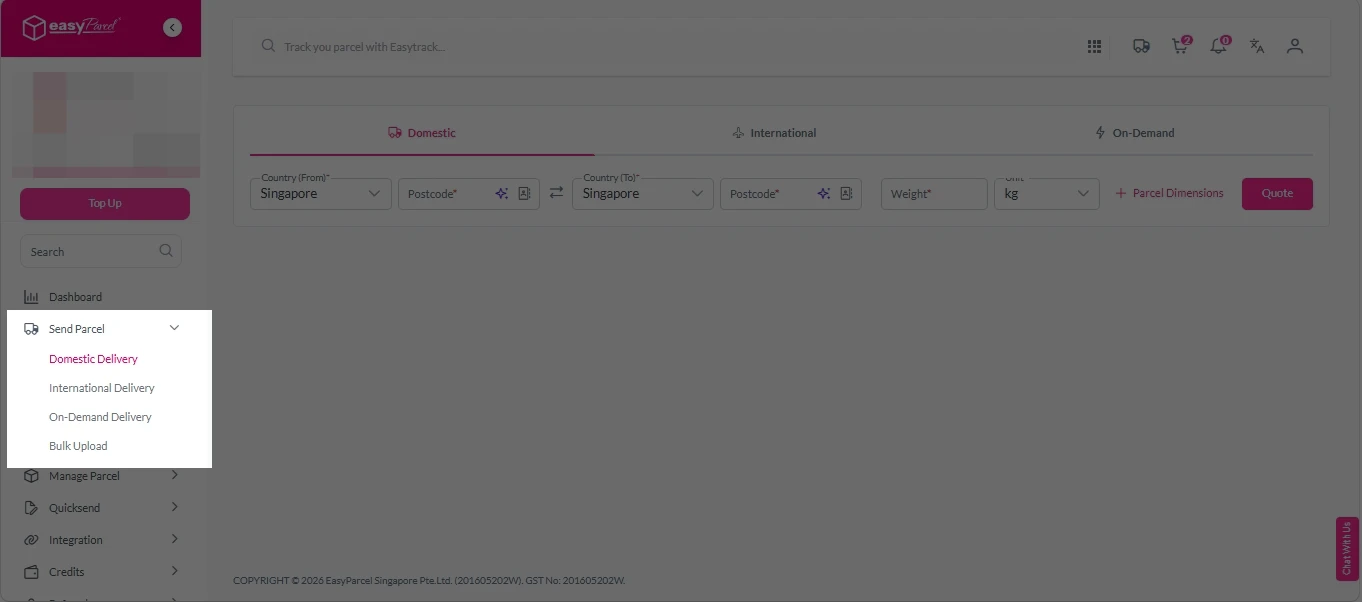
Step 2: Under “Send Parcel”, choose either Domestic Delivery (for shipments within Singapore) or International Delivery (for shipments overseas). 

Next gen- Send Parcel 1

Step 3: Enter Shipment Details. 

Domestic Delivery

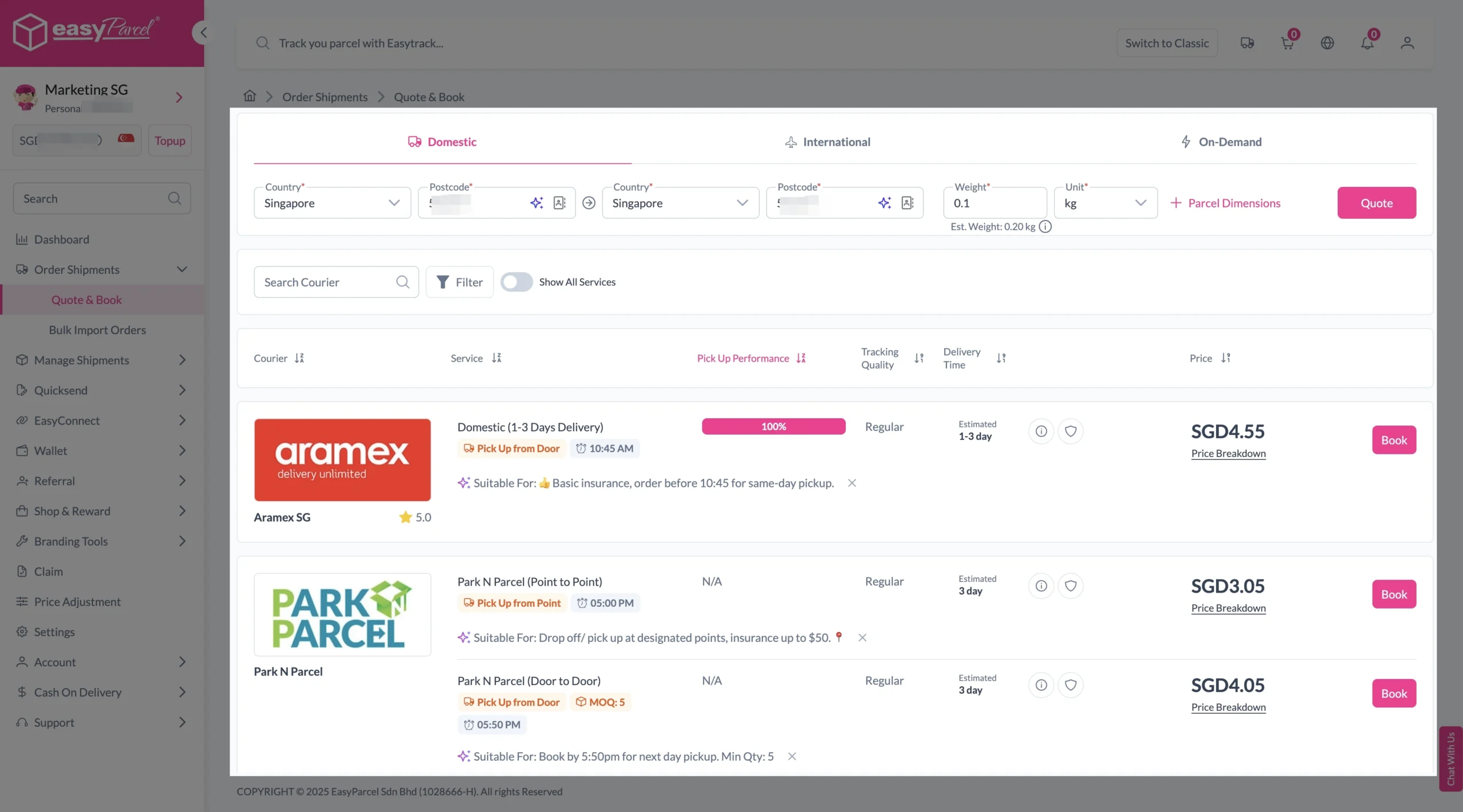
1. Fill in the origin and destination postcode.
2. Provide the parcel weight.
3. (Optional) Add parcel dimensions for a more accurate shipping rate.
4. Click the “Quote” button.
5. A list of courier rates will appear below, as shown in the image.
6. Choose your preferred SingPost service and click “Book Now.”

send-parcel-nextgen-step-3-domestic

7. Fill in all details included Sender Details, Receiver Details, Parcel Details and Add-On Services.
Sender and Receiver Details: 

send-parcel-nextgen-step-4

Parcel Details: 
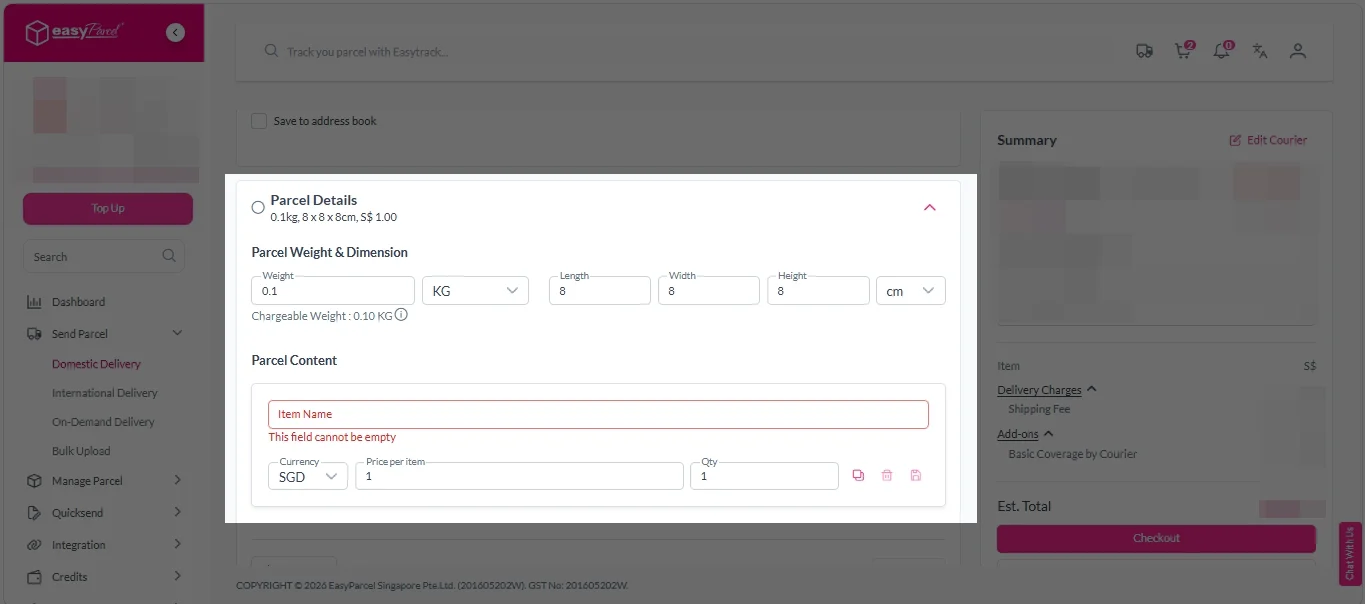
Enter the actual weight, dimension and content of your parcel. 
Parcel Content:
Fill in your item name, price per item, and quantity. 

Domestic delivery - parcel details

Add-On Services: 
i. Tick the box to add EasyCover for additional protection against loss.
Note: EasyCover availability depends on the courier selected. Learn more about EasyCover

add on services 2

ii. Choose your preferred notification channel – SMS, Email, or WhatsApp. Click “Preview” to see how it looks,  and click “Customise” to add brand message to the notification.
Note: Learn more about Customise Branding Servcies

add on services 3

iii. Tick the “Mask Sender Details” checkbox. EasyParcel Next Gen will automatically hide your sender information based on your saved privacy settings
Note: Mask Sender Details only available for certain couriers. Find out what courier is available for Mask Sender Details.

iv. Tick the “Custom AWB” checkbox. EasyParcel Next Gen will apply your saved AWB template automatically. 
Note: Custom AWB is only available for certain couriers. Find out which couriers support Custom AWB

custom awb 1

8. Double check all details and click on “Checkout”. 

send-parcel-nextgen-step-4

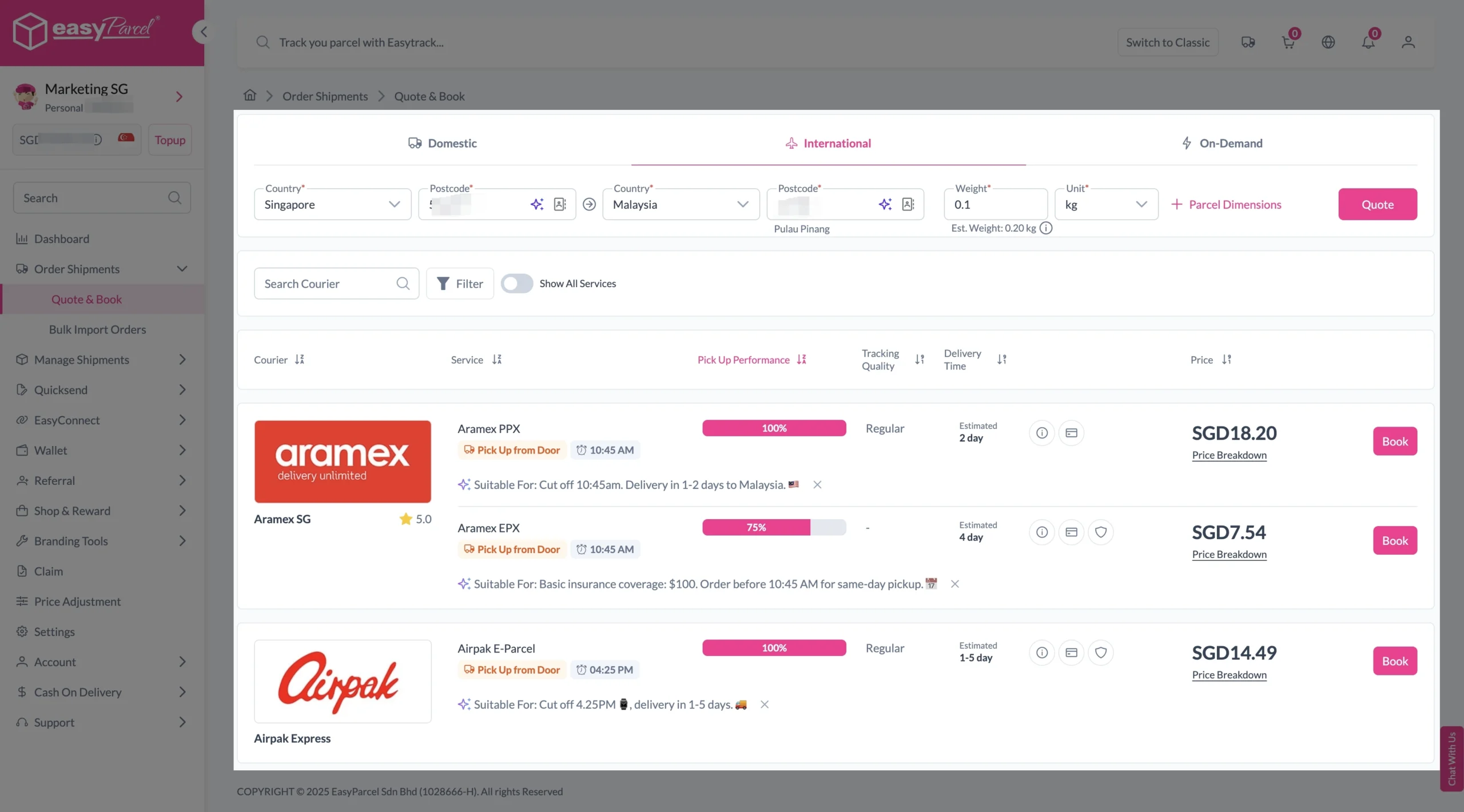
1. Fill in the origin postcode.
2. Enter the destination country and postcode.
3. Provide the parcel weight.
4. (Optional) Add parcel dimensions for a more accurate shipping rate.
5. Click the “Quote” button.
6. A list of courier rates will appear below, as shown in the image.
7. Choose your preferred SingPost service and click “Book Now.”

send-parcel-nextgen-step-3-international

8. Fill in all details included Sender Details, Receiver Details, Parcel Details and Add-On Services.
Sender and Receiver Details: 

send-parcel-nextgen-step-4

Parcel Details: 
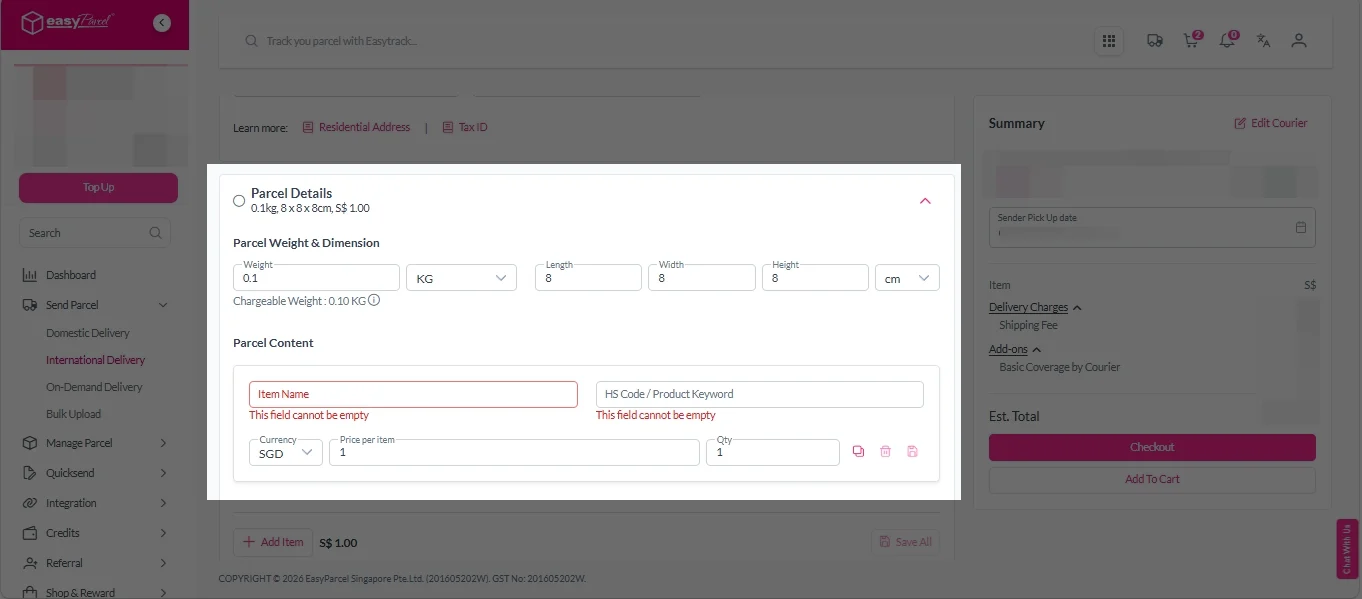
Enter the actual weight, dimension and content of your parcel. 
Parcel Content:
Fill in your item name. Then, choose your item category from the dropdown menu. The HS code will be auto generated based on your selection.

Note: Learn more about Smart HS Code.

International- Parcel Details

Add-On Services: 
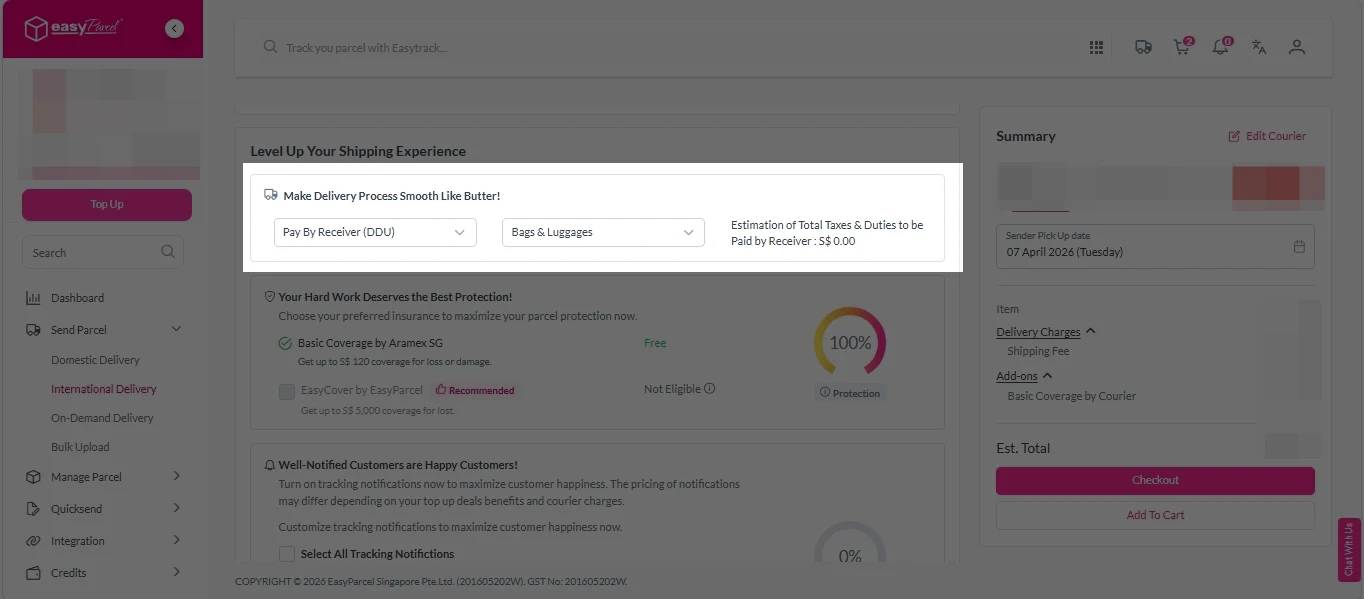
i.  Select your preferred duties payment option – Delivered Duty Paid (DDP) or Delivered Duty Unpaid (DDU)
Note: Learn more about DDP and DDU.

add on services 1

ii. Tick the box to add EasyCover for additional protection against loss.
Note: EasyCover availability depends on the courier selected. Learn more about EasyCover

add on services 2

iii. Choose your preferred notification channel – SMS, Email, or WhatsApp. Click “Preview” to see how it looks,  and click “Customise” to add brand message to the notification.
Note: Learn more about Customise Branding Servcies

add on services 3

iv. Tick the “Mask Sender Details” checkbox. EasyParcel Next Gen will automatically hide your sender information based on your saved privacy settings
Note: Mask Sender Details only available for certain couriers. Find out what courier is available for Mask Sender Details.

v. Tick the “Custom AWB” checkbox. EasyParcel Next Gen will apply your saved AWB template automatically. 
Note: Custom AWB is only available for certain couriers. Find out which couriers support Custom AWB

custom awb 1

9. Double check all details and click on “Checkout”. 

send-parcel-nextgen-step-4

Step 4: Double check all the details and click on “Pay Now” to make payment. 

send-parcel-nextgen-step-5

Step 5: Your shipment has been booked successfully.
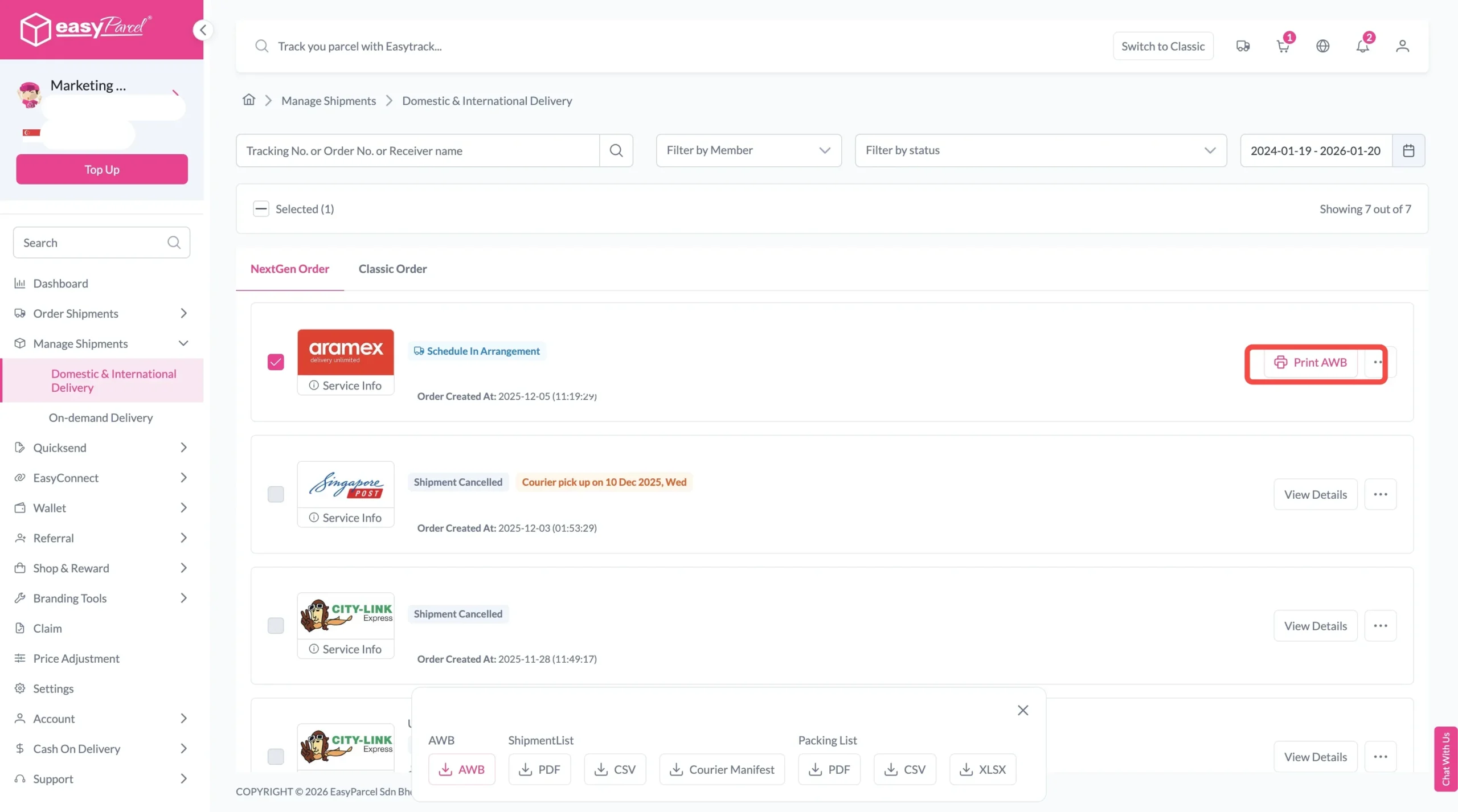
To download and print AWB, you can go to “Manage Shipments”. 

Single AWB
  1. Click the three dots icon next to the shipment.
  2. Select “Print AWB” from the dropdown menu.
  3. A PDF file will automatically download and save.
download AWB (2)

For bulk downloads AWB:

  1. Tick the “Selected” checkbox to choose all your orders.
  2. A menu will appear at the bottom of the screen.
  3. Click “AWB” to download all AWBs in bulk.
download AWB

Frequently Asked Questions (FAQs)

What courier is cheaper?
EasyParcel lets you quote and compare shipping rates from over 60 courier services in one place, helping you find the most affordable option for your parcel delivery.
How long does SingPost Speedpost take to deliver?
The delivery duration for SingPost Speedpost varies depending on the specific service chosen, catering to different shipping needs. SingPost Speedpost offers four delivery services within its coverage area: Speedpost Economy delivers in 3 business days Speedpost Standard ensures delivery in 1 business day Speedpost Priority guarantees delivery the same business day before 6pm Speedpost Prime provides next business day delivery before 6pm, making it ideal for urgent shipments.
How do I Track SingPost SpeedPost Shipment?
You can check your SingPost Speedpost shipment tracking status online by entering your tracking number through EasyParcel’s EasyTrack feature for real-time updates.

Related Blog

Join 1.5 Million Happy Customers & Start Saving

Create your free account today and receive S$6 shipping coupon to start saving from your very first parcel. Compare courier rates, book in minutes, and start saving immediately.
×