Return Parcels Made Easy with EasyParcel

Return Parcels Made Easy with EasyParcel

Table of Contents

Returning a parcel is sometimes necessary—whether the item doesn’t fit, arrives damaged, or isn’t what was expected. A smooth return process helps reduce stress and saves time. This guide explains how individuals can return parcels easily, what to expect during the return process, and how EasyParcel helps make returning parcels simple and hassle-free.

Whether returning an online purchase or sending an item back to a seller, this article offers clear steps and helpful tips to ensure a smooth return experience from pickup to delivery.

Step-by-Step: How to Book a "Return Parcel" on EasyParcel

Step 1: Login your EasyParcel account. 

send-parcel-nextgen-step-1

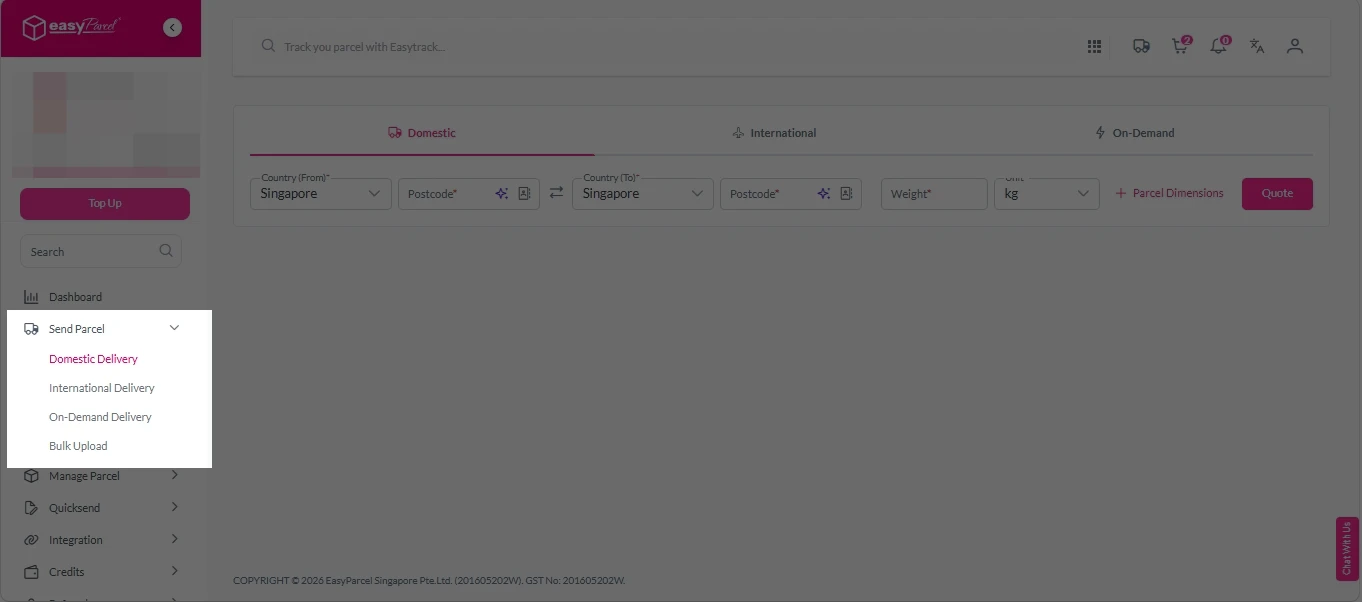
Step 2: Under “Send Parcel”, choose either Domestic Delivery (for shipments within Singapore), International Delivery (for shipments overseas) orOn-Demand Delivery (for urgent shipments). 

Next gen- Send Parcel 1

Step 3: Enter Shipment Details. 

Domestic Delivery

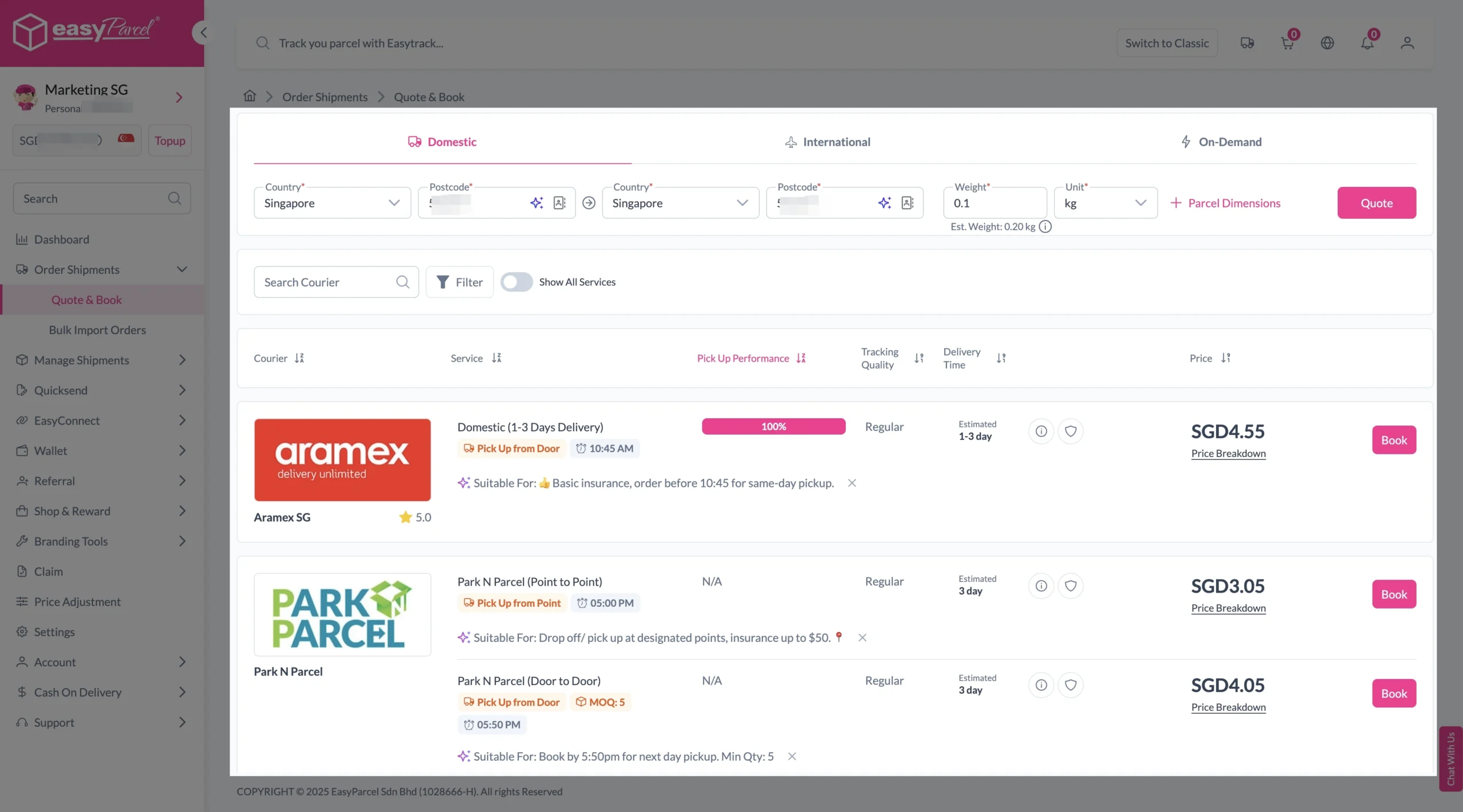
1. Fill in the origin and destination postcode.
2. Provide the parcel weight.
3. (Optional) Add parcel dimensions for a more accurate shipping rate.
4. Click the “Quote” button.
5. A list of courier rates will appear below, as shown in the image.
6. Choose your preferred courier and click “Book Now.”

send-parcel-nextgen-step-3-domestic

7. Fill in all details included Sender Details, Receiver Details, Parcel Details and Add-On Services.
Sender and Receiver Details: 

send-parcel-nextgen-step-4

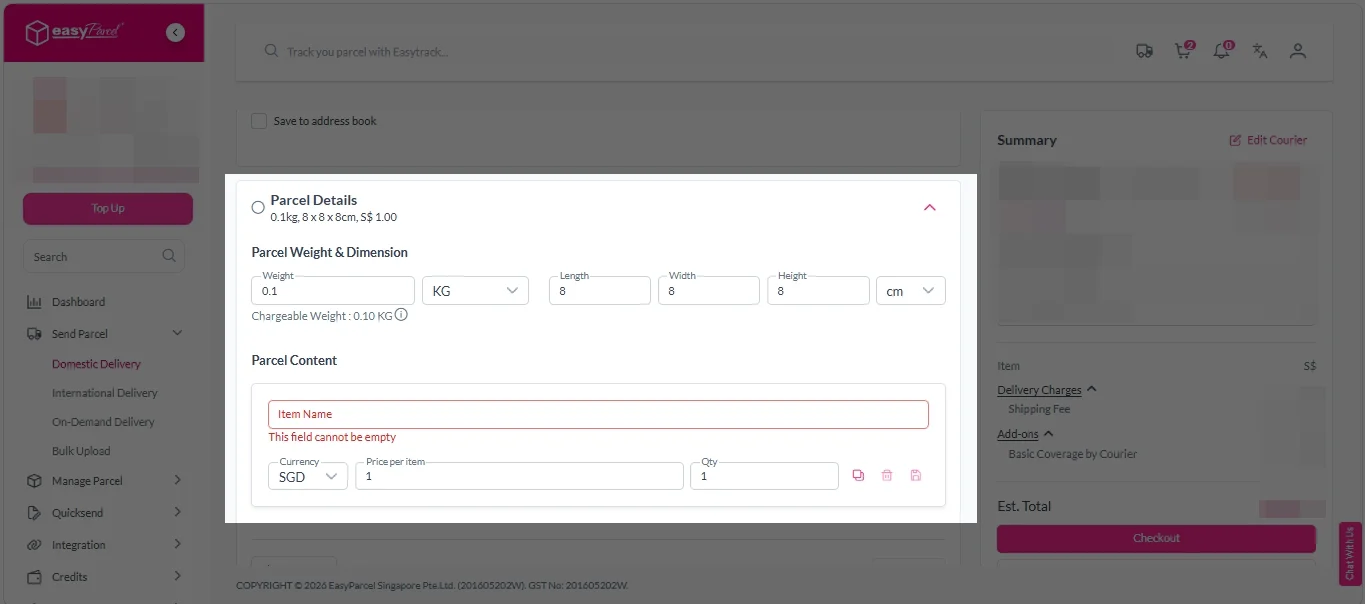
Parcel Details: 
Enter the actual weight, dimension and content of your parcel. 
Parcel Content:
Fill in your item name, price per item, and quantity. 

Domestic delivery - parcel details

Add-On Services: 
i. Tick the box to add EasyCover for additional protection against loss.
Note: EasyCover availability depends on the courier selected. Learn more about EasyCover

add on services 2

ii. Choose your preferred notification channel – SMS, Email, or WhatsApp. Click “Preview” to see how it looks,  and click “Customise” to add brand message to the notification.
Note: Learn more about Customise Branding Servcies

add on services 3

iii. Tick the “Mask Sender Details” checkbox. EasyParcel Next Gen will automatically hide your sender information based on your saved privacy settings
Note: Mask Sender Details only available for certain couriers. Find out what courier is available for Mask Sender Details.

iv. Tick the “Custom AWB” checkbox. EasyParcel Next Gen will apply your saved AWB template automatically. 
Note: Custom AWB is only available for certain couriers. Find out which couriers support Custom AWB

custom awb 1

8. Double check all details and click on “Checkout”. 

send-parcel-nextgen-step-4

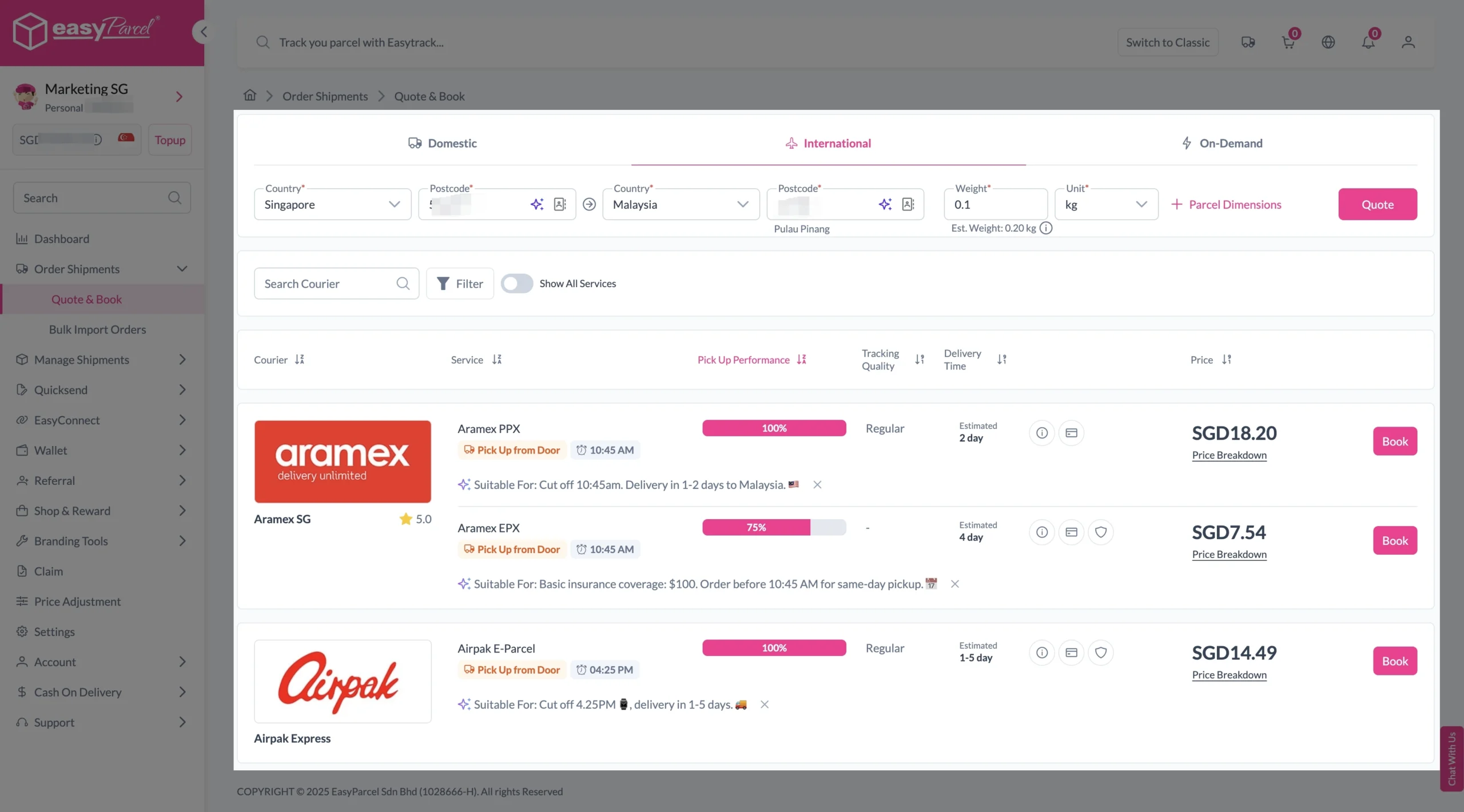
1. Fill in the origin postcode.
2. Enter the destination country and postcode.
3. Provide the parcel weight.
4. (Optional) Add parcel dimensions for a more accurate shipping rate.
5. Click the “Quote” button.
6. A list of courier rates will appear below, as shown in the image.
7. Choose your preferred courier and click “Book Now.”

send-parcel-nextgen-step-3-international

8. Fill in all details included Sender Details, Receiver Details, Parcel Details and Add-On Services.
Sender and Receiver Details: 

send-parcel-nextgen-step-4

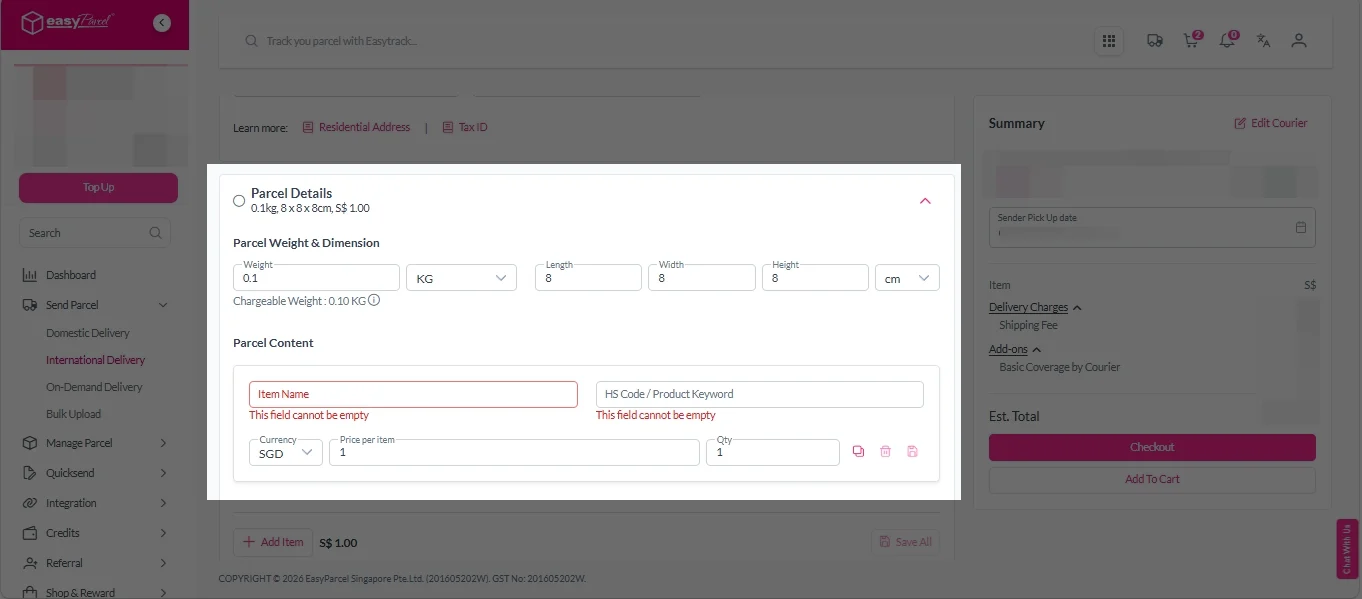
Parcel Details: 
Enter the actual weight, dimension and content of your parcel. 
Parcel Content:
Fill in your item name. Then, choose your item category from the dropdown menu. The HS code will be auto generated based on your selection.

Note: Learn more about Smart HS Code.

International- Parcel Details

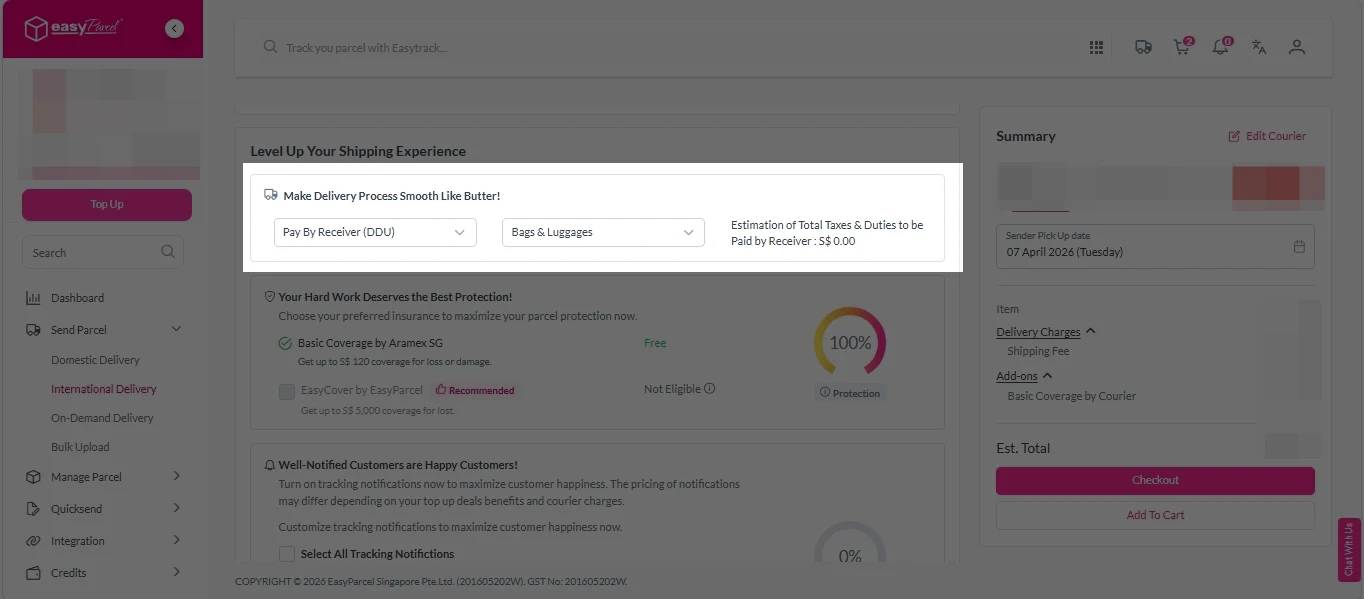
Add-On Services: 
i.  Select your preferred duties payment option – Delivered Duty Paid (DDP) or Delivered Duty Unpaid (DDU)
Note: Learn more about DDP and DDU.

add on services 1

ii. Tick the box to add EasyCover for additional protection against loss.
Note: EasyCover availability depends on the courier selected. Learn more about EasyCover

add on services 2

iii. Choose your preferred notification channel – SMS, Email, or WhatsApp. Click “Preview” to see how it looks,  and click “Customise” to add brand message to the notification.
Note: Learn more about Customise Branding Servcies

add on services 3

iv. Tick the “Mask Sender Details” checkbox. EasyParcel Next Gen will automatically hide your sender information based on your saved privacy settings
Note: Mask Sender Details only available for certain couriers. Find out what courier is available for Mask Sender Details.

v. Tick the “Custom AWB” checkbox. EasyParcel Next Gen will apply your saved AWB template automatically. 
Note: Custom AWB is only available for certain couriers. Find out which couriers support Custom AWB

custom awb 1

9. Double check all details and click on “Checkout”. 

send-parcel-nextgen-step-4

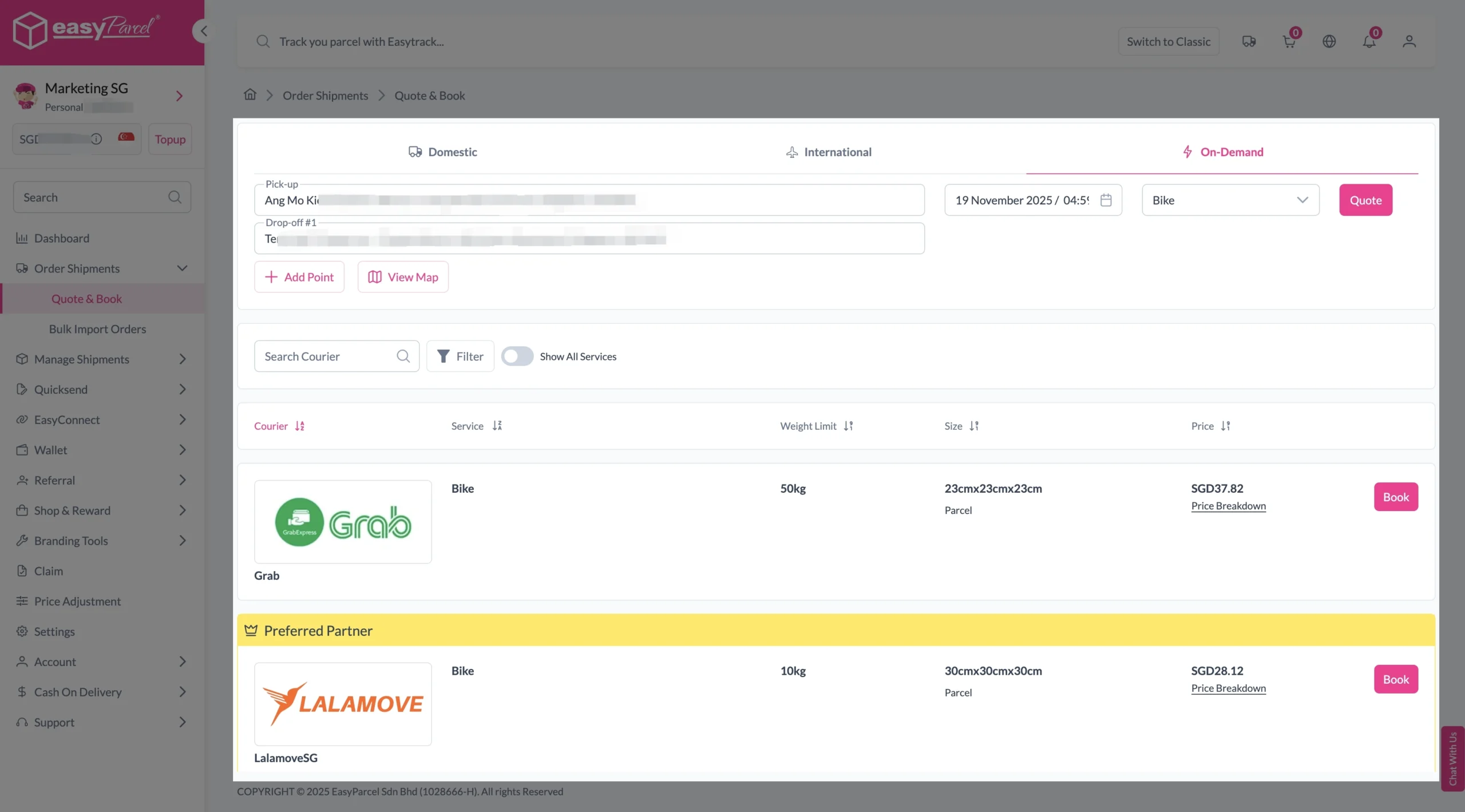
1. Fill in the exact address of your pick-up location.
2. Enter the addresses of up to 9 drop-off points.
3. Select your preferred pick-up date and time.
4. Choose the transport type.
5. Click the “Quote” button to get the rates.
6. Choose your preferred courier and click “Book Now.”

send-parcel-nextgen-step-3-on-demand

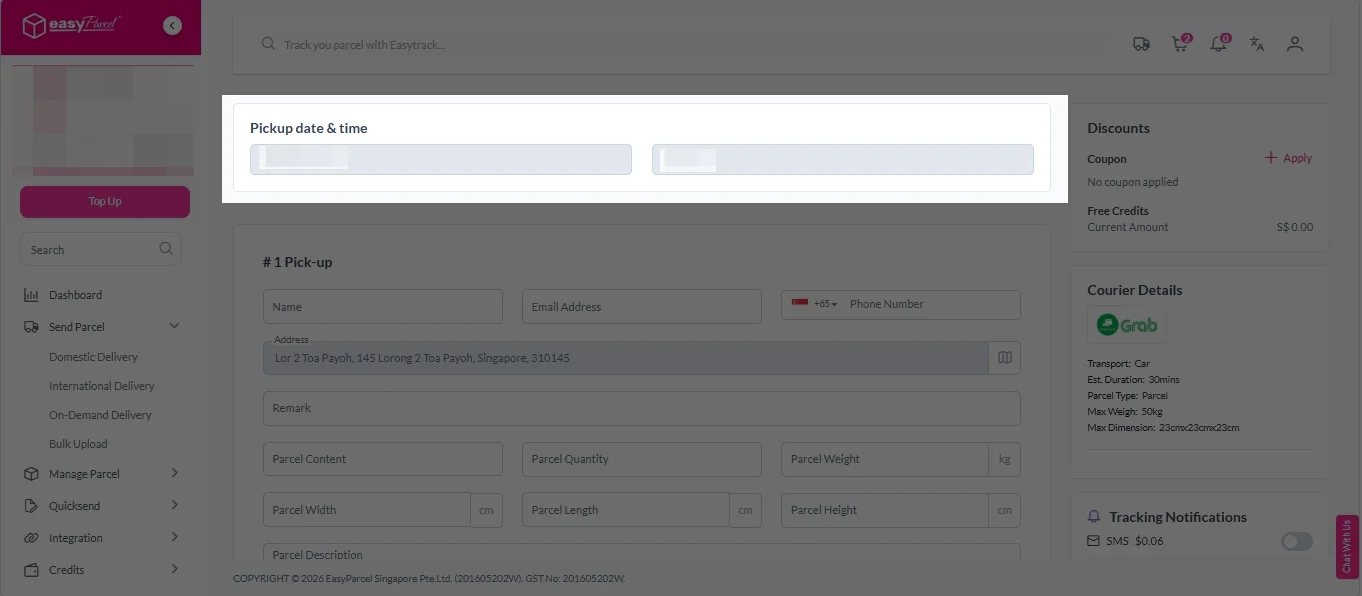
7. Check “Pickup date & time”. 

On-demand details 1

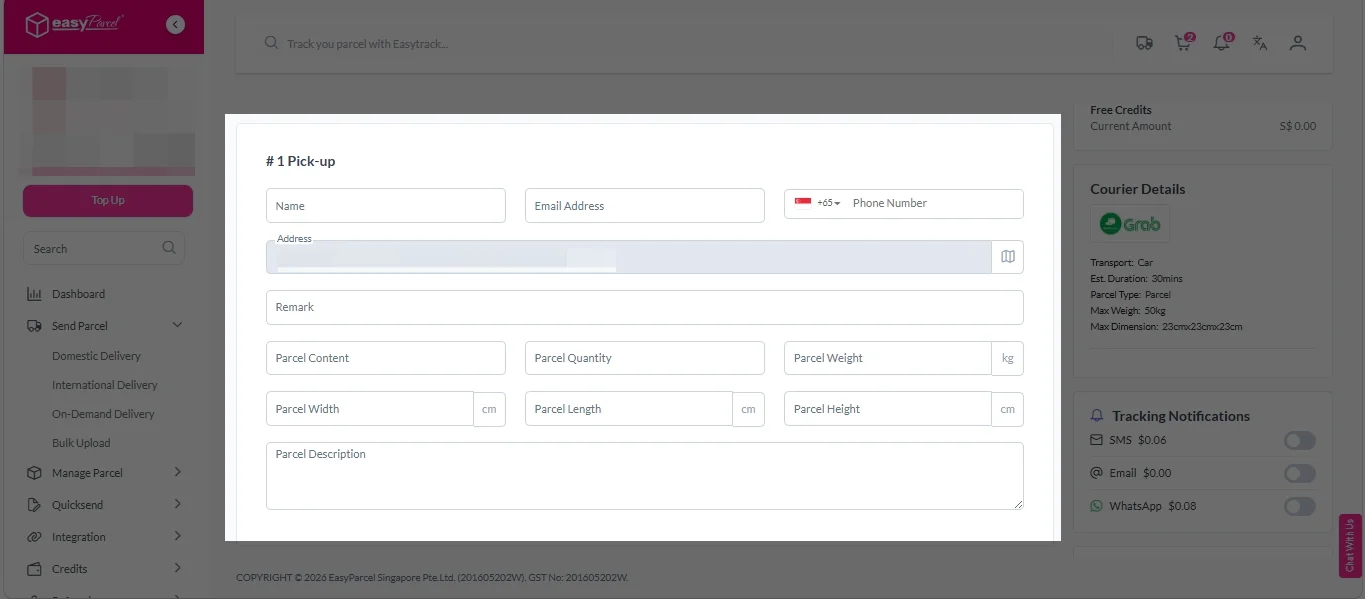
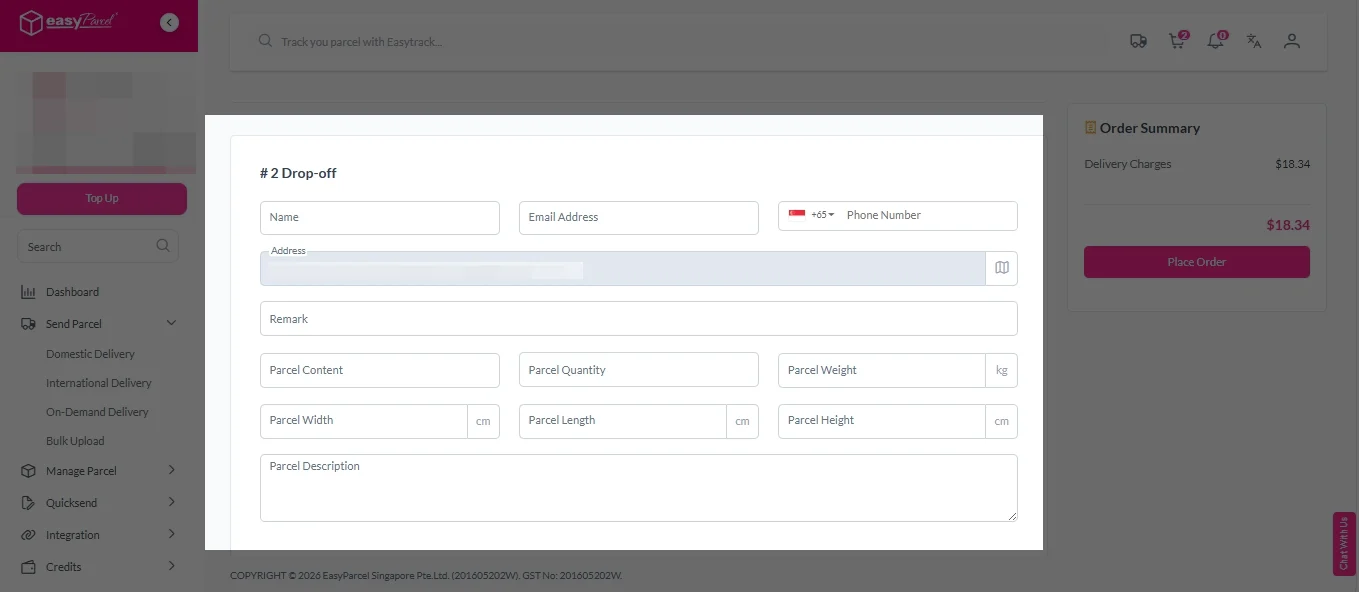
8. Fill in all the details. 

On-demand details 2
On-demand details 3

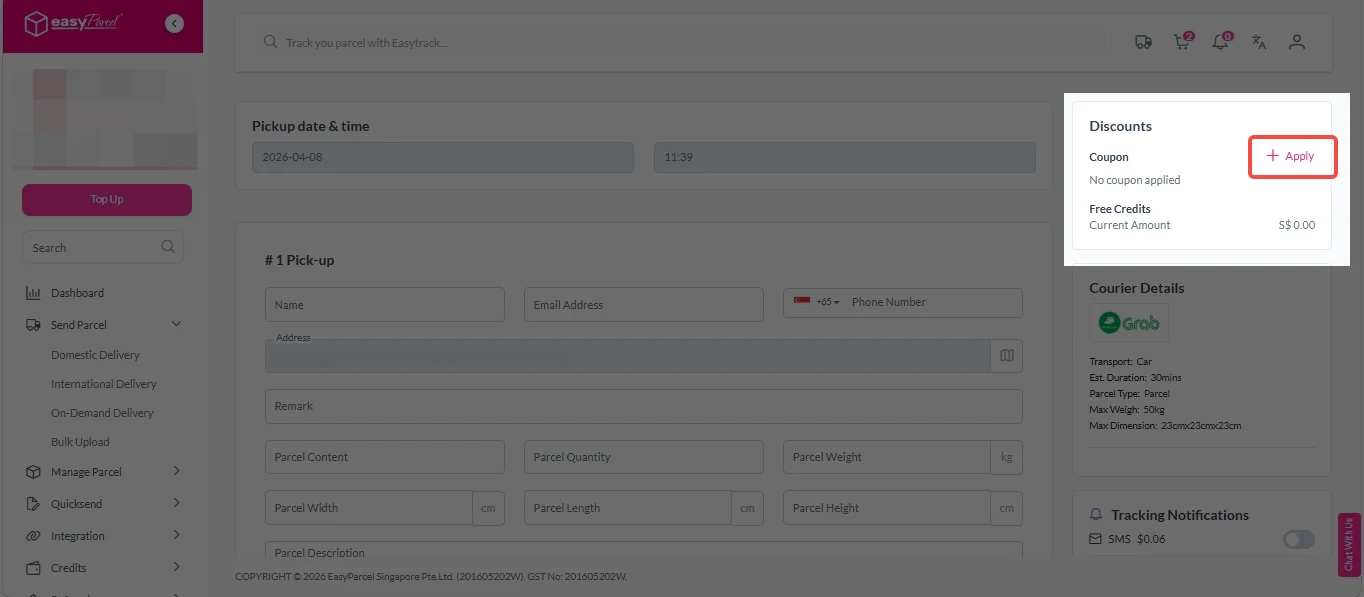
9. (Optional) Click “Apply” to add discount coupon.  

On-demand discounts

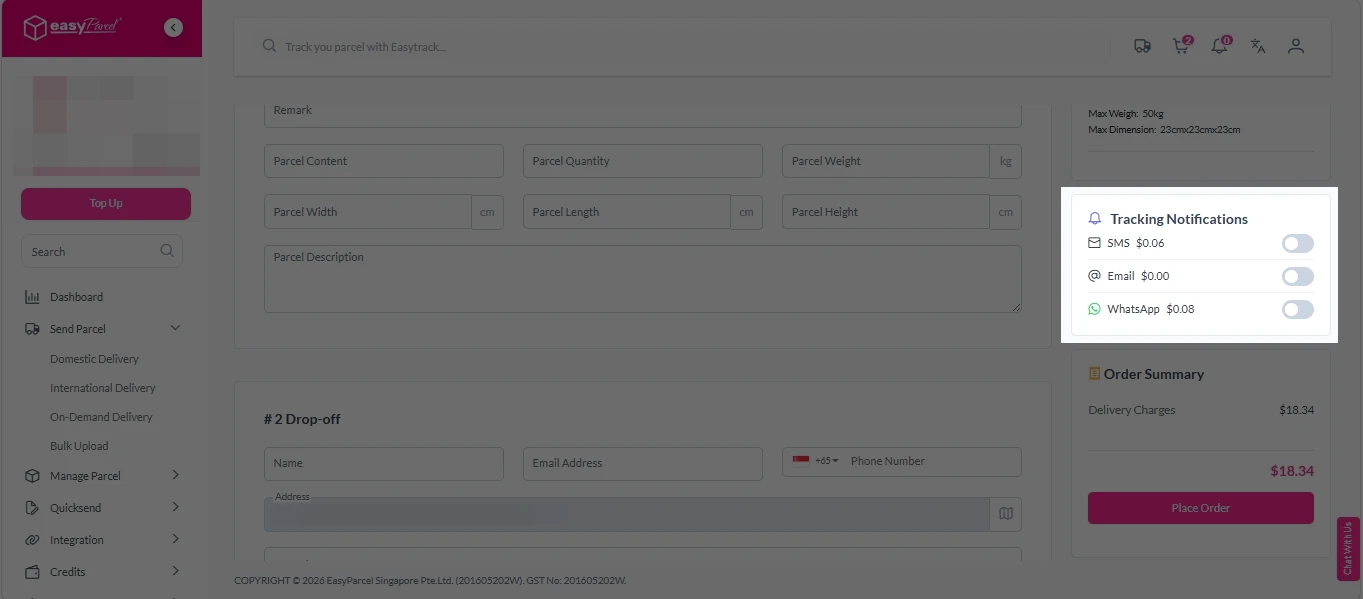
10. (Optional) Under “Tracking Notifications”, choose your preferred notification channel – SMS, Email, or WhatsApp

On-demand tracking notification

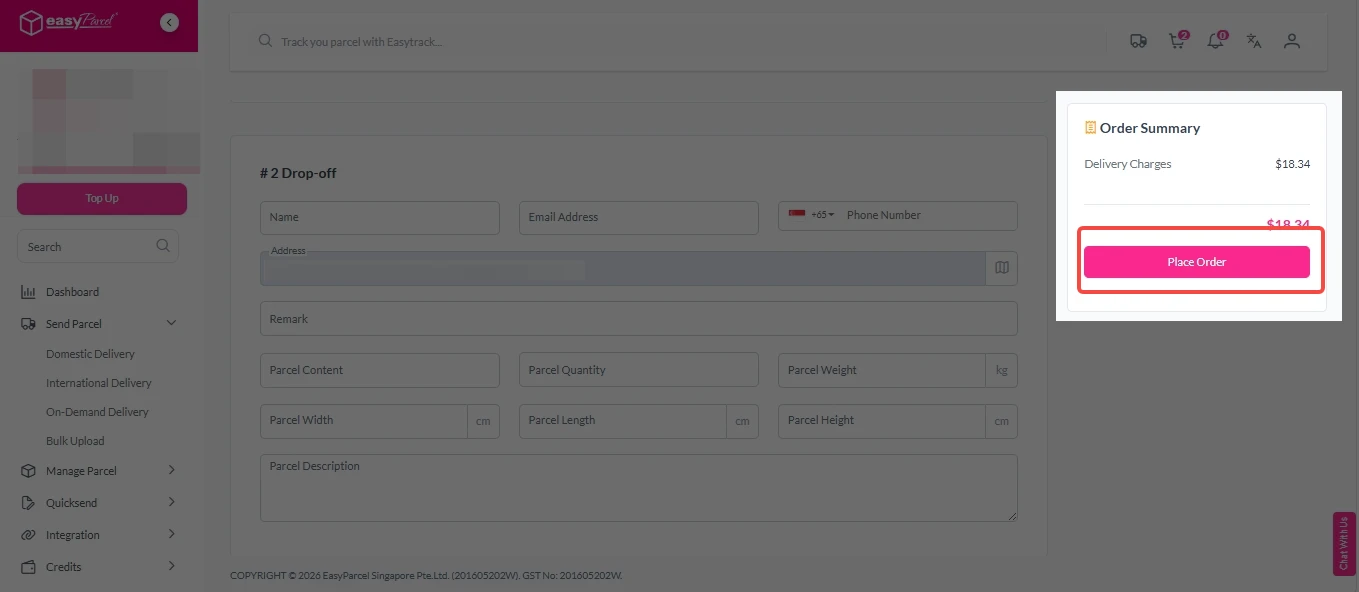
11. Double check all details and click on “Place Order”. 

On-demand details 4

Step 4: Double check all the details and click on “Pay Now” to make payment. 

send-parcel-nextgen-step-5

Step 5: Your shipment has been booked successfully.
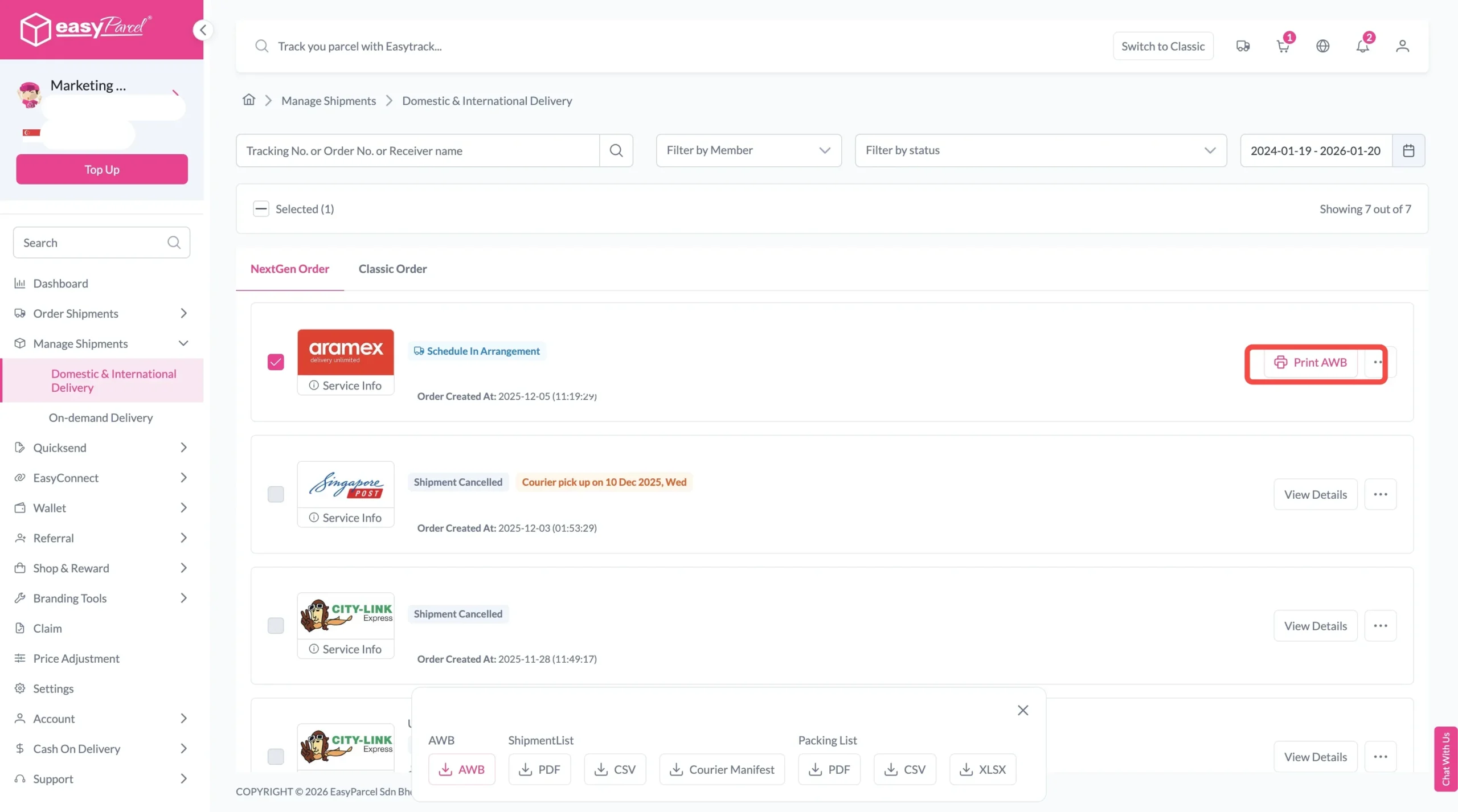
To download and print AWB, you can go to “Manage Shipments”. 

Single AWB
  1. Click the three dots icon next to the shipment.
  2. Select “Print AWB” from the dropdown menu.
  3. A PDF file will automatically download and save.
download AWB (2)

For bulk downloads AWB:

  1. Tick the “Selected” checkbox to choose all your orders.
  2. A menu will appear at the bottom of the screen.
  3. Click “AWB” to download all AWBs in bulk.
download AWB

Have return parcel to send?

Return Parcel Made Simple & Affordable with EasyParcel

Flexible Courier Choices

You can select from multiple courier services based on your preferred delivery speed and budget.

Convenient Pickup or Drop-Off (PODU) Options

EasyParcel offers doorstep pickup or nearby drop-off points for added convenience. You can return parcels without affecting daily routine.

Clear Tracking Updates

You can check parcel updates throughout the return process.

Affordable Return Shipping Rates

EasyParcel provides cost-effective return shipping options with clear pricing. You can return parcels confidently without worrying about high fees.

Frequently Asked Question (FAQs)

Can I choose which courier handles my return?
Yes! You can select from multiple courier options based on speed, convenience, and cost, so your return parcel is delivered the way you prefer.
How long does it take for my return parcel to reach the seller?
Delivery times depend on the courier you choose, but EasyParcel provides an estimated delivery timeframe of each courier when you book the return.
How do I track my return parcel?
You can track your return parcel via EasyTrack. You can enter up to 15 tracking numbers or EasyParcel order numbers and get the latest status of your parcels.

Join 1.5 Million Happy Customers & Start Saving

Create your free account today and receive S$6 shipping coupon to start saving from your very first parcel. Compare courier rates, book in minutes, and start saving immediately.
×