Finding a reliable SG logistics company shouldn’t require opening ten different websites. Whether you need standard delivery, same-day service, or international shipping, Singapore has many trusted options.
This blog lists the top 10 popular and reliable SG logistics company providers.
Table of Contents
Top 10 SG Logistics Company Providers

1. SingPost
- Best for: Standard local delivery, affordable rates
- Price from: from S$2.65
- Delivery speed: 1-3 working days
- Max weight: 30 kg
Singapore’s national postal service – ideal for lightweight items and budget-conscious shipping.

2. FedEx
- Best for: Fast international shipping, global coverage
- Price from: from S$28.90
- Delivery speed: 1-5 working days
- Max weight: 70 kg
A global logistics leader – perfect for urgent international parcels and business documents.

3. J&T Express
- Best for: High-volume ecommerce, 365-day operation
- Price from: from S$2.85
- Delivery speed: 1-3 working days
- Max weight: 30 kg
Operates 365 days a year – perfect for ecommerce stores with consistent daily volume.

4. Ninja Van
- Best for: SMEs, COD management, SE Asia last-mile
- Price from: from S$3.55
- Delivery speed: 1-3 working days
- Max weight: 30 kg
Ninja Van’s COD system automatically collects payments and remits them to you – reducing administrative work.

5. GrabExpress
- Best for: Fast on-demand delivery
- Price from: Based on distance
- Delivery speed: 1 hour
- Max weight: 10 kg
One of the most accessible on-demand delivery services, available 24/7 across Singapore.

6. Lalamove
- Best for: On-demand delivery, large or bulky items
- Price from: Base fare S$5
- Delivery speed: Islandwide: within 1 hour.
- Max weight: 2500 kg
Lalamove’s multiple vehicle options allow you to ship furniture, electronics, or bulk orders that don’t fit standard courier limits.

7. TracX Logis
- Best for: Affordable cross-border shipping
- Price from: from S$3.65
- Delivery speed: 1-2 working days
- Max weight: 30 kg
Offers competitive rates for international shipments from Singapore.

8. uParcel
- Best for: Scheduled 1-hour express delivery slots
- Price from: from S$8.99
- Delivery speed: 1 hour, 3 hours, 7 hours, next day delivery
- Max weight: 25 kg
Offers precise delivery windows – perfect for time-sensitive products like cakes, flowers, or medical supplies.

9. Park N Parcel
- Best for: Affordable local delivery
- Price from: from S$2.45
- Delivery speed: 1 – 3 working days
- Max weight: 8 kg
One of the most budget-friendly options for local delivery in Singapore.

10. Aramex
- Best for: International shipping, Middle East, Asia
- Price from: from S$4.05
- Delivery speed: 1 – 3 working days
- Max weight: 30 kg
A global logistics provider with strong coverage in the Middle East, Asia, and Africa.
From Budget to Express – Find Your Perfect Courier
How to Book SG Logistics Company Using EasyParcel
Step 1: Login your EasyParcel account.
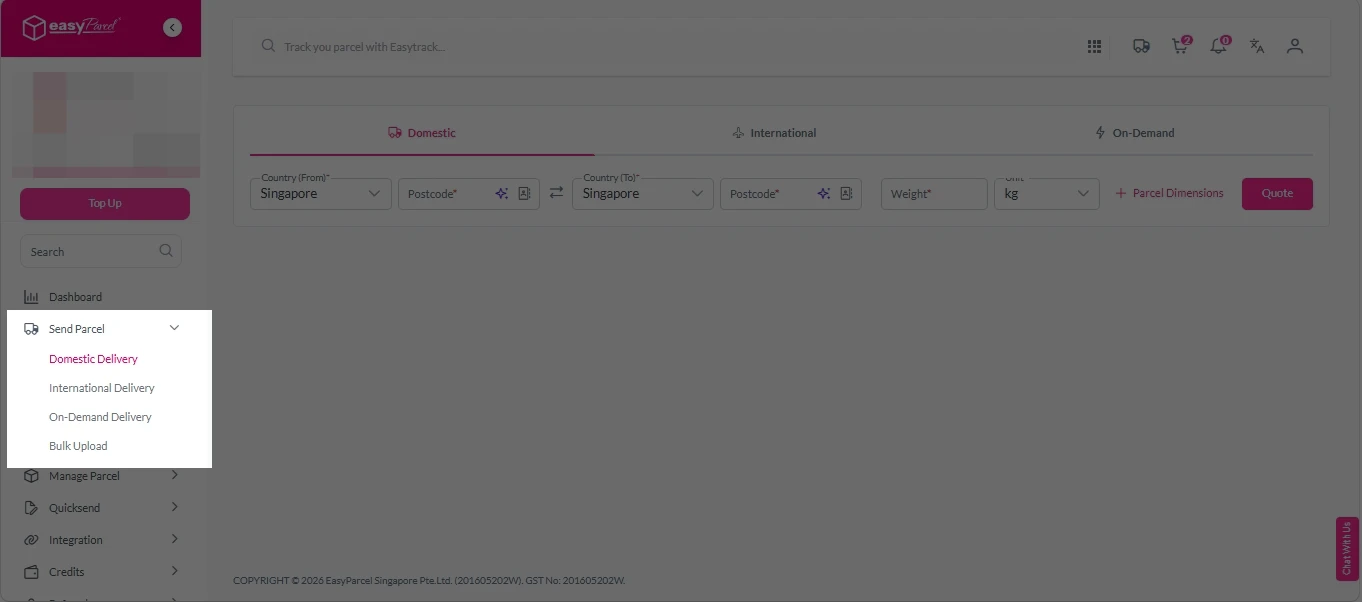
Step 2: Under “Send Parcel”, choose either “Domestic Delivery“ (for shipments within Singapore) or “International Delivery“ (for shipments overseas).
Step 3: Enter Shipment Details.
Domestic Delivery
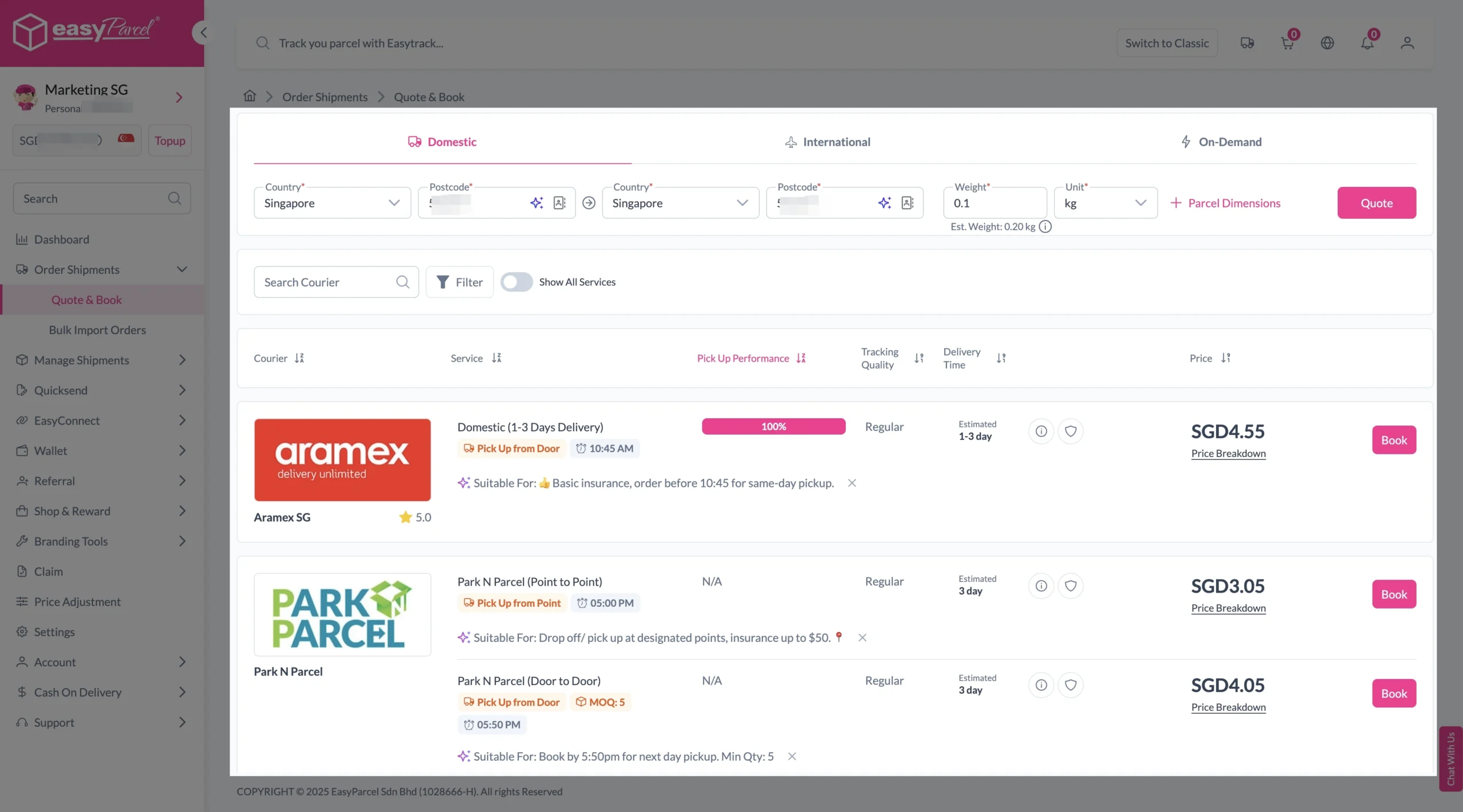
1. Fill in the origin and destination postcode.
2. Provide the parcel weight.
3. (Optional) Add parcel dimensions for a more accurate shipping rate.
4. Click the “Quote” button.
5. A list of courier rates will appear below, as shown in the image.
6. Choose your preferred SingPost service and click “Book Now.”
7. Fill in all details included Sender Details, Receiver Details, Parcel Details and Add-On Services.
Sender and Receiver Details:
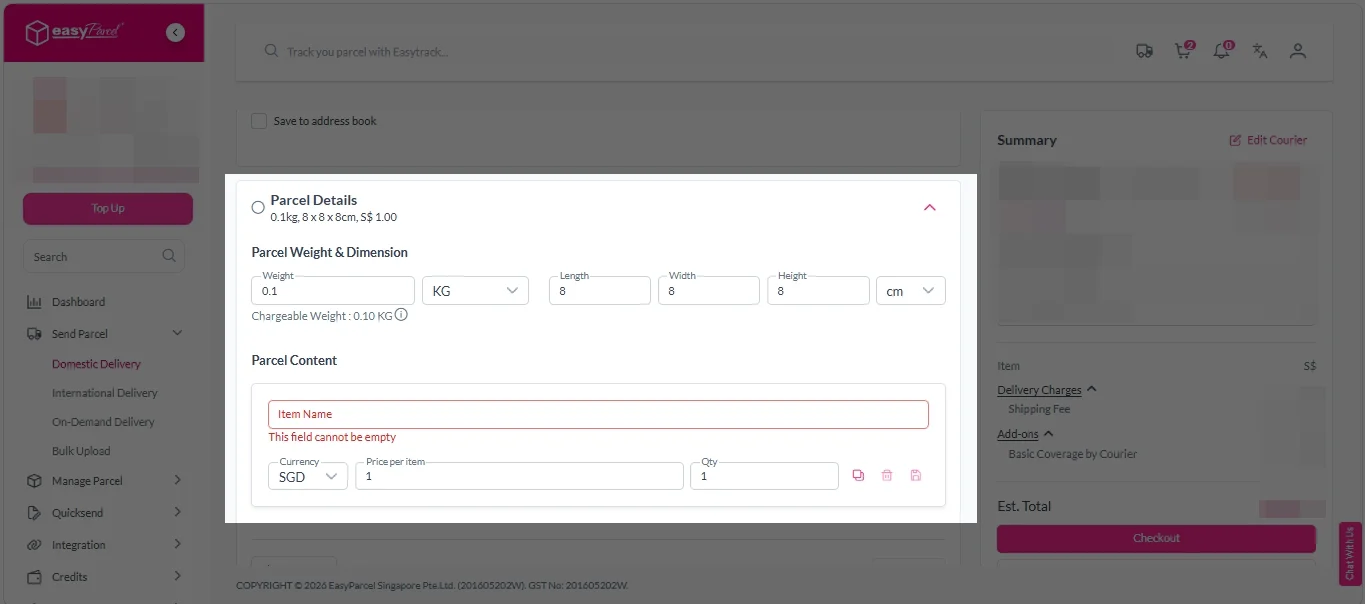
Parcel Details:
Enter the actual weight, dimension and content of your parcel.
Parcel Content:
Fill in your item name, price per item, and quantity.
Add-On Services:
i. Tick the box to add EasyCover for additional protection against loss.
Note: EasyCover availability depends on the courier selected. Learn more about EasyCover.
ii. Choose your preferred notification channel – SMS, Email, or WhatsApp. Click “Preview” to see how it looks, and click “Customise” to add brand message to the notification.
Note: Learn more about Customise Branding Servcies.
iii. Tick the “Mask Sender Details” checkbox. EasyParcel Next Gen will automatically hide your sender information based on your saved privacy settings.
Note: Mask Sender Details only available for certain couriers. Find out what courier is available for Mask Sender Details.
iv. Tick the “Custom AWB” checkbox. EasyParcel Next Gen will apply your saved AWB template automatically.
Note: Custom AWB is only available for certain couriers. Find out which couriers support Custom AWB.
8. Double check all details and click on “Checkout”.
International Delivery
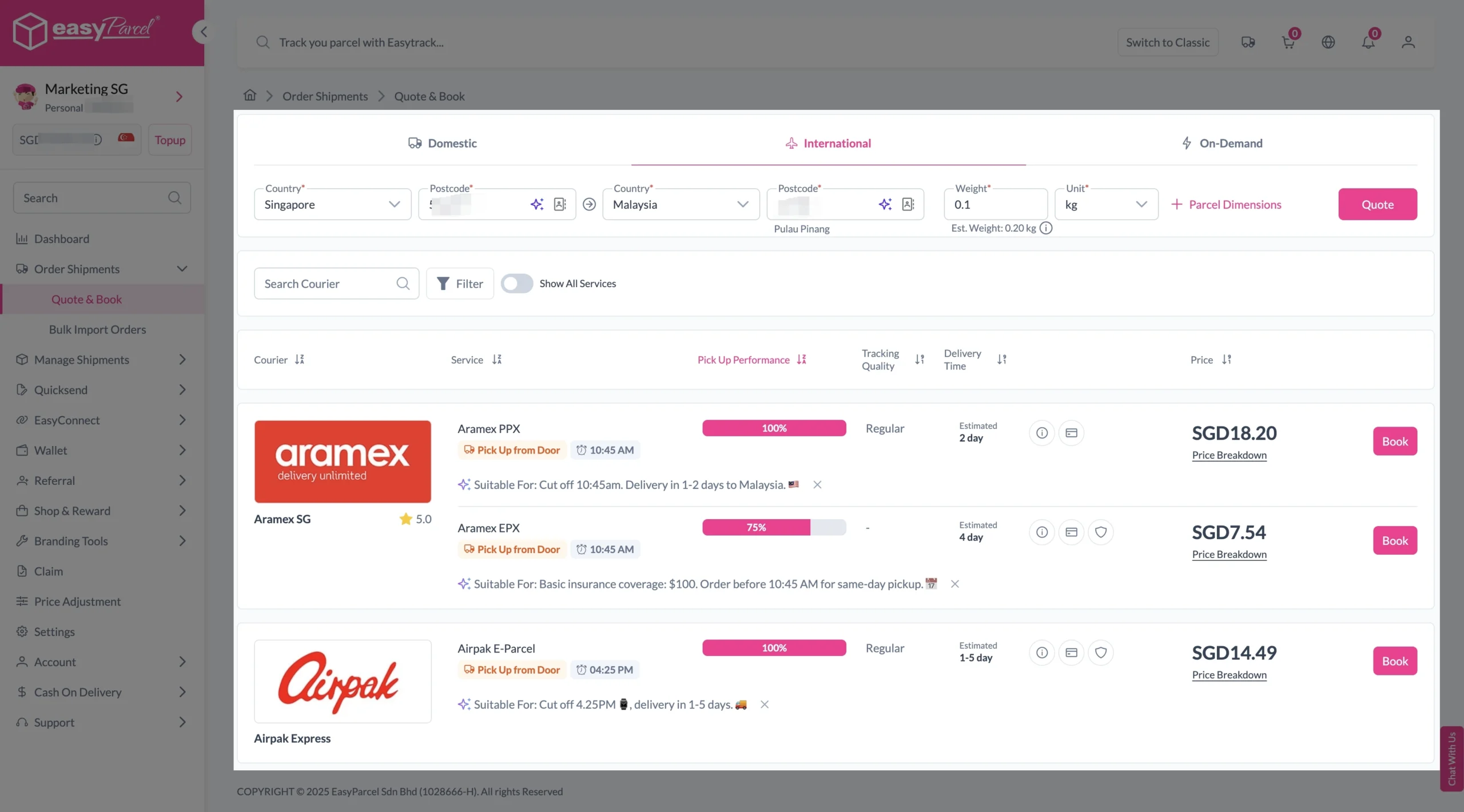
1. Fill in the origin postcode.
2. Enter the destination country and postcode.
3. Provide the parcel weight.
4. (Optional) Add parcel dimensions for a more accurate shipping rate.
5. Click the “Quote” button.
6. A list of courier rates will appear below, as shown in the image.
7. Choose your preferred SingPost service and click “Book Now.”
8. Fill in all details included Sender Details, Receiver Details, Parcel Details and Add-On Services.
Sender and Receiver Details:
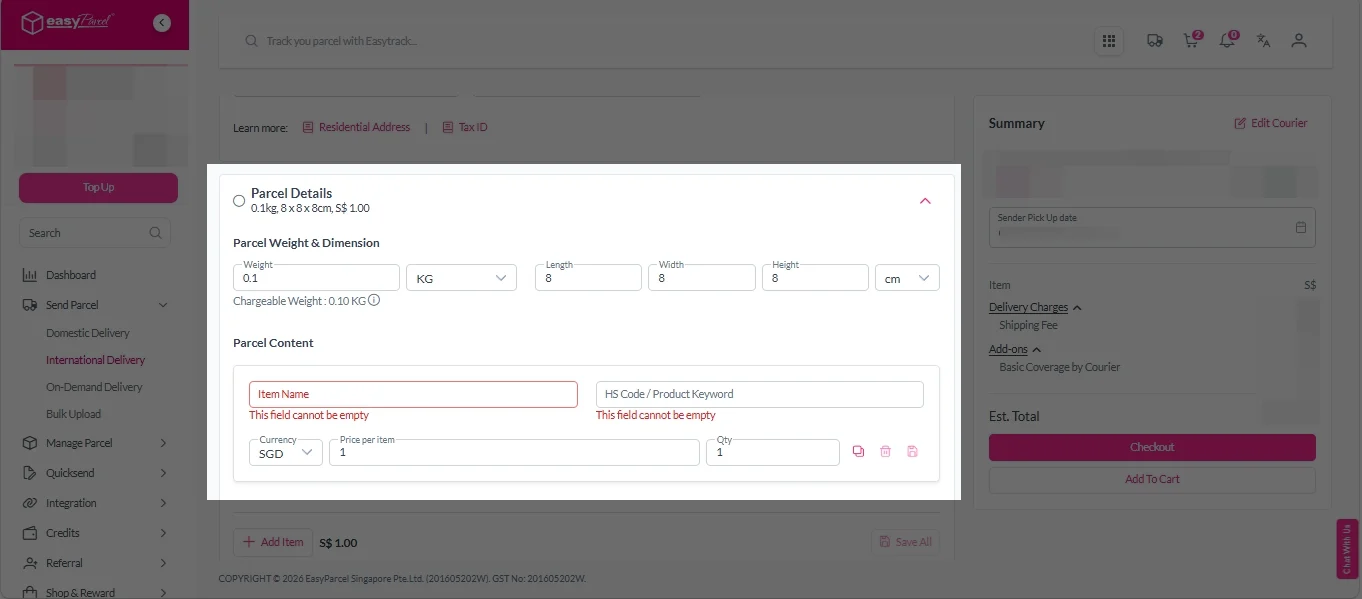
Parcel Details:
Enter the actual weight, dimension and content of your parcel.
Parcel Content:
Fill in your item name. Then, choose your item category from the dropdown menu. The HS code will be auto generated based on your selection.
Note: Learn more about Smart HS Code.
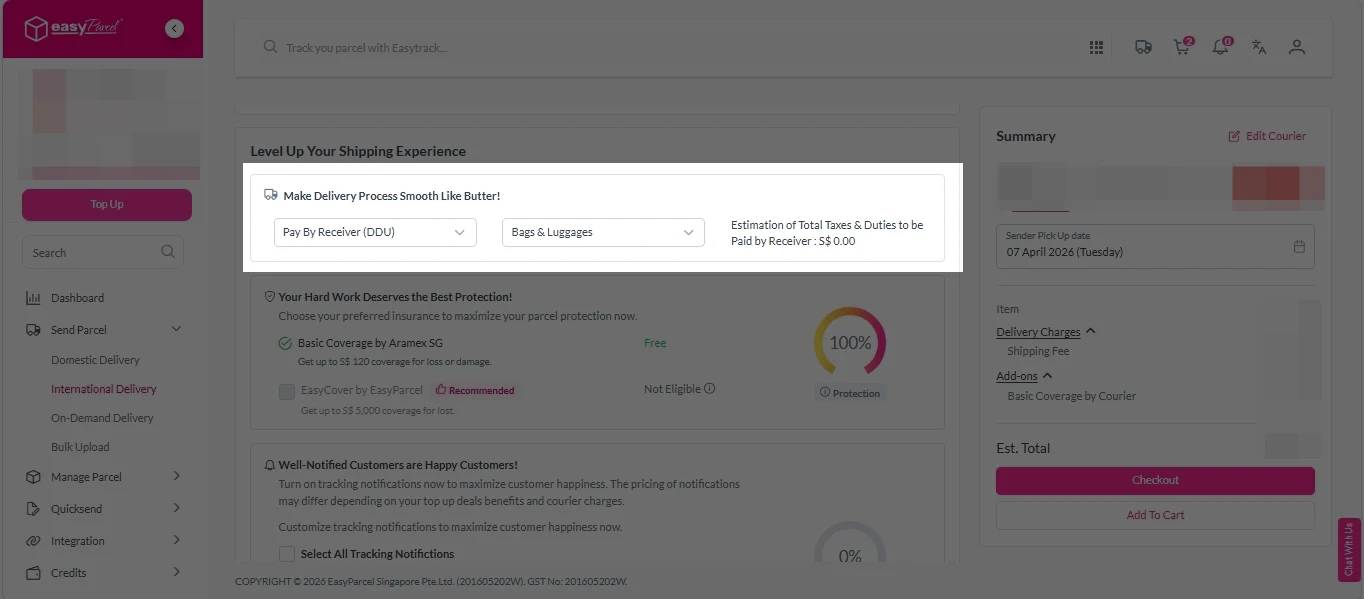
Add-On Services:
i. Select your preferred duties payment option – Delivered Duty Paid (DDP) or Delivered Duty Unpaid (DDU).
Note: Learn more about DDP and DDU.
ii. Tick the box to add EasyCover for additional protection against loss.
Note: EasyCover availability depends on the courier selected. Learn more about EasyCover.
iii. Choose your preferred notification channel – SMS, Email, or WhatsApp. Click “Preview” to see how it looks, and click “Customise” to add brand message to the notification.
Note: Learn more about Customise Branding Servcies.
iv. Tick the “Mask Sender Details” checkbox. EasyParcel Next Gen will automatically hide your sender information based on your saved privacy settings.
Note: Mask Sender Details only available for certain couriers. Find out what courier is available for Mask Sender Details.
v. Tick the “Custom AWB” checkbox. EasyParcel Next Gen will apply your saved AWB template automatically.
Note: Custom AWB is only available for certain couriers. Find out which couriers support Custom AWB.
9. Double check all details and click on “Checkout”.
Step 4: Double check all the details and click on “Pay Now” to make payment.
Step 5: Your shipment has been booked successfully.
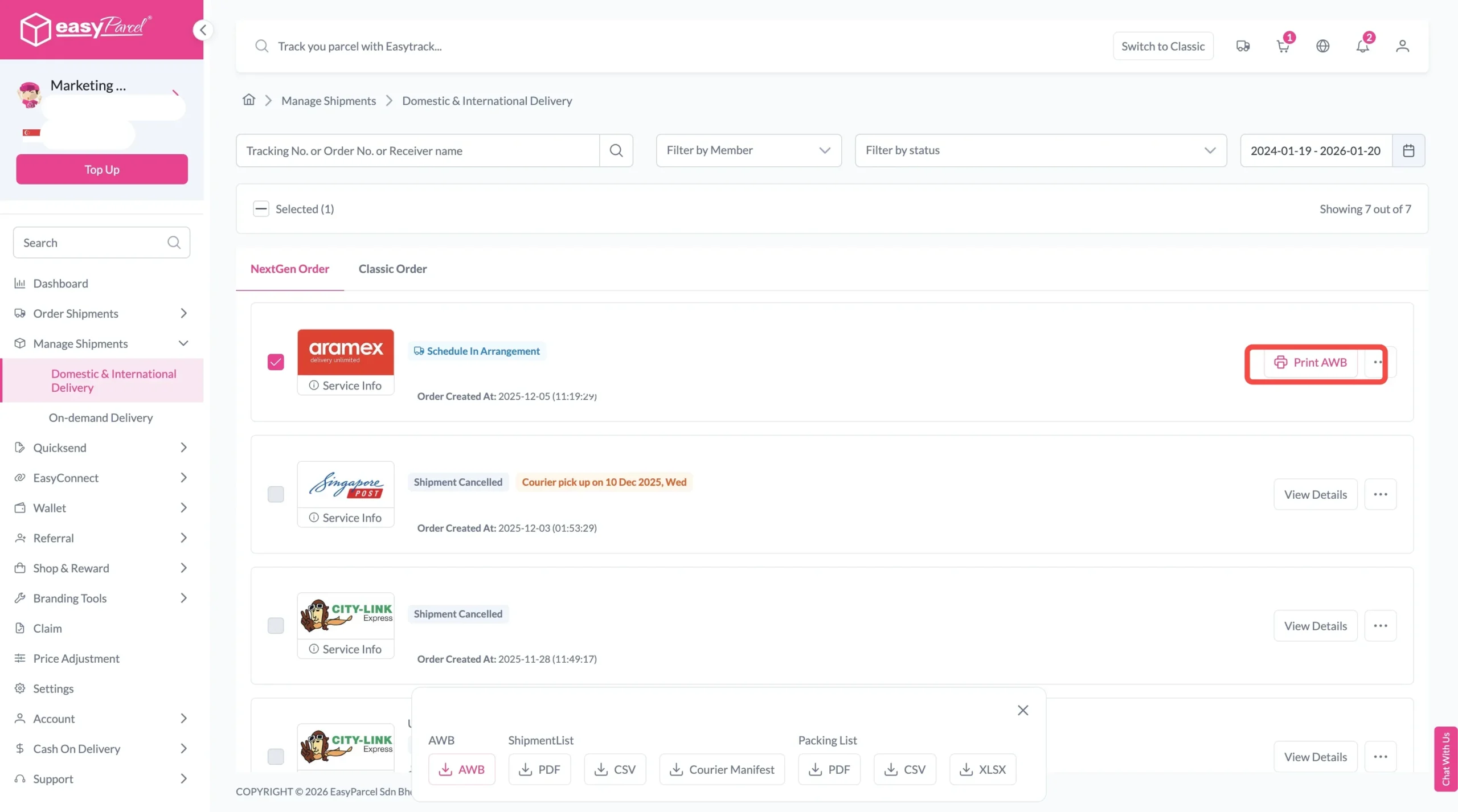
To download and print AWB, you can go to “Manage Shipments”.
Single AWB
- Click the three dots icon next to the shipment.
- Select “Print AWB” from the dropdown menu.
- A PDF file will automatically download and save.
Bulk AWB
For bulk downloads AWB:
- Tick the “Selected” checkbox to choose all your orders.
- A menu will appear at the bottom of the screen.
- Click “AWB” to download all AWBs in bulk.
Benefits of Using EasyParcel
Save Cost
Compare rates from 60+ couriers and pick the most affordable option
Save Time
Easy booking, manage, and track all from one dashboard.
Increase Safety
Real-time tracking and EasyCover parcel protection coverage up to S$5,000
Malaysia
Thailand
Indonesia