SingPost Delivery Services Available on EasyParcel: Local & International

[New] Point-to-door and International SingPost Delivery are Now in EasyParcel

We’re excited to announce that New SingPost delivery services are now available on EasyParcel, which are SingPost E-Saver, SingPost Speedpost Express International, and SingPost Speedpost Priority International. Whether you’re looking for budget-friendly shipping, fast express delivery, or a reliable mid-tier option, SingPost has you covered.

Table of Contents

Available SingPost Delivery Services on EasyParcel

Service Name
Price
Delivery Duration
Delivery Coverage
Max Weight & Dimension
More Details
speedpost-economy-singpost Speedpost Economy
from S$2.95
3 working days
Singapore islandwide (SingPost coverage areas)
Max Weight: 30kg
Max Dimension:
L + 2W + 2H = 300cm
speedpost-standard-singpost Speedpost Standard
from S$4.15
1 working day
speedpost-priority-singpost Speedpost Priority
from S$12.75
Within Same Working Day
SingPost-domestic-delivery-fast-courier-service E-Saver (Point-to-Door)
from S$2.65
1 working day
speedpost-priority-international SingPost Speedpost Priority International
from S$26.50
Depends on the destination country
Worldwide international delivery
Max Weight: 30kg
Max Dimension:
L + W + H = 200cm
Speedpost Express International SingPost Speedpost Express International
from S$29.28

Send Urgent Parcel with SingPost Speedpost Express International

Fast international delivery with free pickup and real-time tracking —book on EasyParcel.

How to Book SingPost New Service?

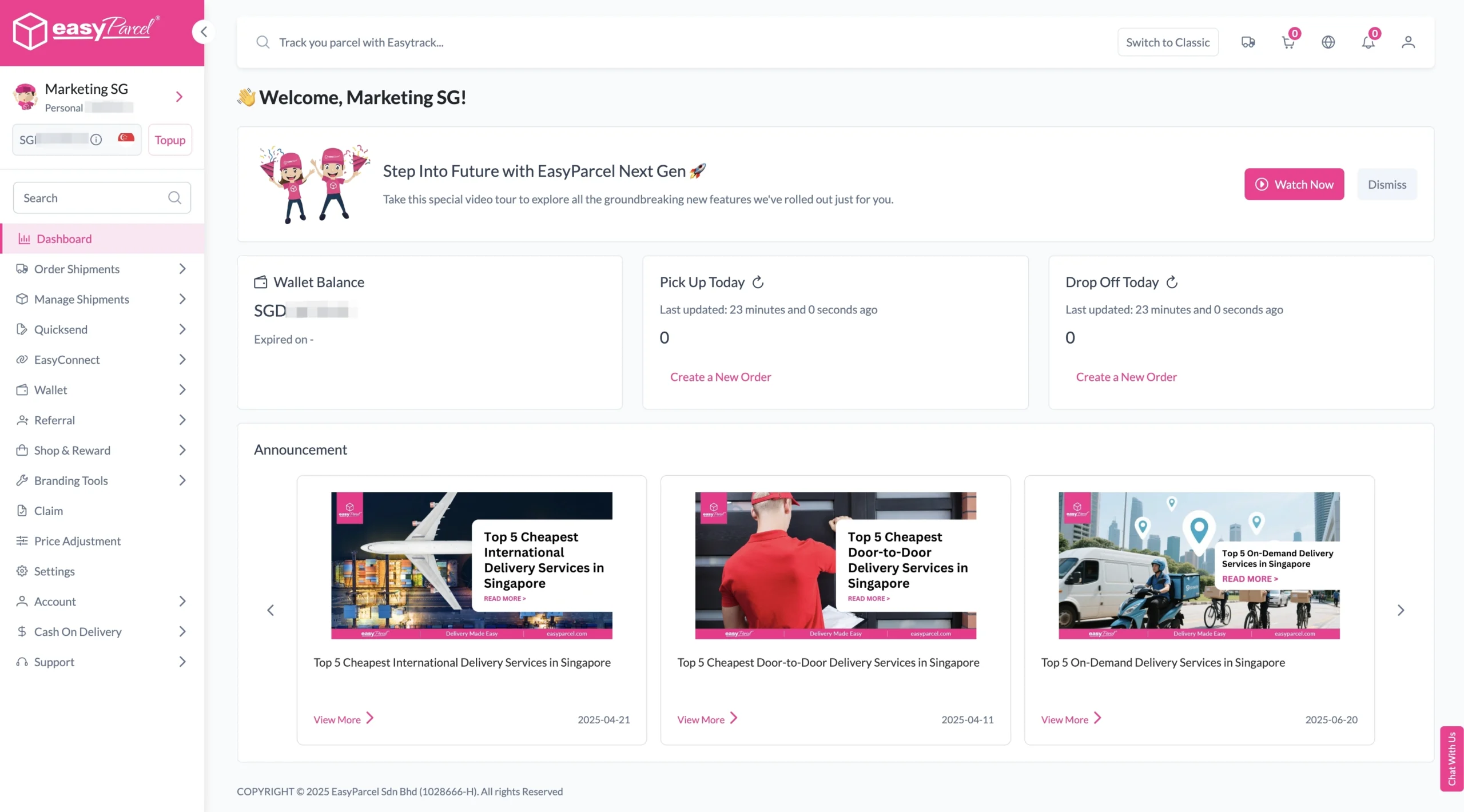
Step 1: Login your EasyParcel account. 

send-parcel-nextgen-step-1

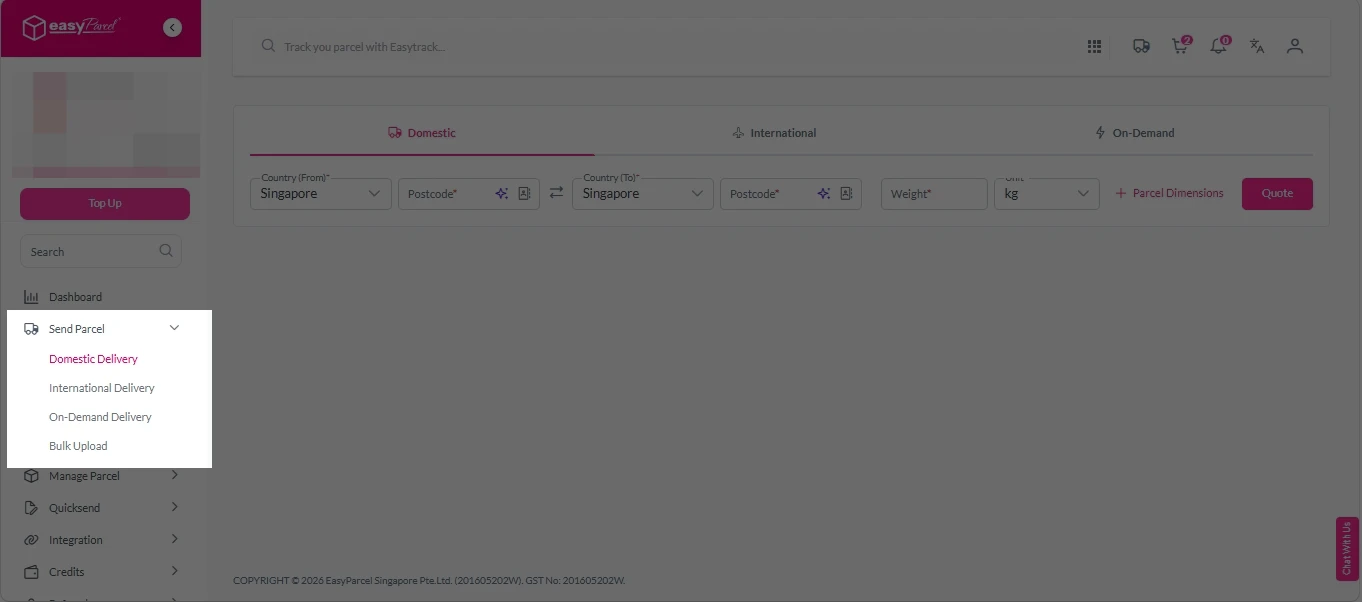
Step 2: Under “Send Parcel”, choose either “Domestic Delivery“ (for shipments within Singapore) or “International Delivery“ (for shipments overseas). 

Next gen- Send Parcel 1

Step 3: Enter Shipment Details. 

Domestic Delivery

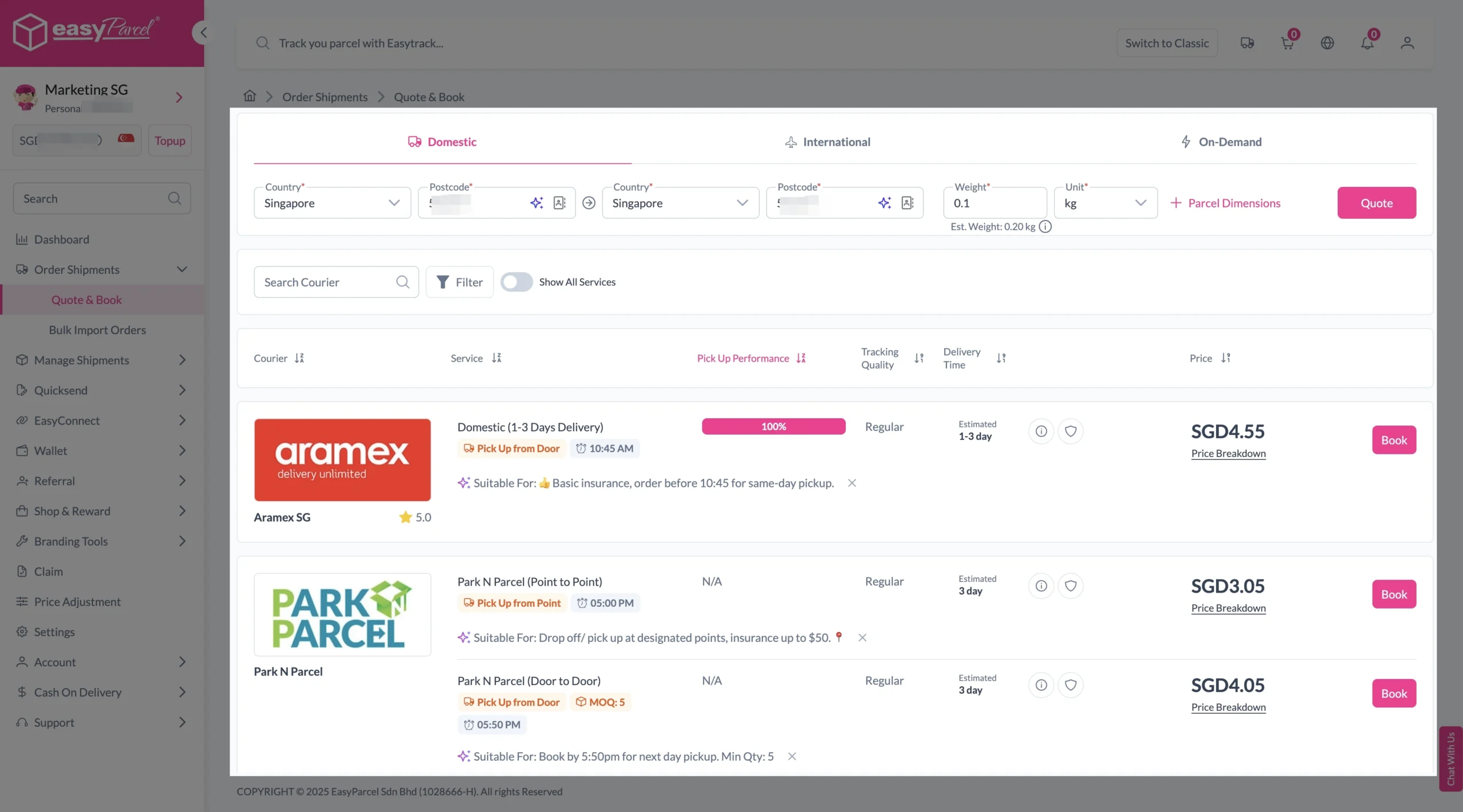
1. Fill in the origin and destination postcode.
2. Provide the parcel weight.
3. (Optional) Add parcel dimensions for a more accurate shipping rate.
4. Click the “Quote” button.
5. A list of courier rates will appear below, as shown in the image.
6. Choose your preferred SingPost service and click “Book Now.”

send-parcel-nextgen-step-3-domestic

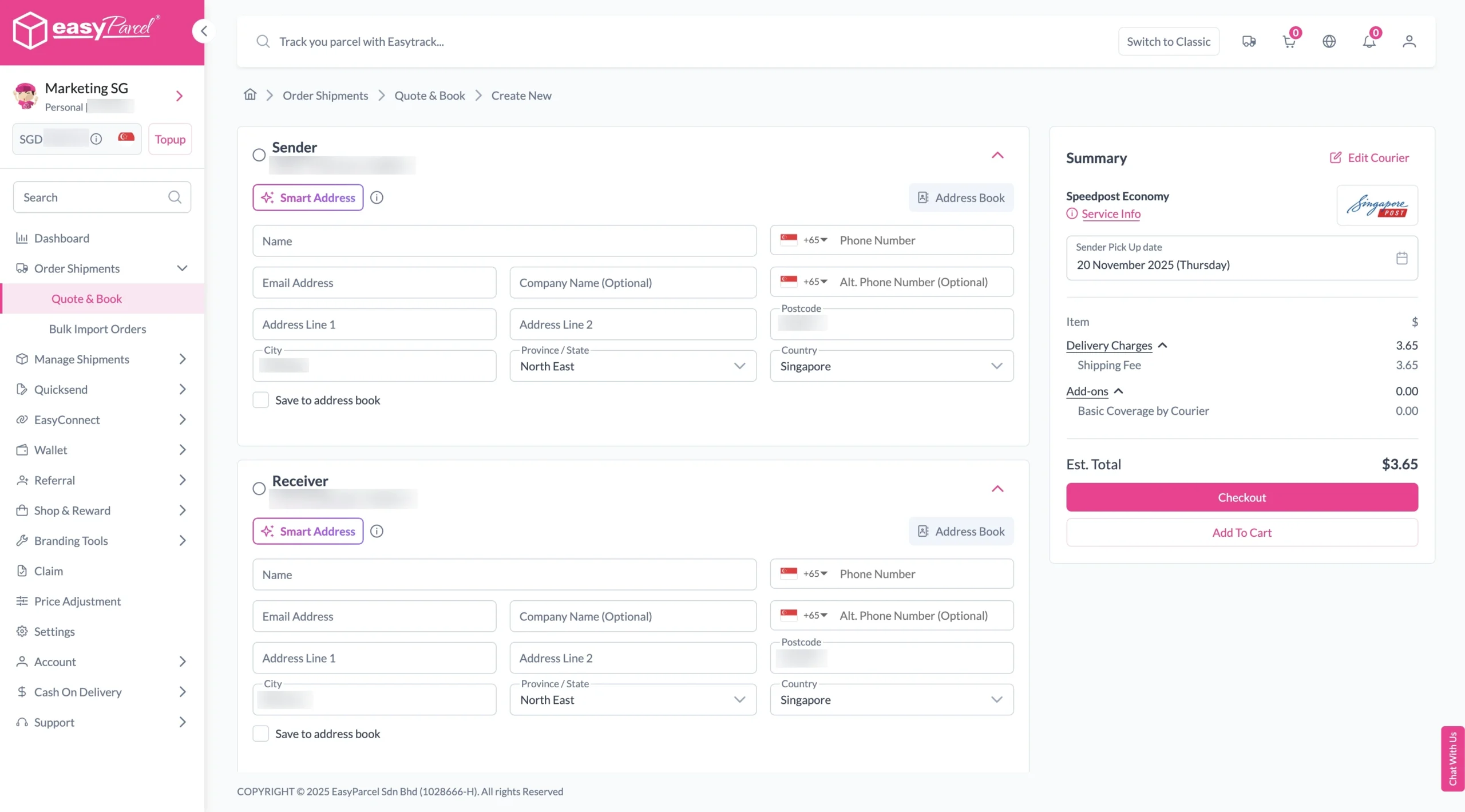
7. Fill in all details included Sender Details, Receiver Details, Parcel Details and Add-On Services.
Sender and Receiver Details: 

send-parcel-nextgen-step-4

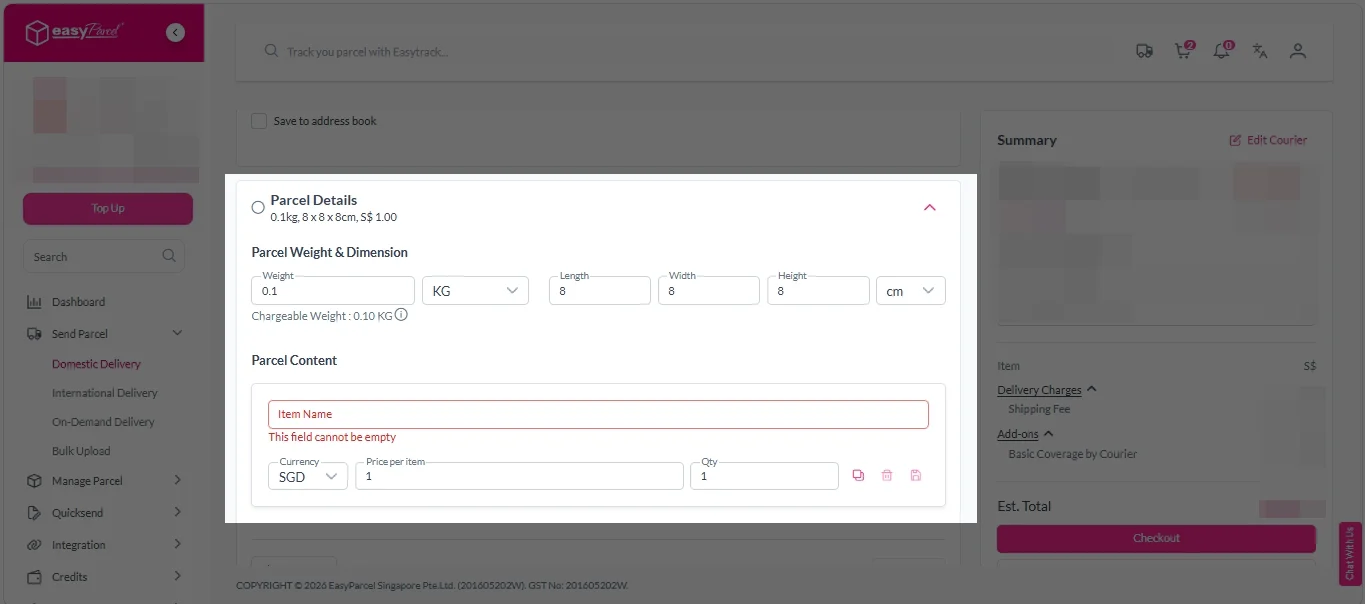
Parcel Details: 
Enter the actual weight, dimension and content of your parcel. 
Parcel Content:
Fill in your item name, price per item, and quantity. 

Domestic delivery - parcel details

Add-On Services: 
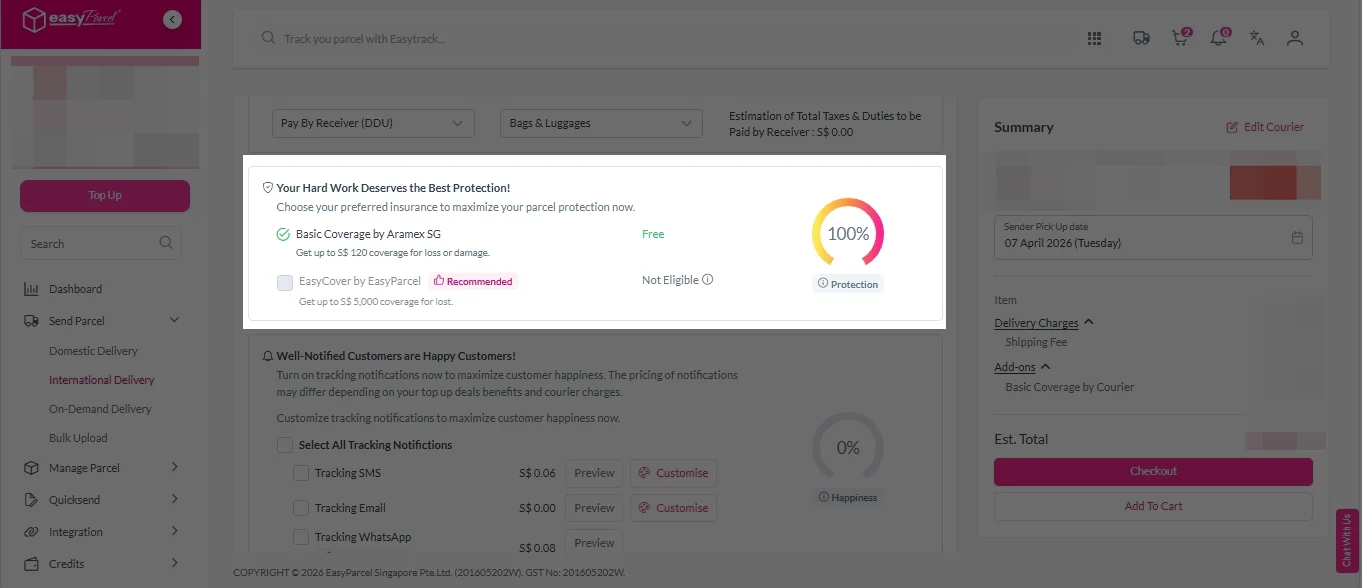
i. Tick the box to add EasyCover for additional protection against loss.
Note: EasyCover availability depends on the courier selected. Learn more about EasyCover. 

add on services 2

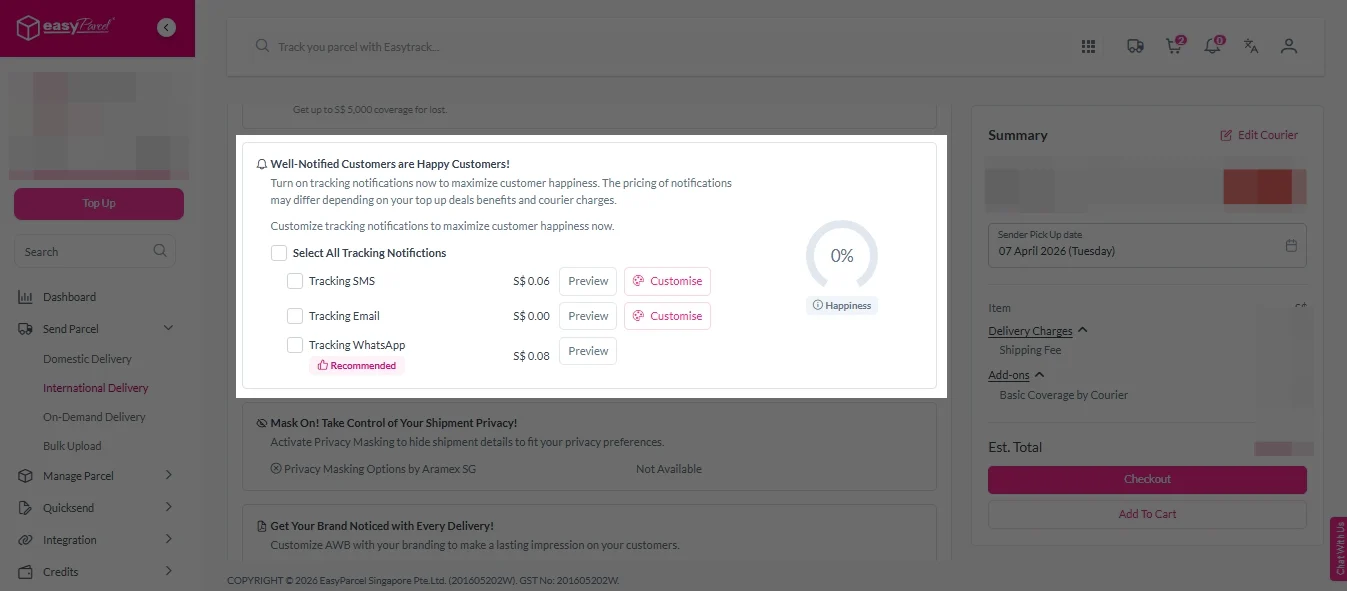
ii. Choose your preferred notification channel – SMS, Email, or WhatsApp. Click “Preview” to see how it looks,  and click “Customise” to add brand message to the notification.
Note: Learn more about Customise Branding Servcies. 

add on services 3

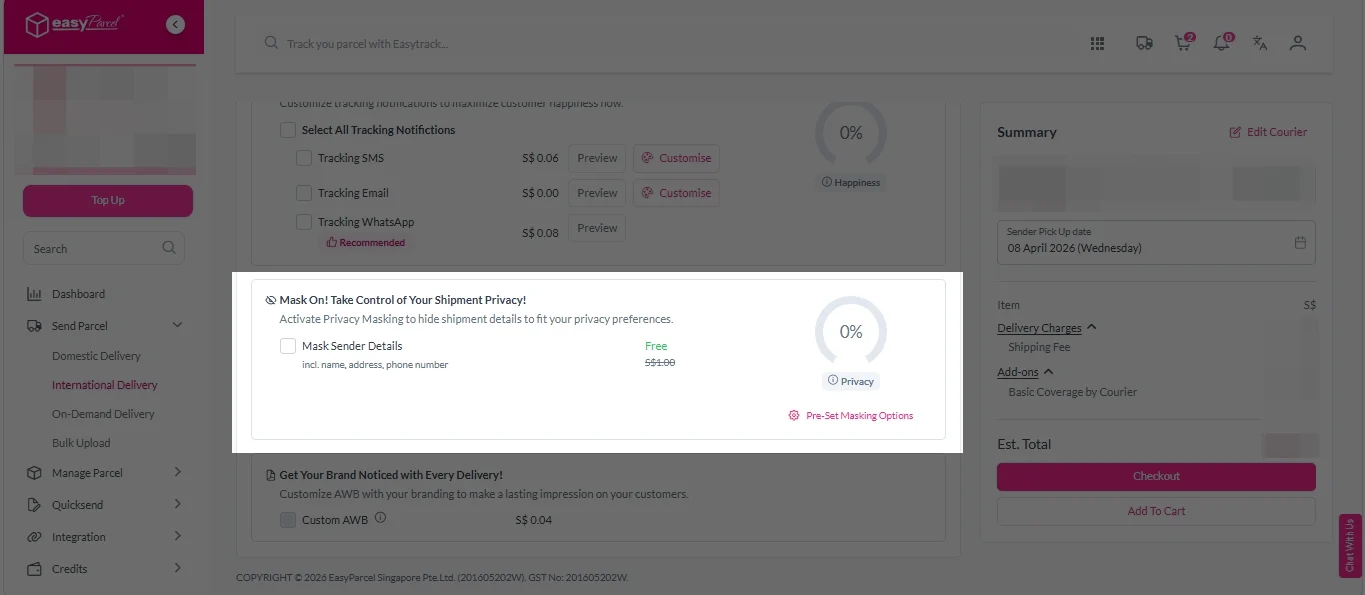
iii. Tick the “Mask Sender Details” checkbox. EasyParcel Next Gen will automatically hide your sender information based on your saved privacy settings. 
Note: Mask Sender Details only available for certain couriers. Find out what courier is available for Mask Sender Details.

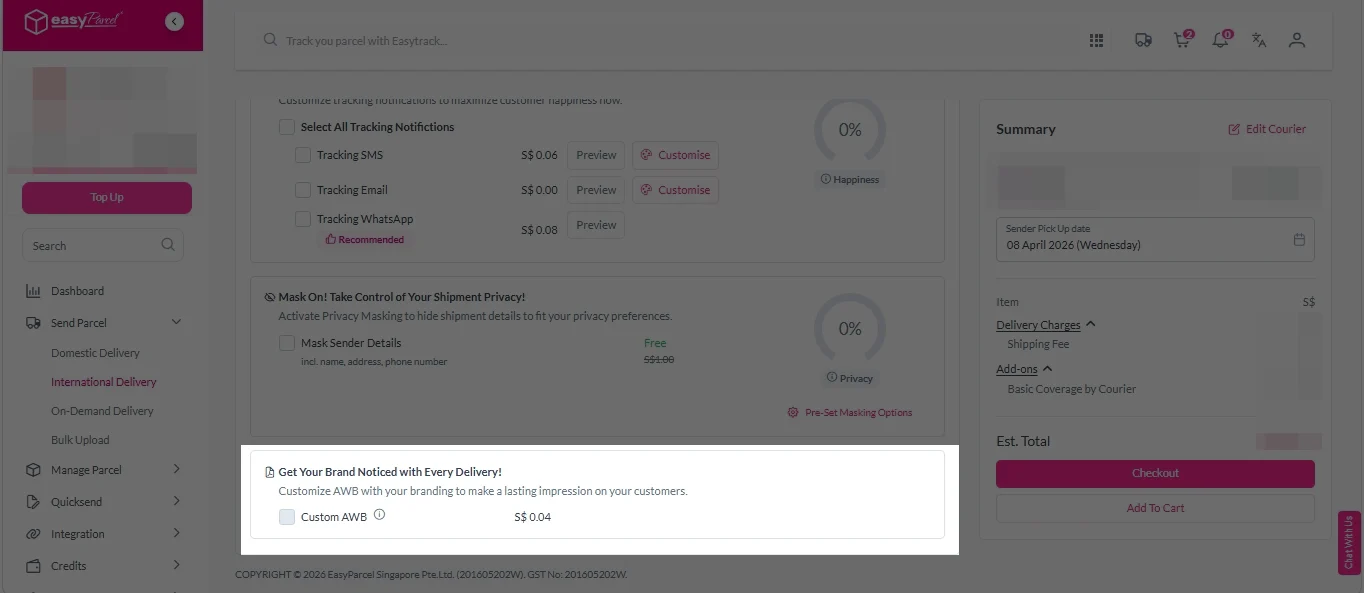
iv. Tick the “Custom AWB” checkbox. EasyParcel Next Gen will apply your saved AWB template automatically. 
Note: Custom AWB is only available for certain couriers. Find out which couriers support Custom AWB. 

custom awb 1

8. Double check all details and click on “Checkout”. 

send-parcel-nextgen-step-4

1. Fill in the origin postcode.
2. Enter the destination country and postcode.
3. Provide the parcel weight.
4. (Optional) Add parcel dimensions for a more accurate shipping rate.
5. Click the “Quote” button.
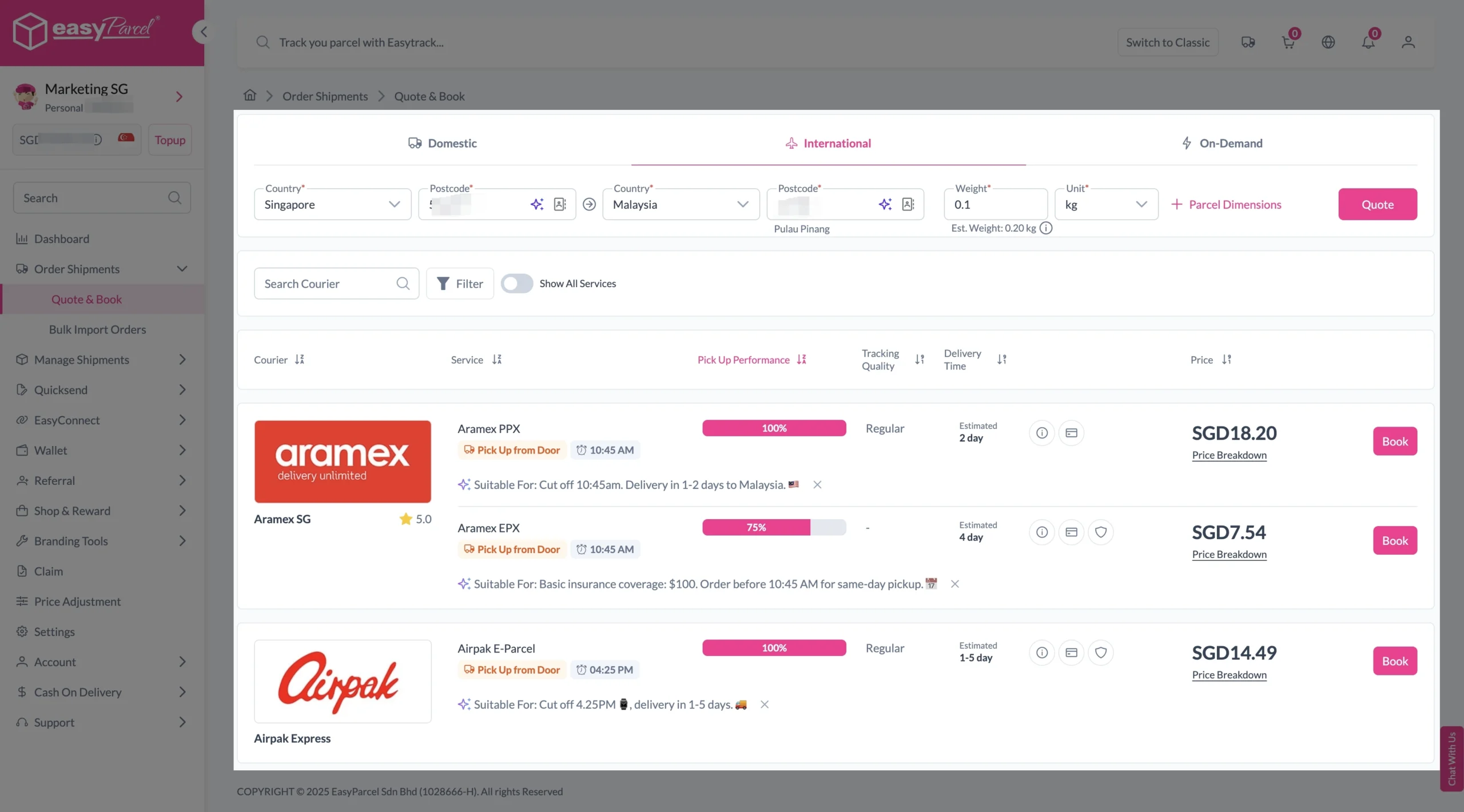
6. A list of courier rates will appear below, as shown in the image.
7. Choose your preferred SingPost service and click “Book Now.”

send-parcel-nextgen-step-3-international

8. Fill in all details included Sender Details, Receiver Details, Parcel Details and Add-On Services.
Sender and Receiver Details: 

send-parcel-nextgen-step-4

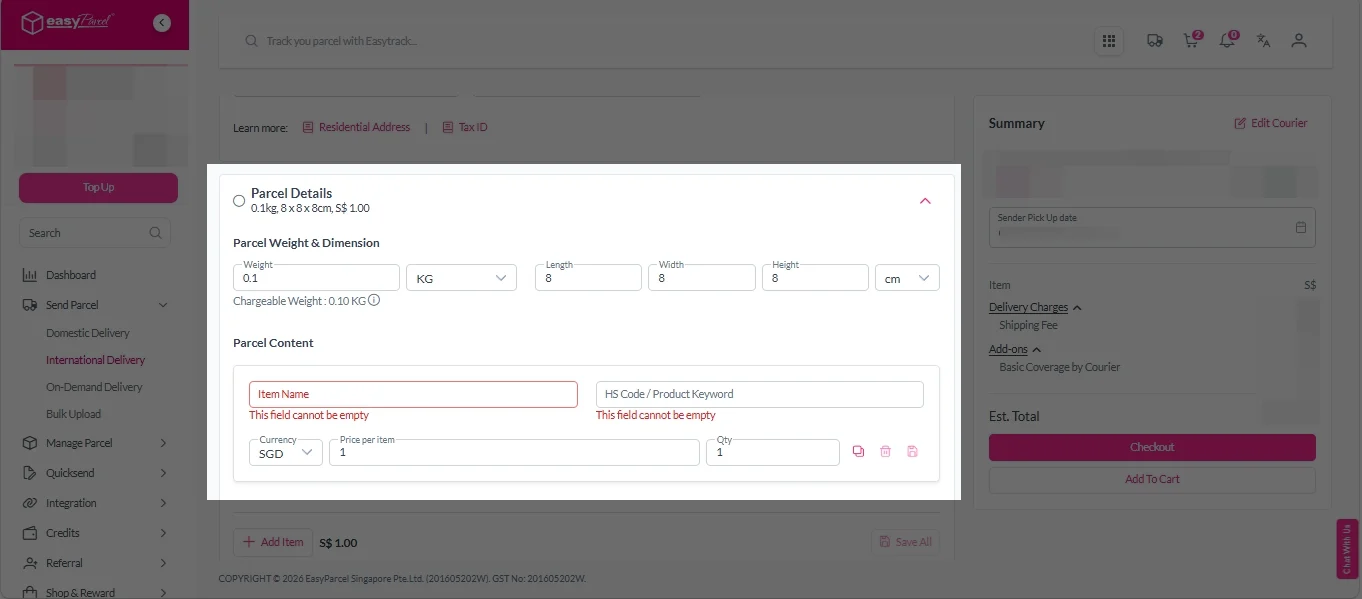
Parcel Details: 
Enter the actual weight, dimension and content of your parcel. 
Parcel Content:
Fill in your item name. Then, choose your item category from the dropdown menu. The HS code will be auto generated based on your selection.

Note: Learn more about Smart HS Code.

International- Parcel Details

Add-On Services: 
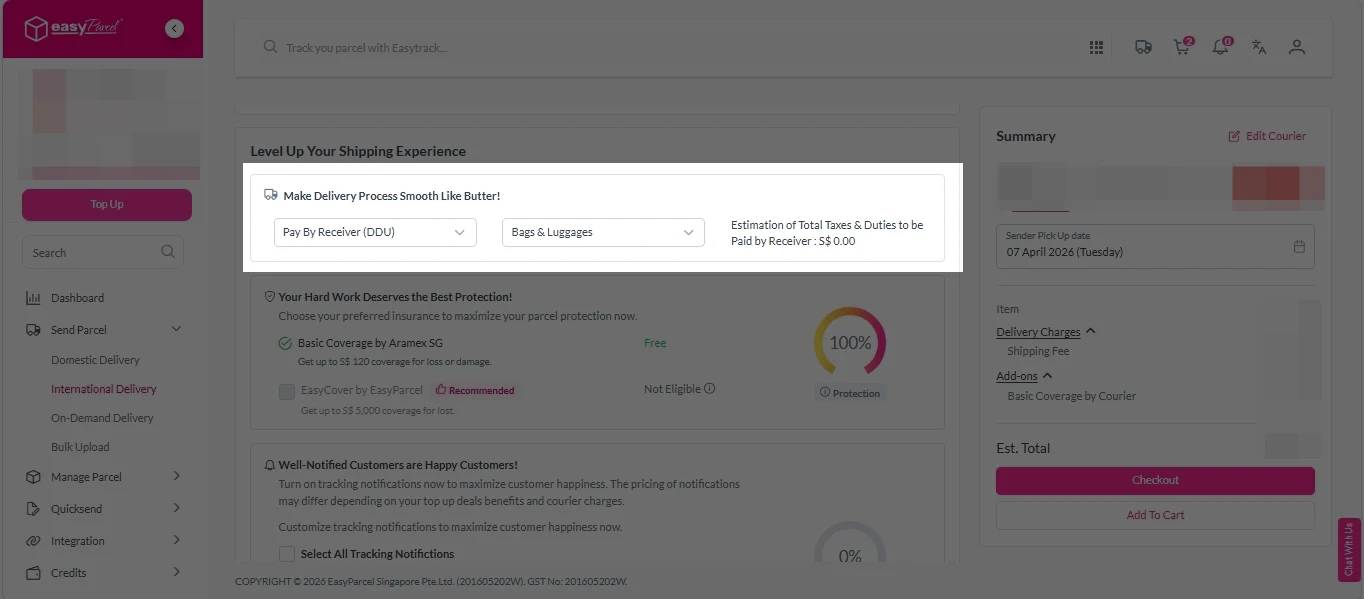
i.  Select your preferred duties payment option – Delivered Duty Paid (DDP) or Delivered Duty Unpaid (DDU). 
Note: Learn more about DDP and DDU.

add on services 1

ii. Tick the box to add EasyCover for additional protection against loss.
Note: EasyCover availability depends on the courier selected. Learn more about EasyCover. 

add on services 2

iii. Choose your preferred notification channel – SMS, Email, or WhatsApp. Click “Preview” to see how it looks,  and click “Customise” to add brand message to the notification.
Note: Learn more about Customise Branding Servcies. 

add on services 3

iv. Tick the “Mask Sender Details” checkbox. EasyParcel Next Gen will automatically hide your sender information based on your saved privacy settings. 
Note: Mask Sender Details only available for certain couriers. Find out what courier is available for Mask Sender Details.

v. Tick the “Custom AWB” checkbox. EasyParcel Next Gen will apply your saved AWB template automatically. 
Note: Custom AWB is only available for certain couriers. Find out which couriers support Custom AWB. 

custom awb 1

9. Double check all details and click on “Checkout”. 

send-parcel-nextgen-step-4

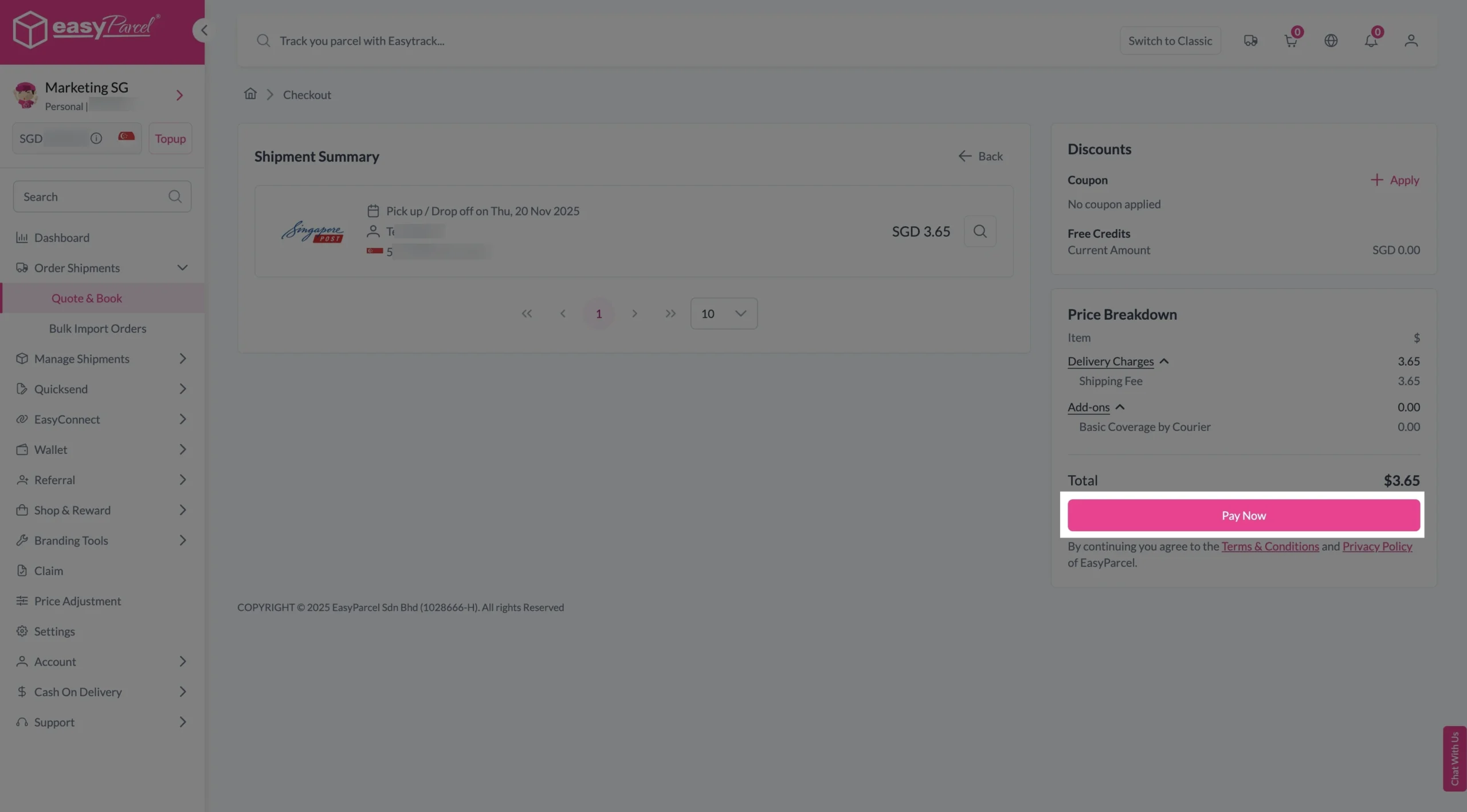
Step 4: Double check all the details and click on “Pay Now” to make payment. 

send-parcel-nextgen-step-5

Step 5: Your shipment has been booked successfully.
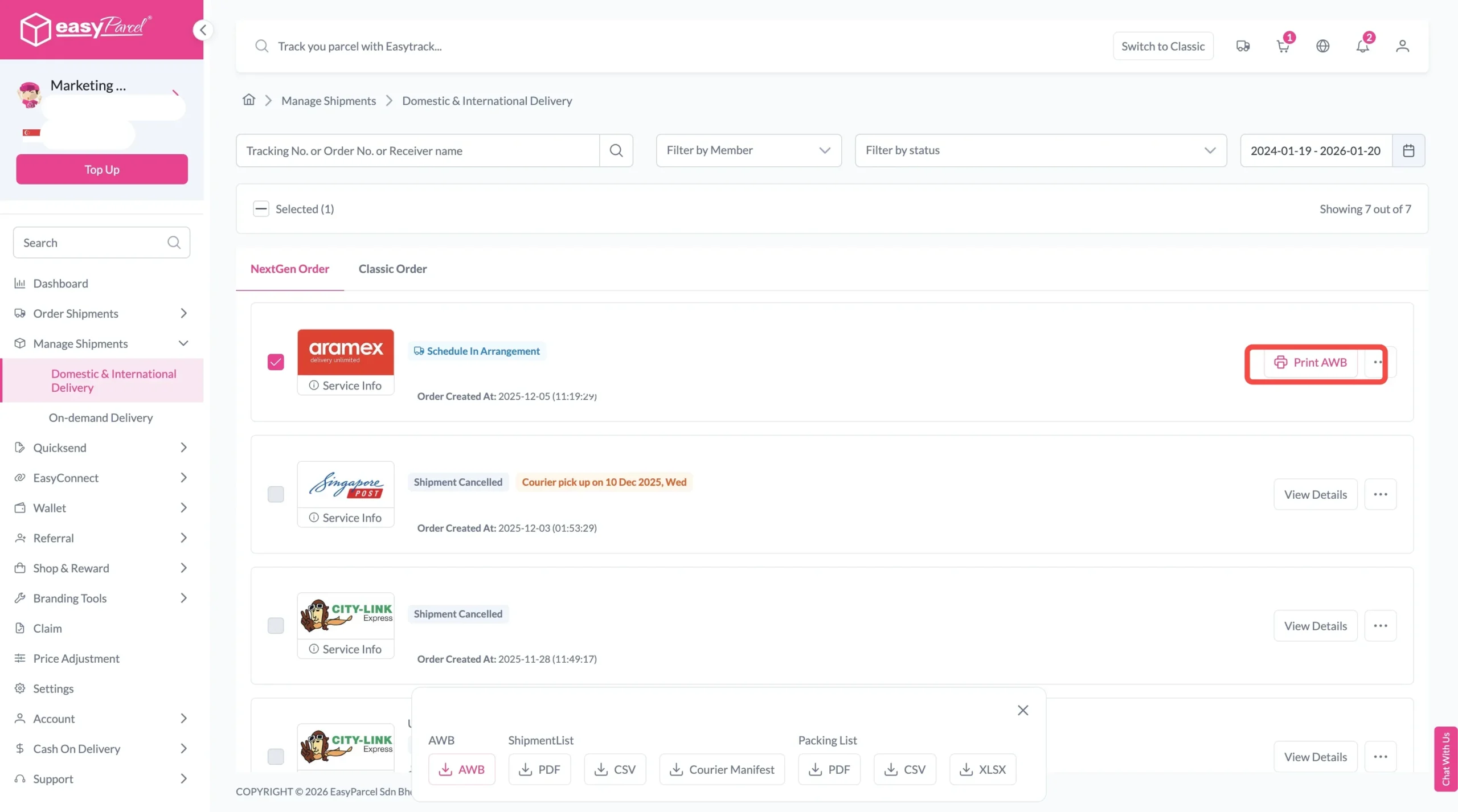
To download and print AWB, you can go to “Manage Shipments”. 

Single AWB
  1. Click the three dots icon next to the shipment.
  2. Select “Print AWB” from the dropdown menu.
  3. A PDF file will automatically download and save.
download AWB (2)

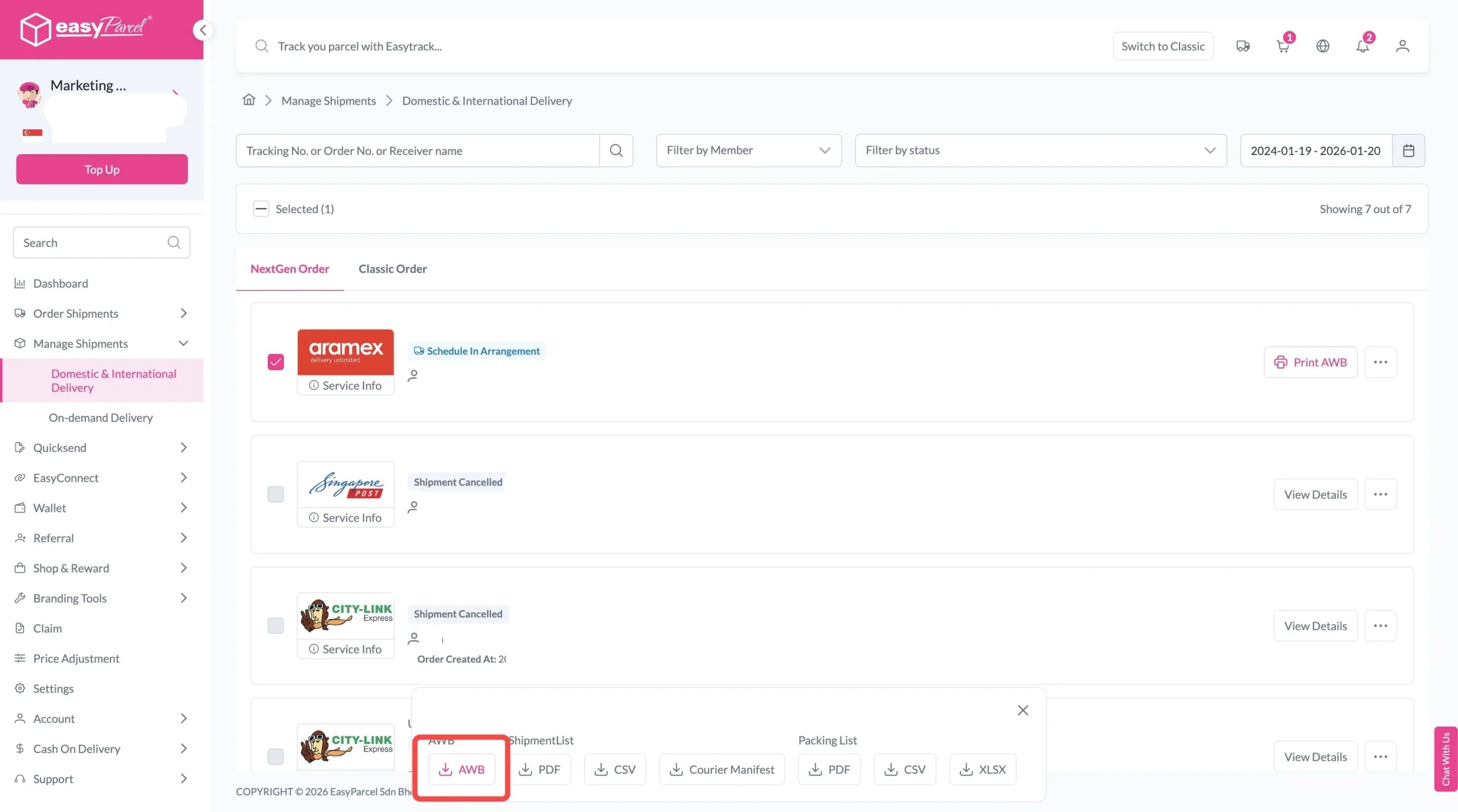
For bulk downloads AWB:

  1. Tick the “Selected” checkbox to choose all your orders.
  2. A menu will appear at the bottom of the screen.
  3. Click “AWB” to download all AWBs in bulk.
download AWB

Why Book SingPost Delivery via EasyParcel

All-In-One Platform

Quote, compare, book, manage and track in one dashboard.

Free Doorstep Pickup

Schedule free pickup from your home or office for all SingPost shipments booked through EasyParcel.

Parcel Tracking

Track all your SingPost deliveries alongside shipments from other couriers using EasyTrack.

Frequently Asked Question (FAQs)

Does SingPost have courier service?
Yes – SingPost offers multiple courier services. For local delivery: Speedpost Economy, Standard, Priority and SingPost E-Saver. For international delivery: Speedpost Priority International, and Speedpost Express International – all available on EasyParcel.
How to book a SingPost courier?
Book SingPost courier services on EasyParcel. Log in, under "Send Parcel", select "Domestic" or "International", enter your parcel details, and choose your preferred SingPost service – then complete payment.

Join 1.5 Million Happy Customers & Start Saving

Create your free account today and receive S$6 shipping coupon to start saving from your very first parcel. Compare courier rates, book in minutes, and start saving immediately.
×