

Compare SingPost Rates Using EasyParcel

Compare SingPost Rates Using EasyParcel

Table of Contents

SingPost rates are commonly used by logistics users and businesses in Singapore for domestic and international shipping. Understanding these rates is important for cost control, delivery planning, and customer satisfaction. However, manually checking and managing SingPost rates can be time-consuming, especially when shipment volume increases.

EasyParcel simplifies this process by providing SingPost rates directly on its platform, alongside other courier options, allowing logistics users to make faster and more informed decisions.

SingPost Domestic Delivery Services

Table Header speedpost-economy-singpost speedpost-standard-singpost speedpost-priority-singpost

Delivery
Duration

3 working days

1 working days

Within Same Working Day

Within Same Working Day

Price From

S$2.95

S$4.15

S$12.75

S$9.35

Free Pick Up

Available

Available

Available

Available

Drop Off

Not Available

Available at Singpost location

Not Available

Available at
POPStops @
Post offices.

Action

Why Use EasyParcel for SingPost Services

Instant Rate Comparison

Quickly compare real-time shipping rates from over 60+ courier services on a single dashboard to find the most affordable option in seconds.

eCommerce Integration

Seamlessly connect your online store—like Shopify or WooCommerce—to automatically sync orders and fulfill them without any manual data entry.

End-to-End Tracking

Monitor every step of your parcel’s journey from pickup to final delivery with EasyParcel tracking system, EasyTrack.

Custom Branding (SMS, Email, AWB, EasyTrack)

Enhance your brand identity by adding your own logo and personalized promotional messages to your AWB, tracking pages and Email.

Tracking Notification (SMS, Email, WhatsApp)

Keep your customers happy and reduce "Where's my parcel?" inquiries by sending automated delivery updates directly to their favorite messaging apps.

Step-by-Step Booking SingPost Domestic Delivery

Step 1: Login your EasyParcel account. 

send-parcel-nextgen-step-1

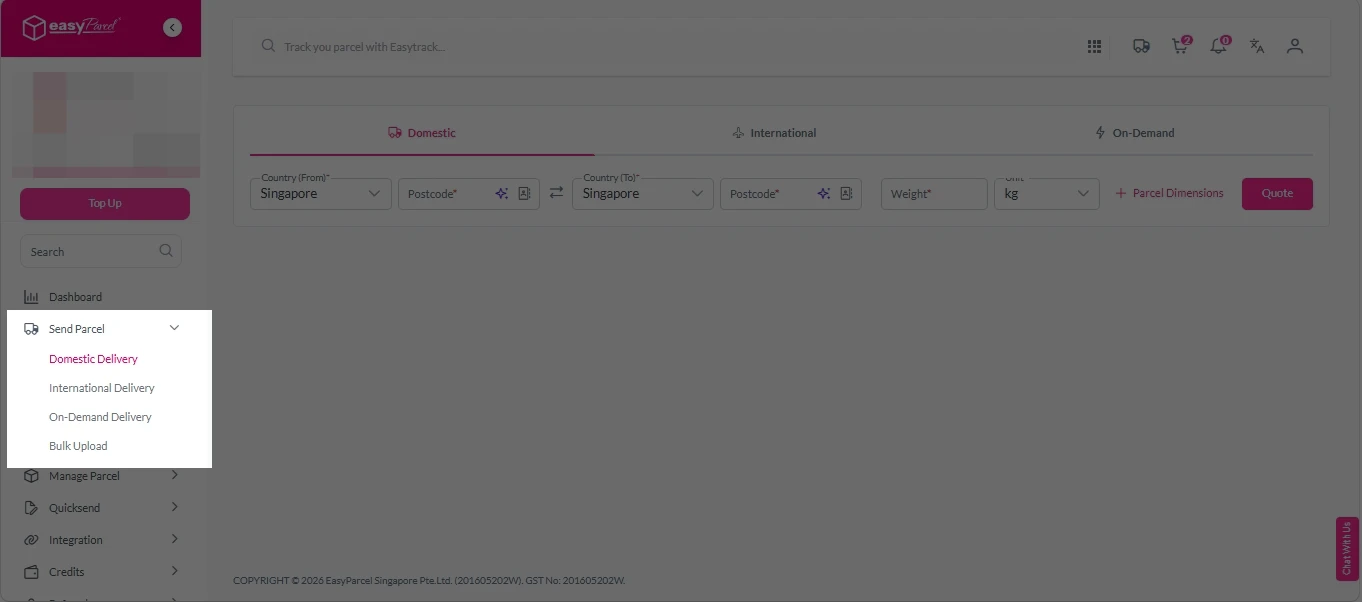
Step 2: Under “Send Parcel”, choose Domestic Delivery”.

Next gen- Send Parcel 1

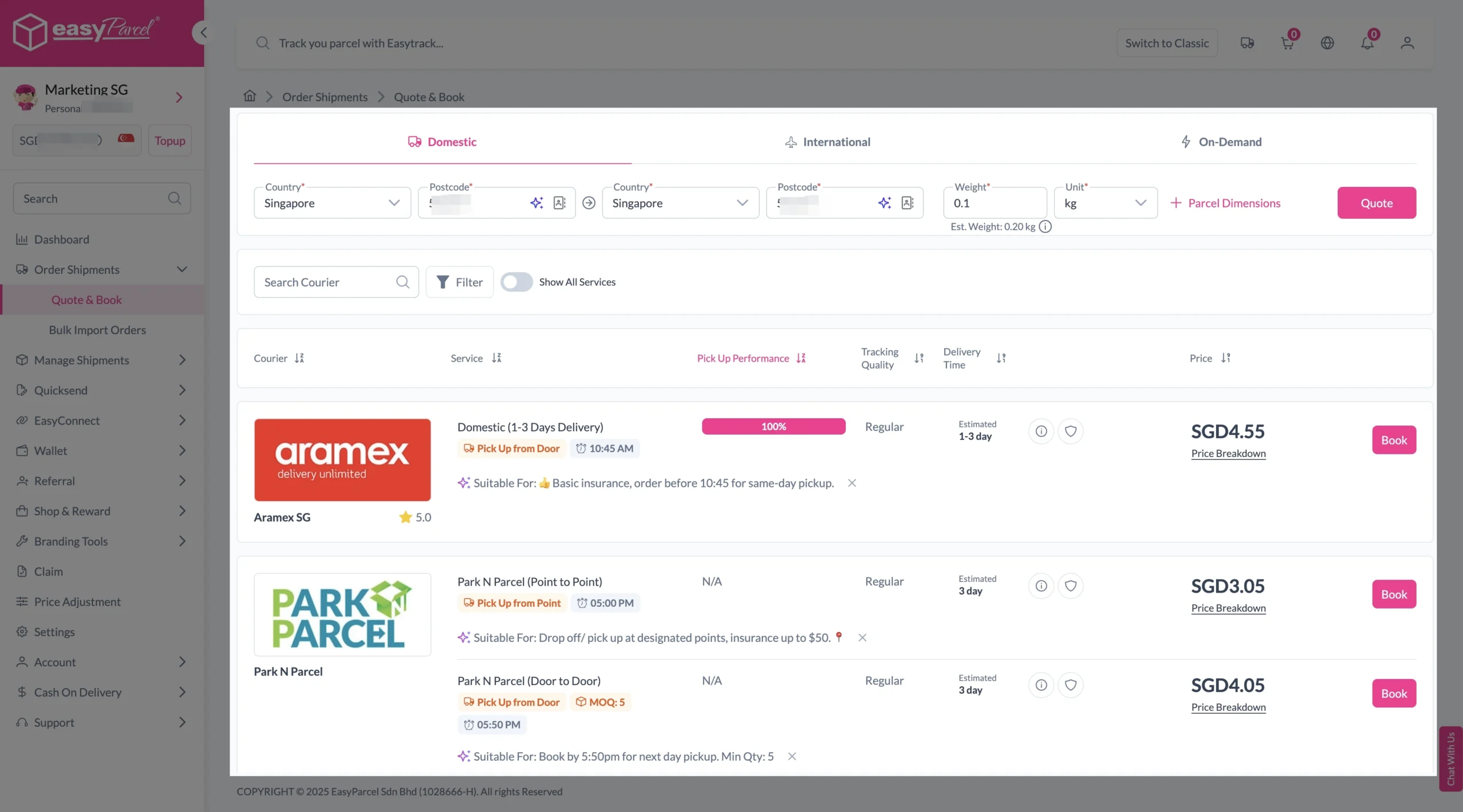
Step 3: Fill in origin, destination with postcode, and parcel weight. Click on “Quote” button. 
A list of courier rates will appear below, as shown in the image. 
Then, select courier that available for pick up service and click “Book”. 

send-parcel-nextgen-step-3-domestic

Step 4: Fill in all details included Sender Details, Receiver Details, Parcel Details and Add-On Services.
Sender and Receiver Details: 

send-parcel-nextgen-step-4

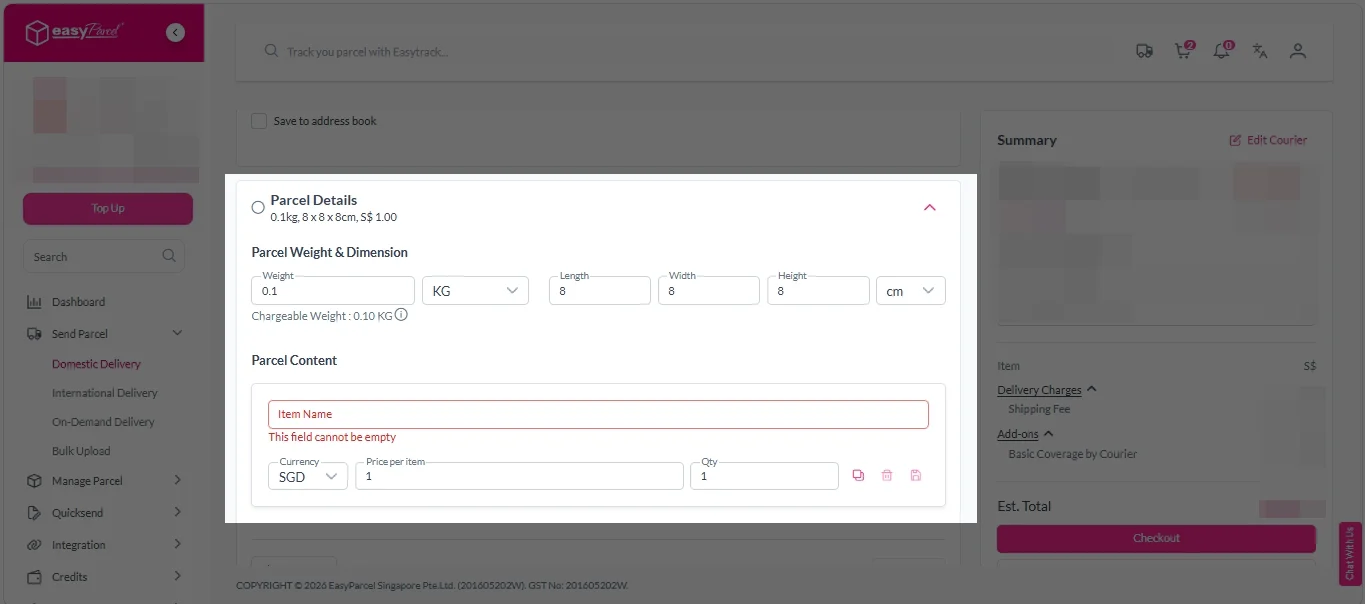
Parcel Details: 
Enter the actual weight, dimension and content of your parcel. 
Parcel Content:
Fill in your item name, price per item, and quantity. 

Domestic delivery - parcel details

Add-On Services: 
i. Tick the box to add EasyCover for additional protection against loss.
Note: EasyCover availability depends on the courier selected. Learn more about EasyCover

add on services 2

ii. Choose your preferred notification channel – SMS, Email, or WhatsApp. Click “Preview” to see how it looks,  and click “Customise” to add brand message to the notification.
Note: Learn more about Customise Branding Servcies

add on services 3

iii. Tick the “Mask Sender Details” checkbox. EasyParcel Next Gen will automatically hide your sender information based on your saved privacy settings
Note: Mask Sender Details only available for certain couriers. Find out what courier is available for Mask Sender Details.

iv. Tick the “Custom AWB” checkbox. EasyParcel Next Gen will apply your saved AWB template automatically. 
Note: Custom AWB is only available for certain couriers. Find out which couriers support Custom AWB

custom awb 1

Step 5: Double check all details and click on “Checkout”. 

send-parcel-nextgen-step-4

Step 6: Double check all the details and click on “Pay Now” to make payment. 

send-parcel-nextgen-step-5

Step 7: Your shipment has been booked successfully.
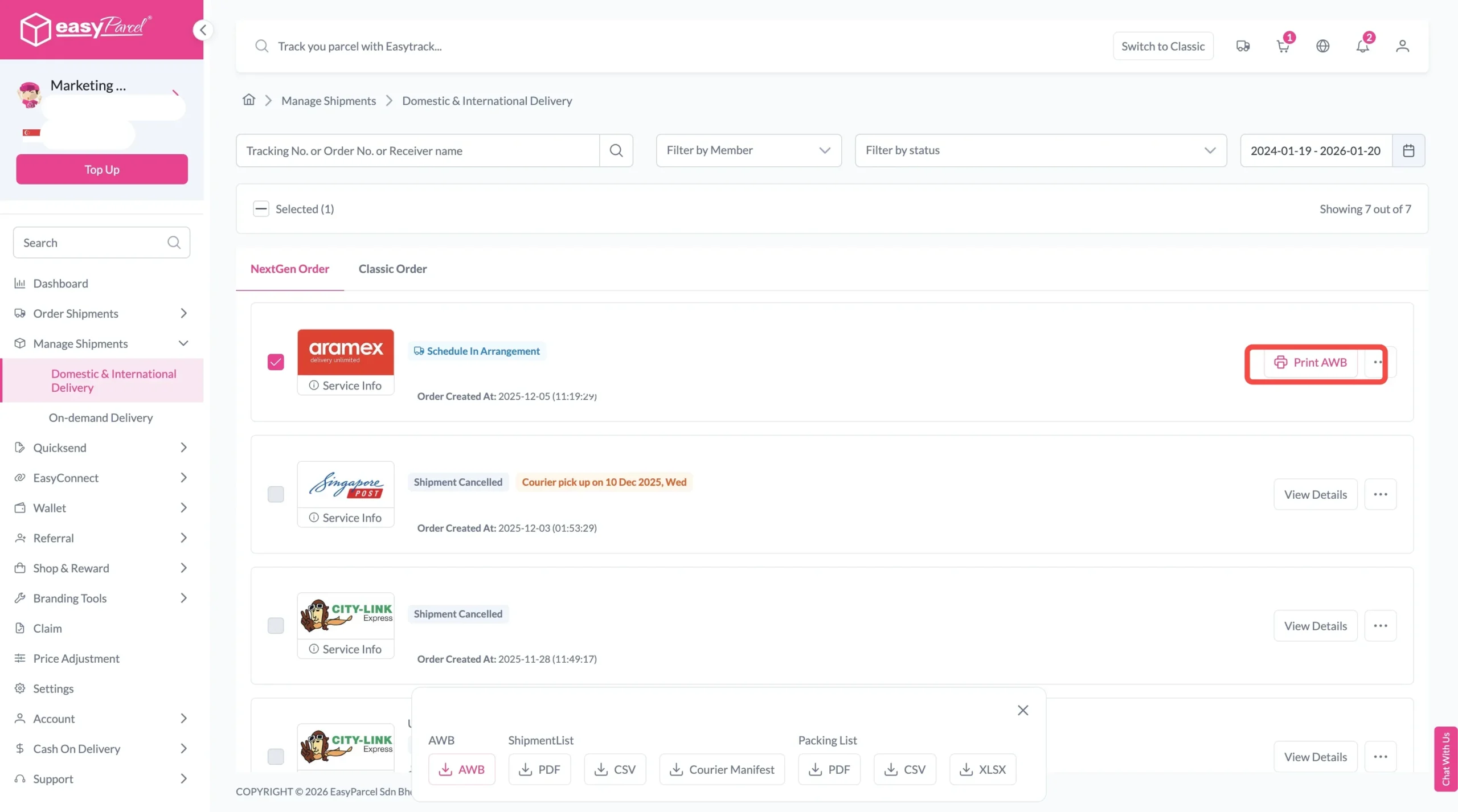
To download and print AWB, you can go to “Manage Shipments”. 

Single AWB
  1. Click the three dots icon next to the shipment.
  2. Select “Print AWB” from the dropdown menu.
  3. A PDF file will automatically download and save.
download AWB (2)

For bulk downloads AWB:

  1. Tick the “Selected” checkbox to choose all your orders.
  2. A menu will appear at the bottom of the screen.
  3. Click “AWB” to download all AWBs in bulk.
download AWB

Frequently Asked Question (FAQs)

Can SingPost rates be compared with other couriers?
Yes. EasyParcel allows instant rate comparison with 60+ courier services. Quote and compare now.
Are there hidden charges when booking SingPost via EasyParcel?
No. All rates are displayed clearly before booking.
Is tracking available for SingPost shipments?
Yes. Shipment updates can be checked through EasyTrack,the tracking system by EasyParcel.

Join 1.5 Million Happy Customers & Start Saving

Create your free account today and receive S$6 shipping coupon to start saving from your very first parcel. Compare courier rates, book in minutes, and start saving immediately.
×