Whether you’re shipping products to customers, sending business documents, or expanding into international markets, choosing the right forwarding company plays an important role in ensuring your parcels arrive safely and on time.
Today, businesses and individuals have more shipping options than ever before. Instead of relying on a single forwarding company, many now prefer using shipping platforms like EasyParcel, which allow them to compare multiple courier services, book shipments online, and manage deliveries from one convenient dashboard.
In this guide, you’ll learn what a forwarding company is, what services it provides, and how EasyParcel helps simplify domestic and international shipping.
Table of Contents
What Is a Forwarding Company?
A forwarding company is a business that helps arrange the transportation of parcels or goods from one location to another. Depending on the shipment, it may coordinate domestic deliveries, international shipping, or cross-border logistics using trusted courier and logistics partners.
Forwarding companies help simplify the shipping process by managing shipment bookings, coordinating deliveries, and ensuring parcels reach their destinations efficiently.
However, instead of contacting different forwarding companies individually, many businesses now use shipping platforms like EasyParcel to compare multiple shipping services and choose the most suitable option based on price, delivery speed, and service availability.
Why Businesses Use Forwarding Companies
Whether you’re an online seller or a growing business, a forwarding company can help simplify your shipping operations.
Some of the key benefits include:
- Deliver parcels locally and internationally
- Access multiple shipping options
- Save time managing shipments
- Improve delivery efficiency
- Track shipments from pickup to delivery
- Support business growth with scalable shipping solutions
As shipping volumes increase, having an efficient shipping partner becomes increasingly important for maintaining customer satisfaction and controlling logistics costs.
Why More Businesses Choose EasyParcel
Instead of using a single forwarding company, EasyParcel gives you access to multiple trusted courier services through one platform.
This means you don’t have to visit different courier websites or create multiple shipping accounts. Simply compare available courier services, choose the option that best suits your shipment, and complete your booking in just a few clicks.
Whether you’re shipping one parcel or managing hundreds of orders every month, EasyParcel makes the entire process faster, easier, and more convenient.
What Can You Do with EasyParcel?
EasyParcel helps businesses and individuals manage their shipping more efficiently by providing access to useful shipping tools and multiple courier services in one place.
With EasyParcel, you can:
- Compare multiple courier services to find the best shipping rate and delivery option.
- Book domestic and international shipments online in minutes.
- Choose doorstep pickup or drop-off based on your preferred courier service.
- Track every shipment from collection to delivery through EasyTrack.
- Manage all your shipments from a single dashboard.
- Enjoy lower member shipping rates and exclusive promotions with Top Up & Pay.
Instead of being limited to one forwarding company, EasyParcel gives you the flexibility to choose the right shipping solution for every parcel.
Who Should Use EasyParcel?
EasyParcel is suitable for a wide range of users who need reliable shipping solutions.
| User | How EasyParcel Helps |
|---|---|
| Online Sellers | Compare courier services and fulfil customer orders more efficiently. |
| SMEs | Simplify local and international shipping while reducing logistics costs. |
| Marketplace Sellers | Manage shipments from platforms like Shopee, Lazada, TikTok Shop, Amazon, and more. |
| Corporate Businesses | Coordinate multiple business shipments from one dashboard. |
| Individuals | Send personal parcels, gifts, and documents with ease. |
Whether you’re shipping occasionally or every day, EasyParcel helps you save time while making shipping simpler and more cost-effective.
Compare Shipping Services with EasyParcel Today

How to Book a Shipment with EasyParcel
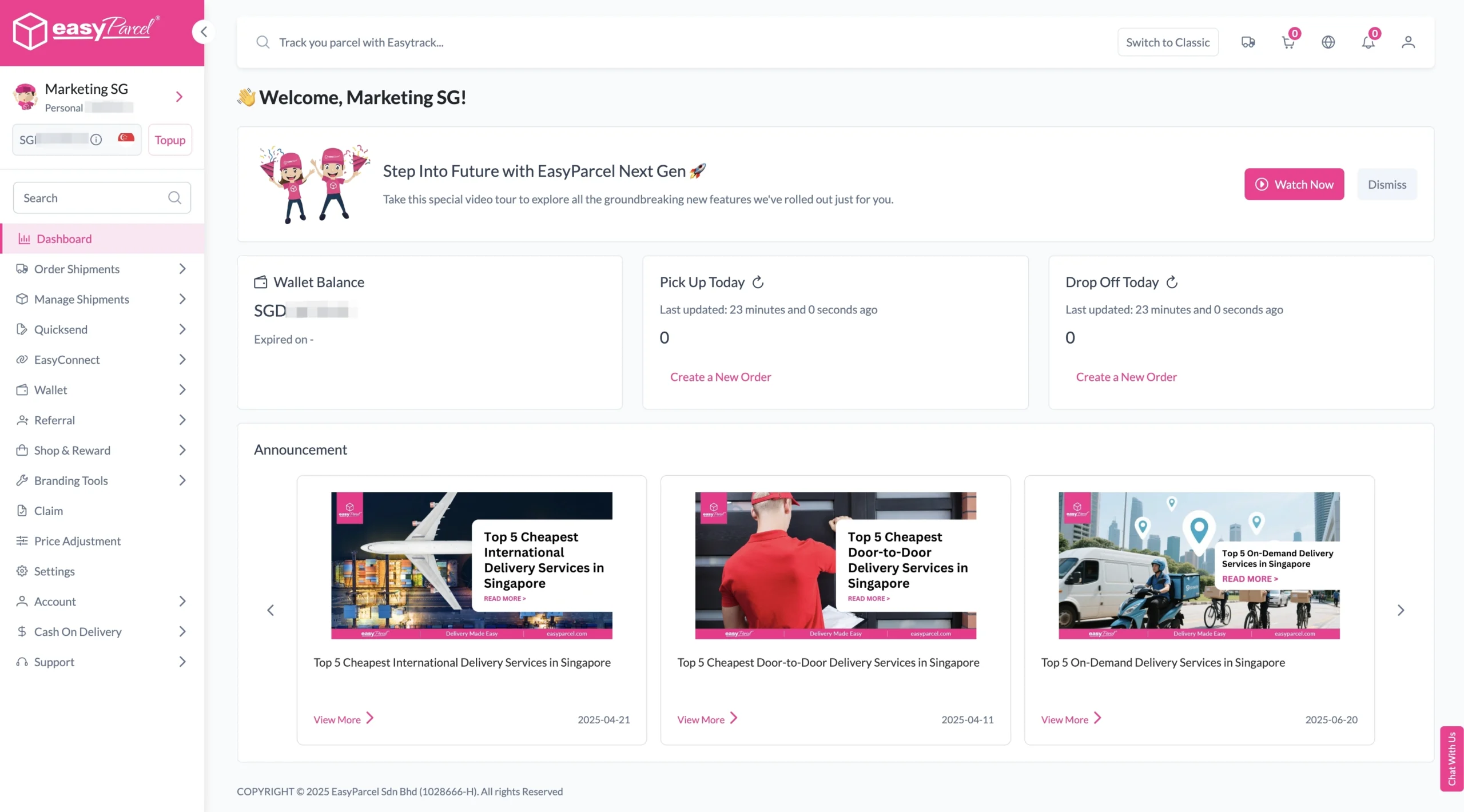
Step 1: Login your EasyParcel account.
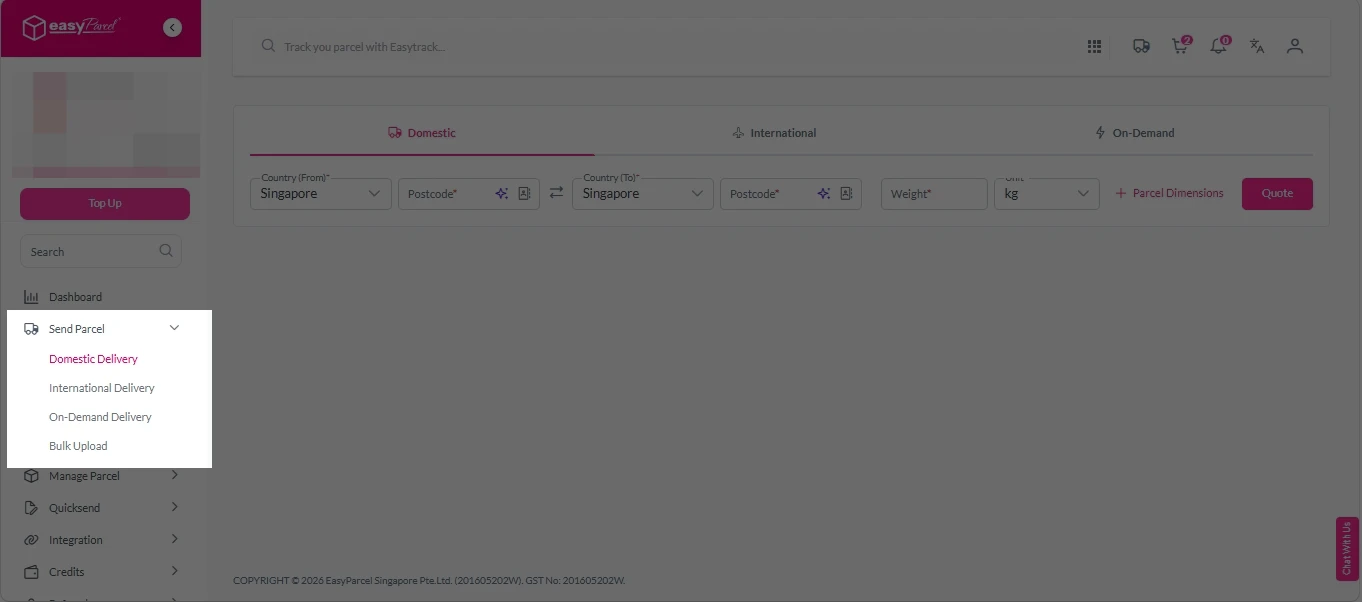
Step 2: Under “Send Parcel”, choose either “Domestic Delivery“ (for shipments within Singapore) or “International Delivery“ (for shipments overseas).
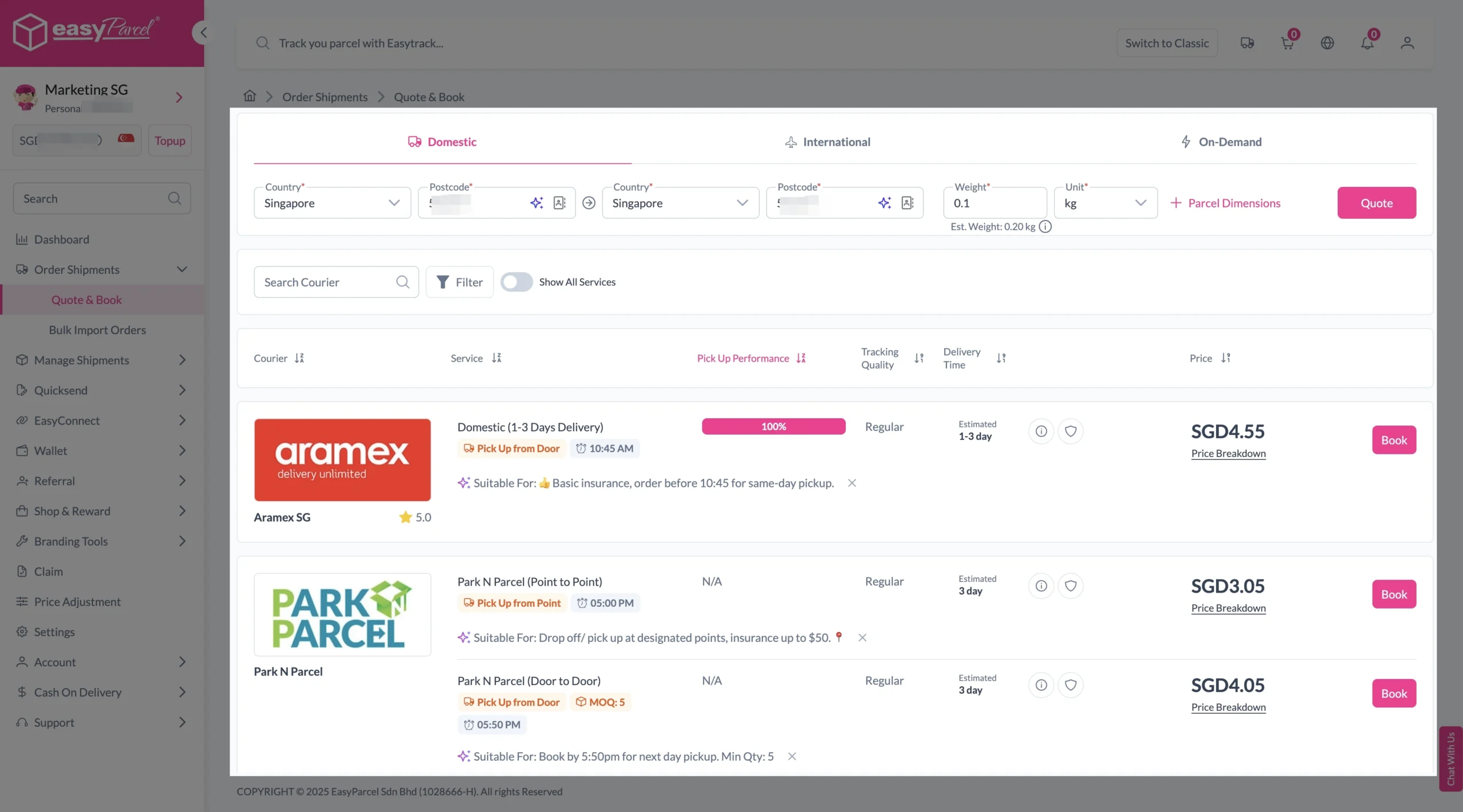
Step 3: Enter Shipment Details.
Domestic Delivery
1. Fill in the origin and destination postcode.
2. Provide the parcel weight.
3. (Optional) Add parcel dimensions for a more accurate shipping rate.
4. Click the “Quote” button.
5. A list of courier rates will appear below, as shown in the image.
6. Choose your preferred SingPost service and click “Book Now.”
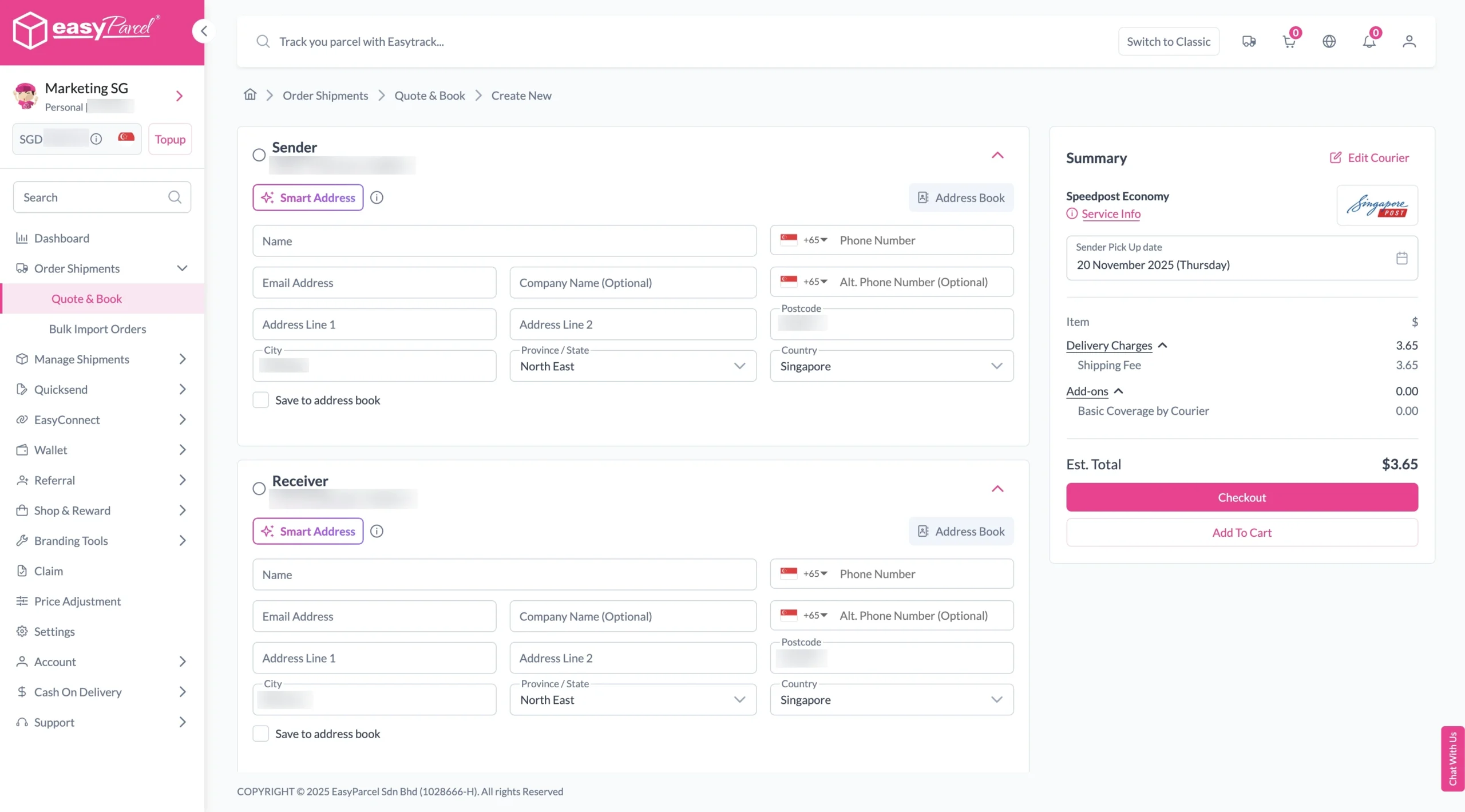
7. Fill in all details included Sender Details, Receiver Details, Parcel Details and Add-On Services.
Sender and Receiver Details:
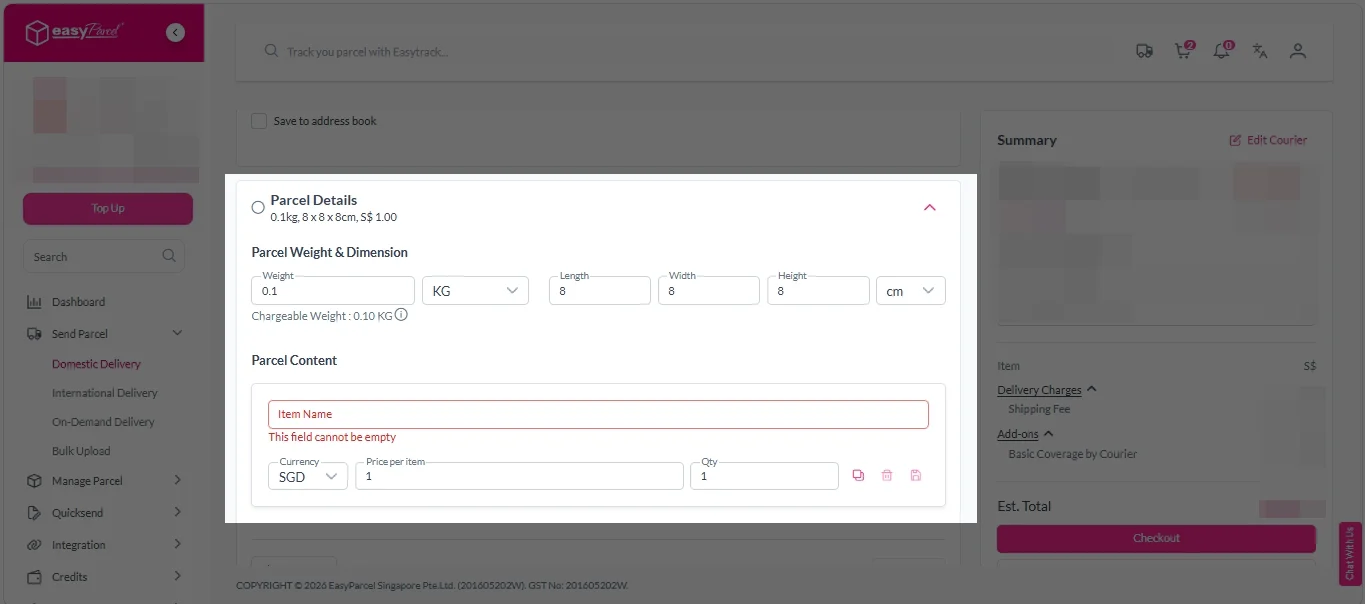
Parcel Details:
Enter the actual weight, dimension and content of your parcel.
Parcel Content:
Fill in your item name, price per item, and quantity.
Add-On Services:
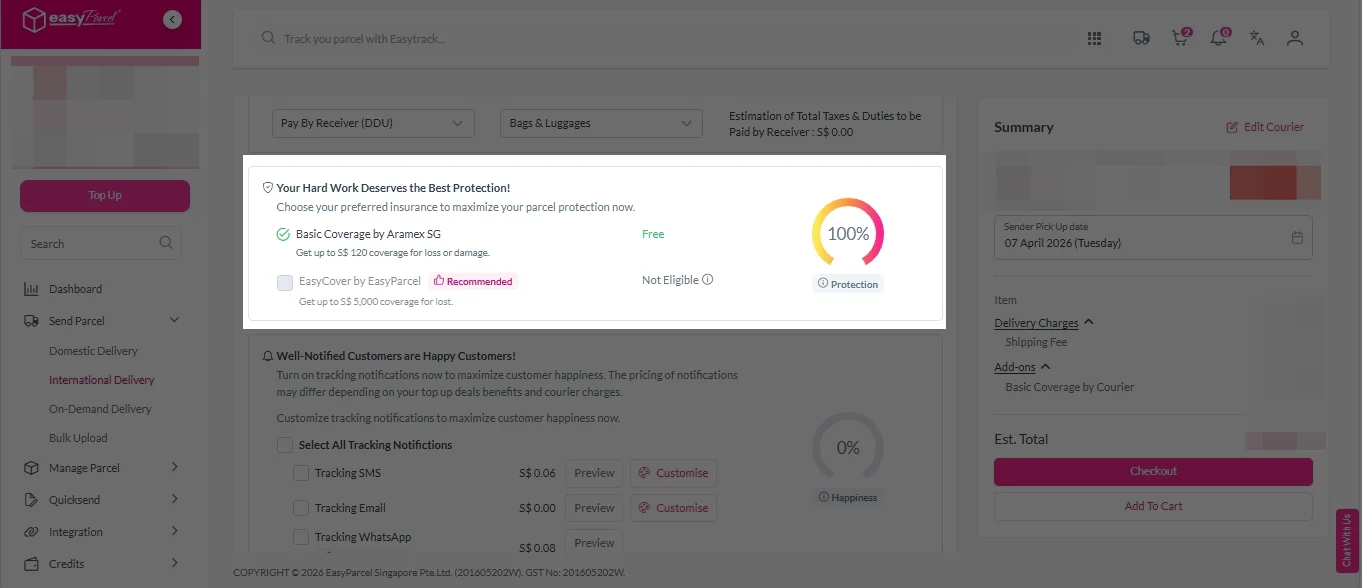
i. Tick the box to add EasyCover for additional protection against loss.
Note: EasyCover availability depends on the courier selected. Learn more about EasyCover.
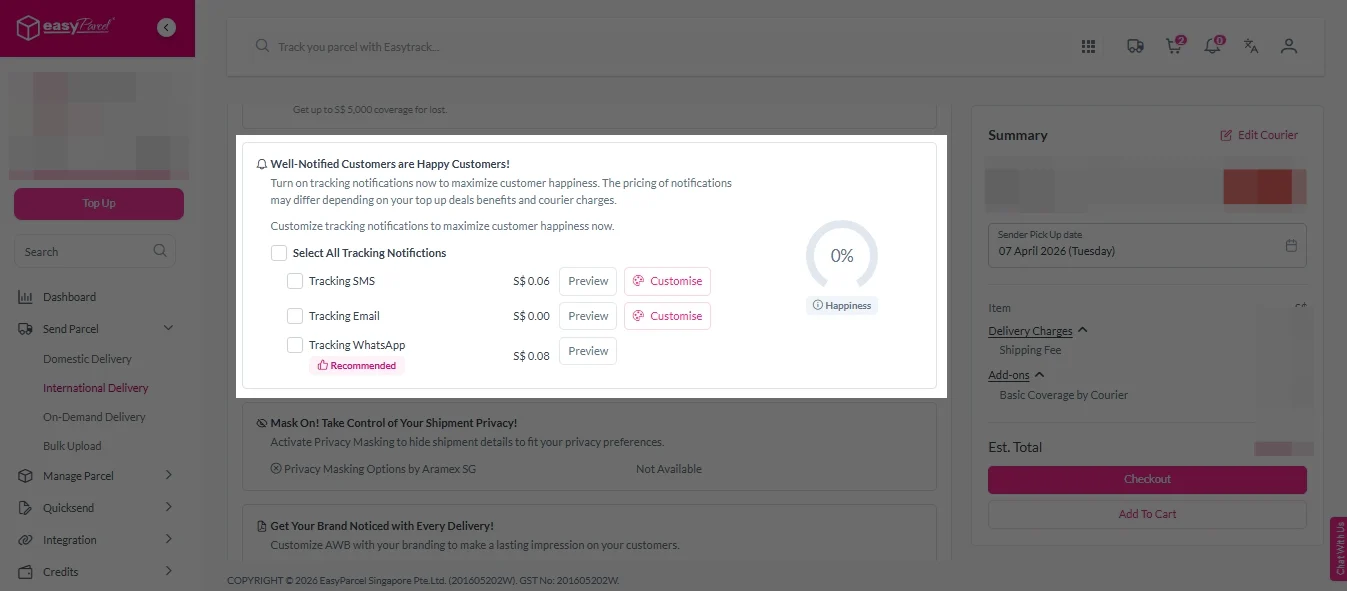
ii. Choose your preferred notification channel – SMS, Email, or WhatsApp. Click “Preview” to see how it looks, and click “Customise” to add brand message to the notification.
Note: Learn more about Customise Branding Servcies.
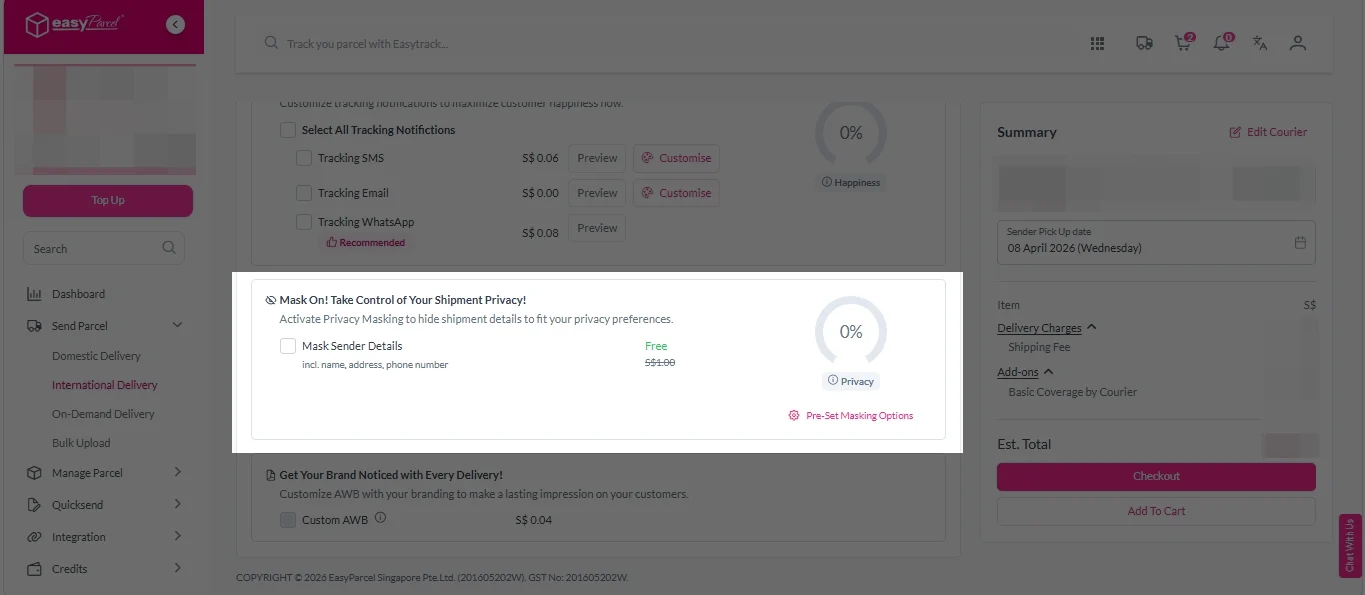
iii. Tick the “Mask Sender Details” checkbox. EasyParcel Next Gen will automatically hide your sender information based on your saved privacy settings.
Note: Mask Sender Details only available for certain couriers. Find out what courier is available for Mask Sender Details.
iv. Tick the “Custom AWB” checkbox. EasyParcel Next Gen will apply your saved AWB template automatically.
Note: Custom AWB is only available for certain couriers. Find out which couriers support Custom AWB.
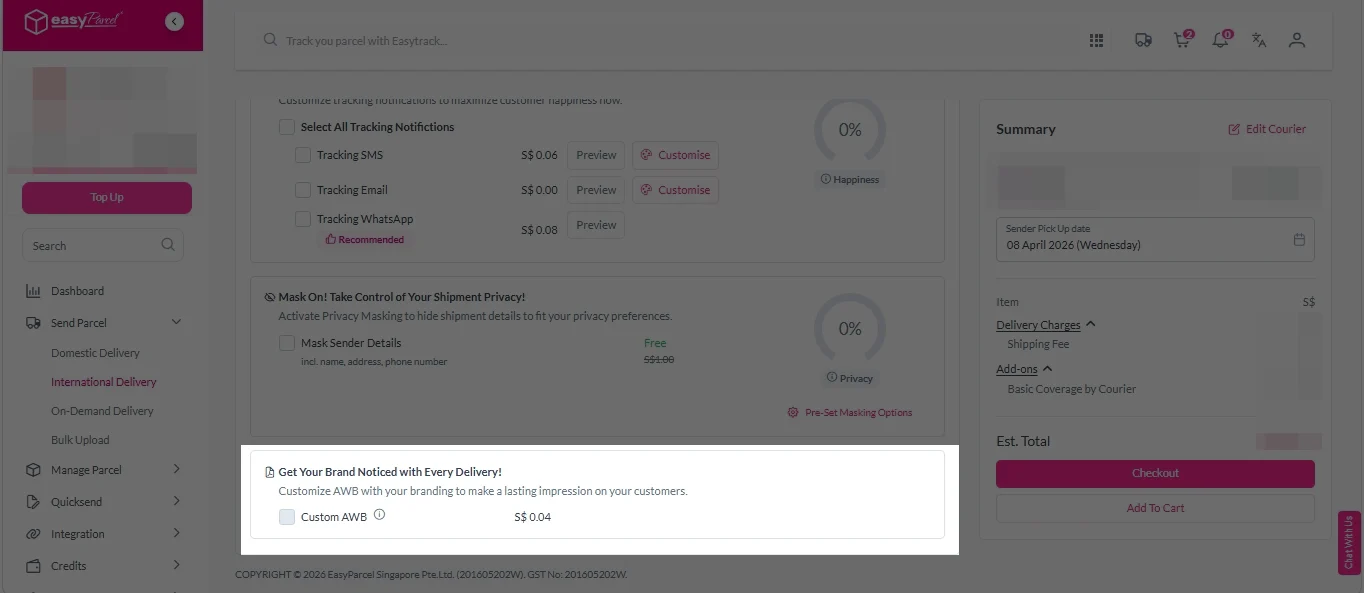
8. Double check all details and click on “Checkout”.
International Delivery
1. Fill in the origin postcode.
2. Enter the destination country and postcode.
3. Provide the parcel weight.
4. (Optional) Add parcel dimensions for a more accurate shipping rate.
5. Click the “Quote” button.
6. A list of courier rates will appear below, as shown in the image.
7. Choose your preferred SingPost service and click “Book Now.”
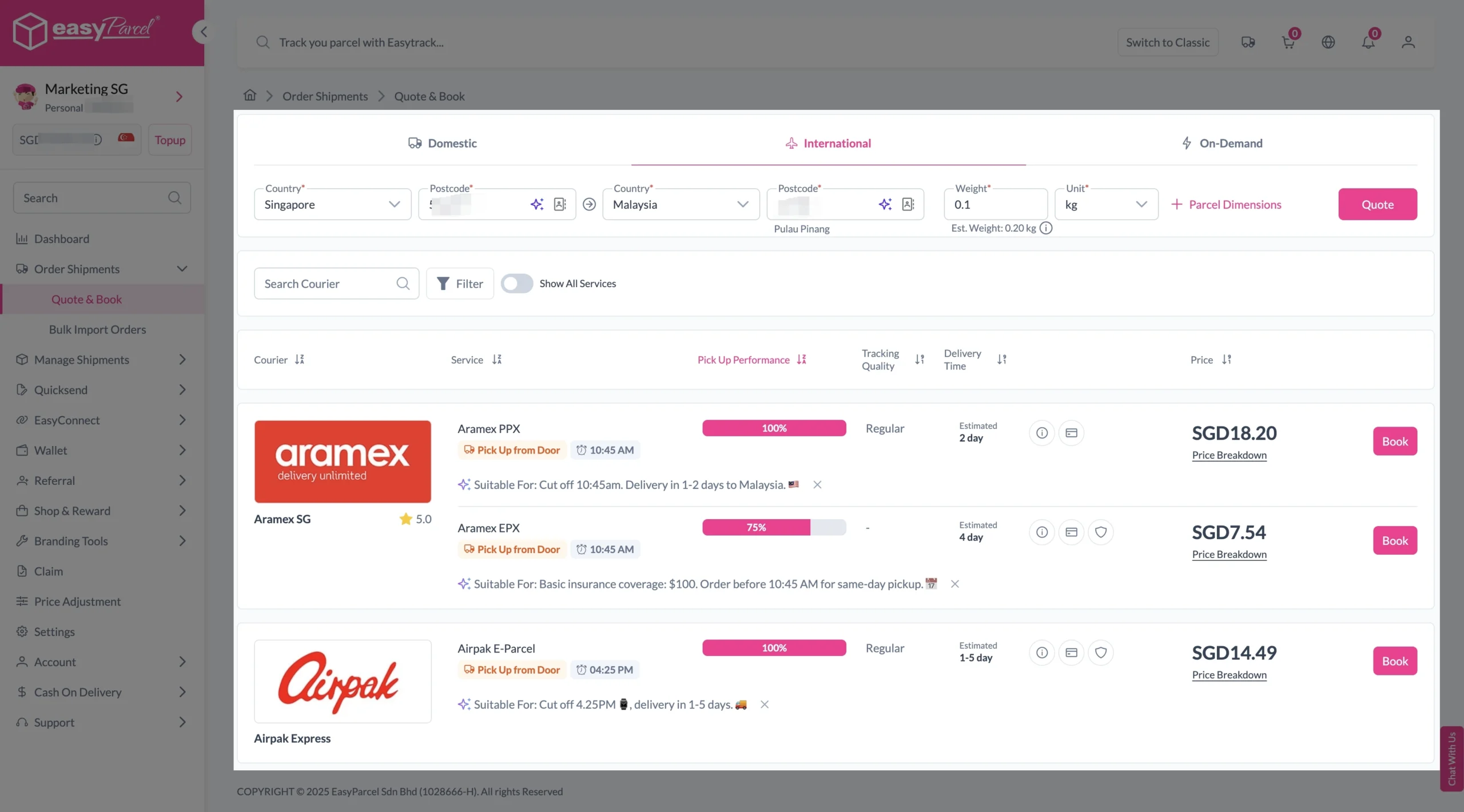
8. Fill in all details included Sender Details, Receiver Details, Parcel Details and Add-On Services.
Sender and Receiver Details:
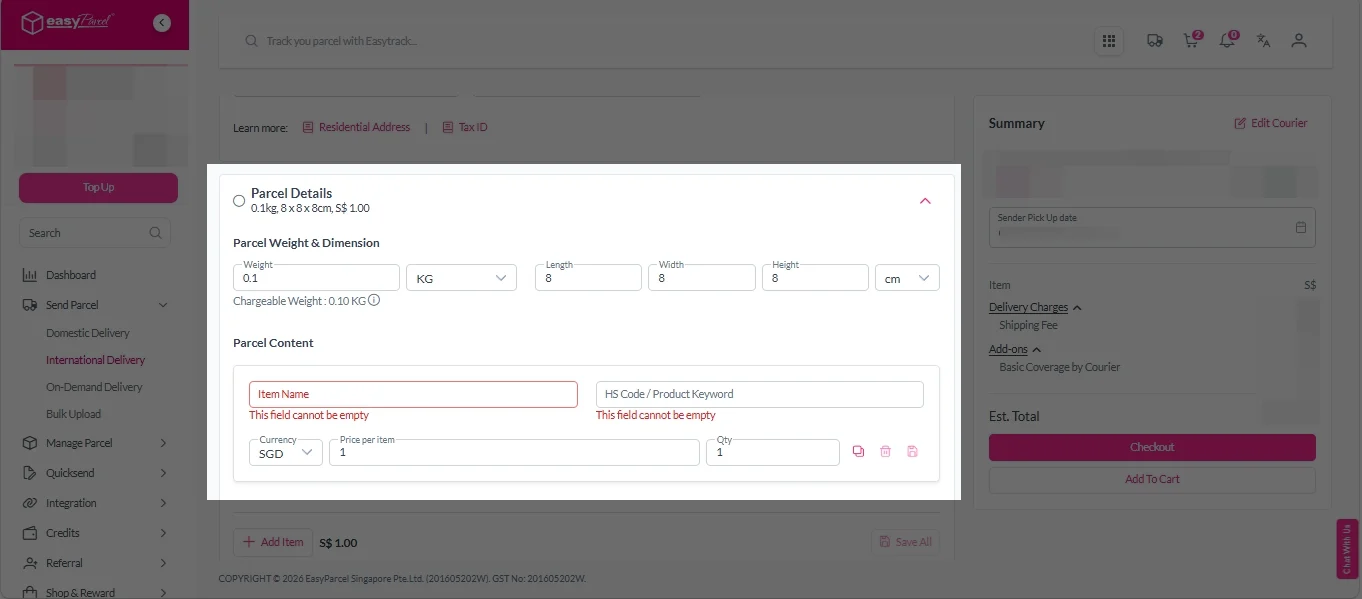
Parcel Details:
Enter the actual weight, dimension and content of your parcel.
Parcel Content:
Fill in your item name. Then, choose your item category from the dropdown menu. The HS code will be auto generated based on your selection.
Note: Learn more about Smart HS Code.
Add-On Services:
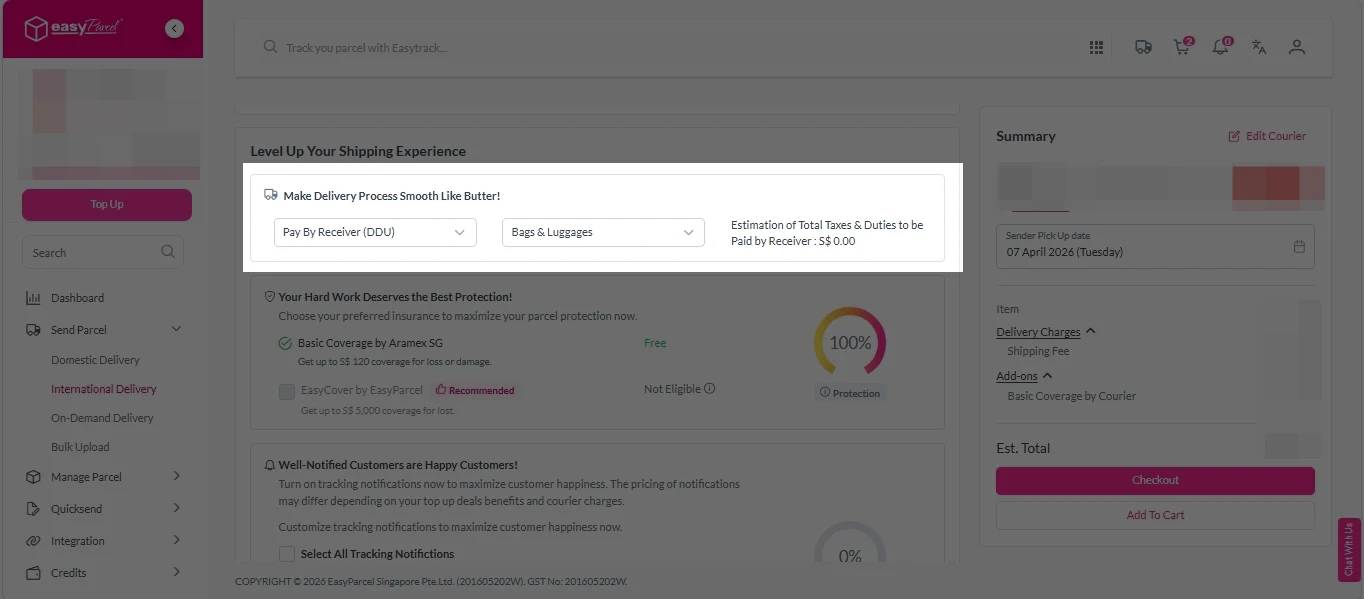
i. Select your preferred duties payment option – Delivered Duty Paid (DDP) or Delivered Duty Unpaid (DDU).
Note: Learn more about DDP and DDU.
ii. Tick the box to add EasyCover for additional protection against loss.
Note: EasyCover availability depends on the courier selected. Learn more about EasyCover.
iii. Choose your preferred notification channel – SMS, Email, or WhatsApp. Click “Preview” to see how it looks, and click “Customise” to add brand message to the notification.
Note: Learn more about Customise Branding Servcies.
iv. Tick the “Mask Sender Details” checkbox. EasyParcel Next Gen will automatically hide your sender information based on your saved privacy settings.
Note: Mask Sender Details only available for certain couriers. Find out what courier is available for Mask Sender Details.
v. Tick the “Custom AWB” checkbox. EasyParcel Next Gen will apply your saved AWB template automatically.
Note: Custom AWB is only available for certain couriers. Find out which couriers support Custom AWB.
9. Double check all details and click on “Checkout”.
Step 4: Double check all the details and click on “Pay Now” to make payment.
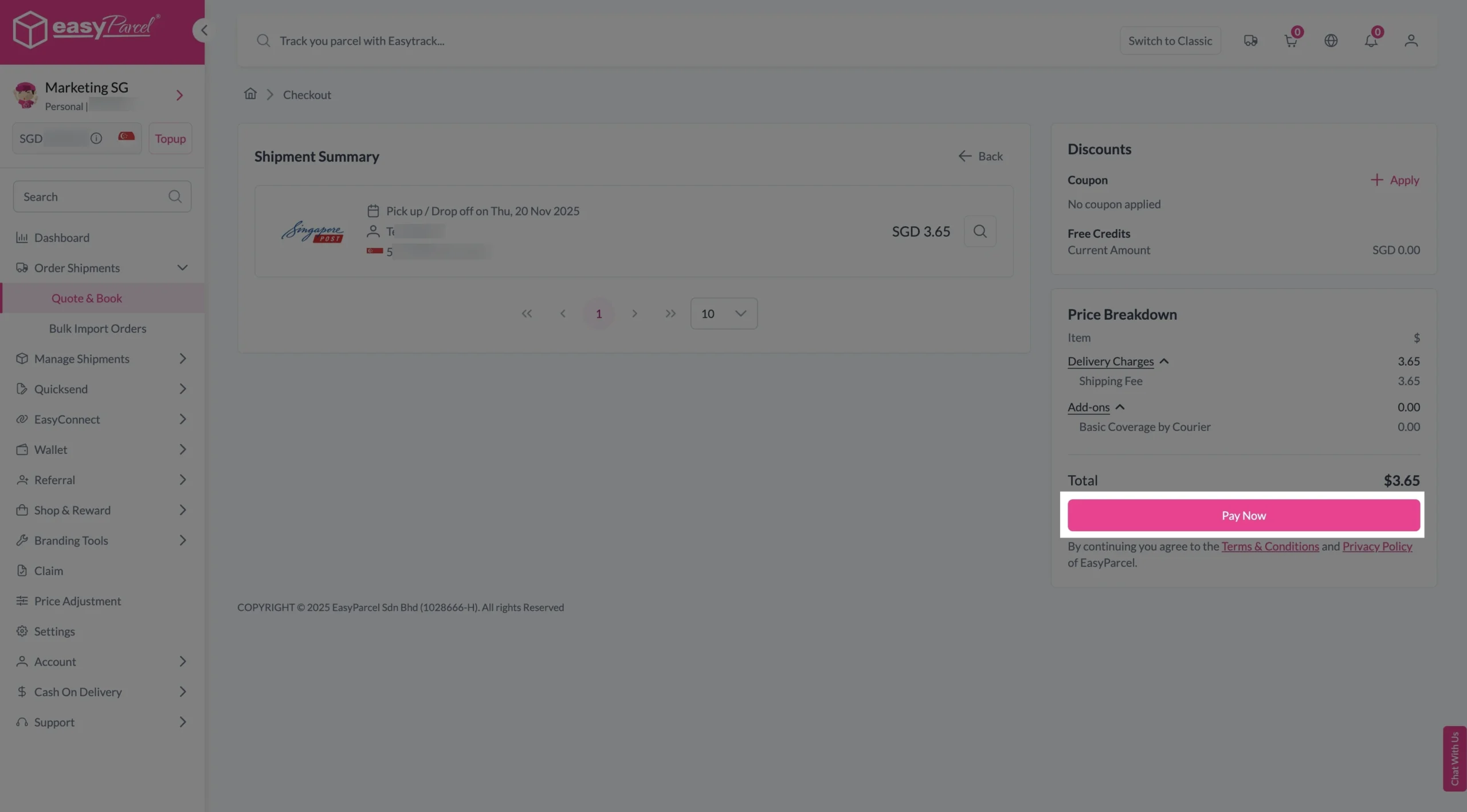
Step 5: Your shipment has been booked successfully.
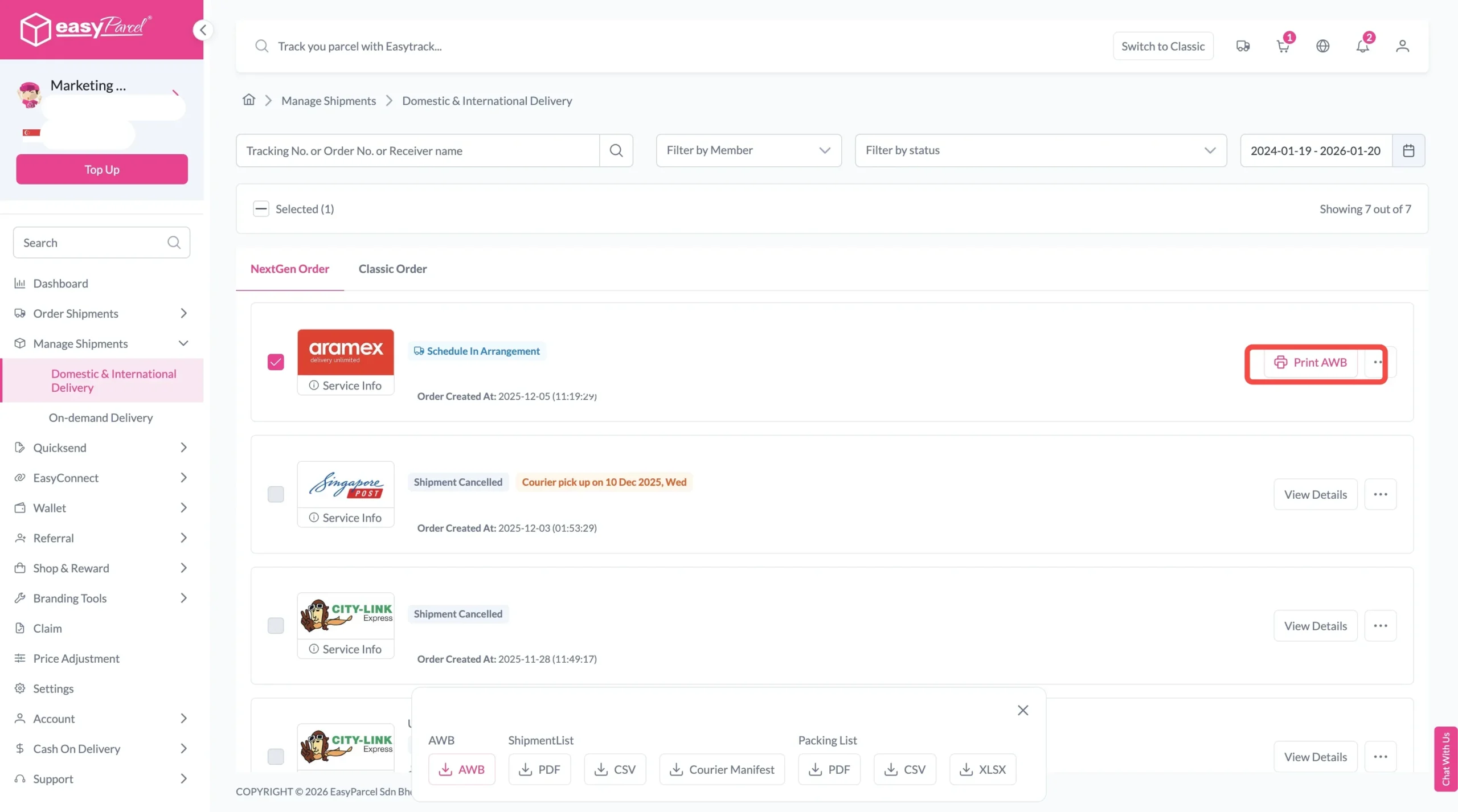
To download and print AWB, you can go to “Manage Shipments”.
Single AWB
- Click the three dots icon next to the shipment.
- Select “Print AWB” from the dropdown menu.
- A PDF file will automatically download and save.
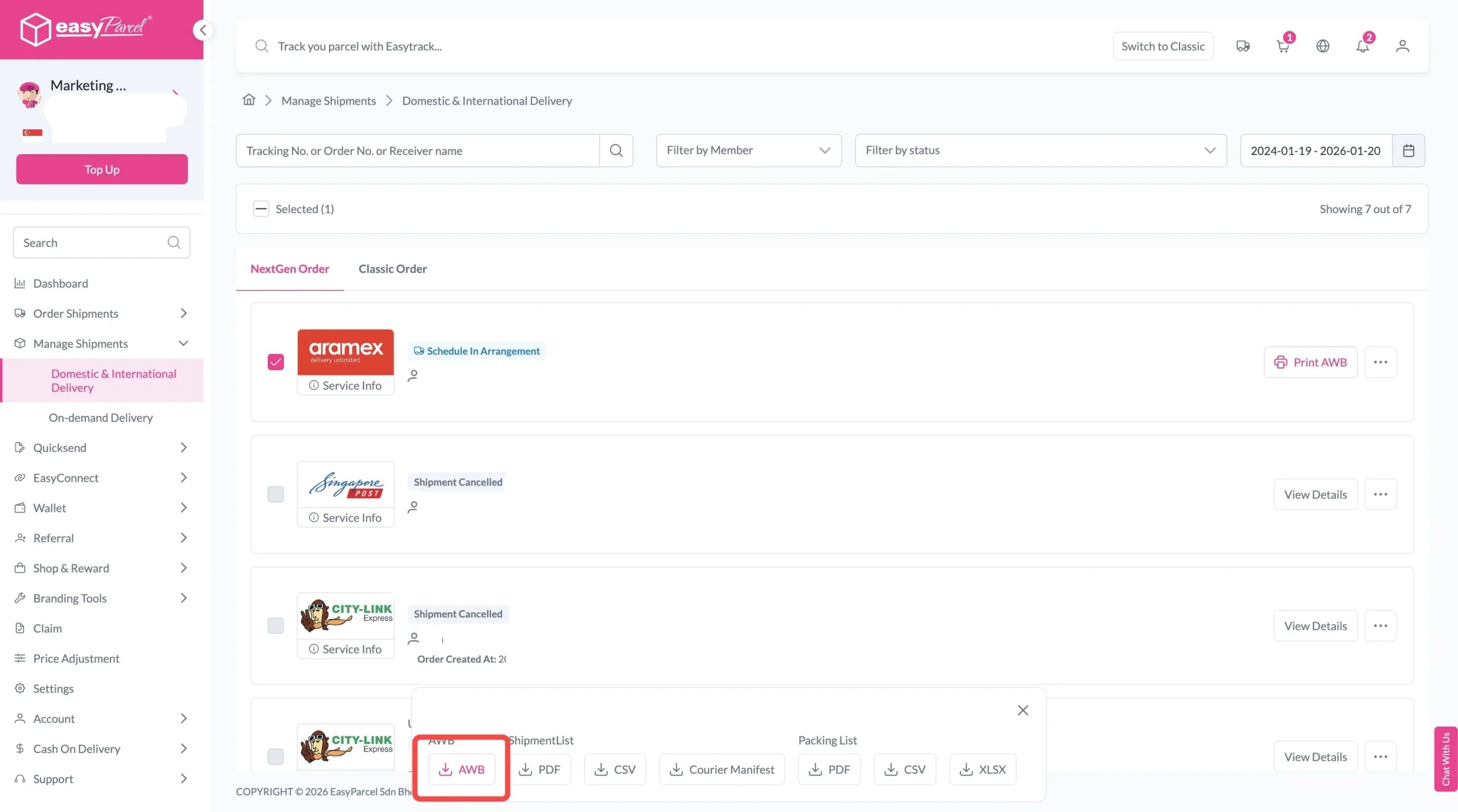
Bulk AWB
For bulk downloads AWB:
- Tick the “Selected” checkbox to choose all your orders.
- A menu will appear at the bottom of the screen.
- Click “AWB” to download all AWBs in bulk.
Conclusion
Choosing the right forwarding company is essential for ensuring reliable and efficient deliveries. While traditional forwarding companies provide shipping services, today’s businesses often need greater flexibility, better pricing, and easier shipment management.
EasyParcel simplifies the entire shipping process by allowing you to compare multiple courier services, book shipments online, manage deliveries from one dashboard, and access smart shipping features that save both time and money. Whether you’re sending parcels within Singapore or shipping internationally, EasyParcel helps you ship with greater confidence and convenience.