
Sending a parcel within Singapore should be simple—not a chore that involves multiple websites, phone calls, or waiting in line at the post office. Yet many people still default to the old way: visiting a courier site, entering details, comparing rates manually, and hoping they picked the right service.
With EasyParcel, booking a local package delivery service takes just a few minutes. Whether you’re an individual sending a gift or a business fulfilling dozens of orders daily, EasyParcel streamlines every step—from comparing rates to tracking your parcels.
Table of Contents
How to Book a Local Package Delivery in Simple Steps
Step 1: Login your EasyParcel account.

Step 2: Under “Send Parcel”, choose “Domestic Delivery”.
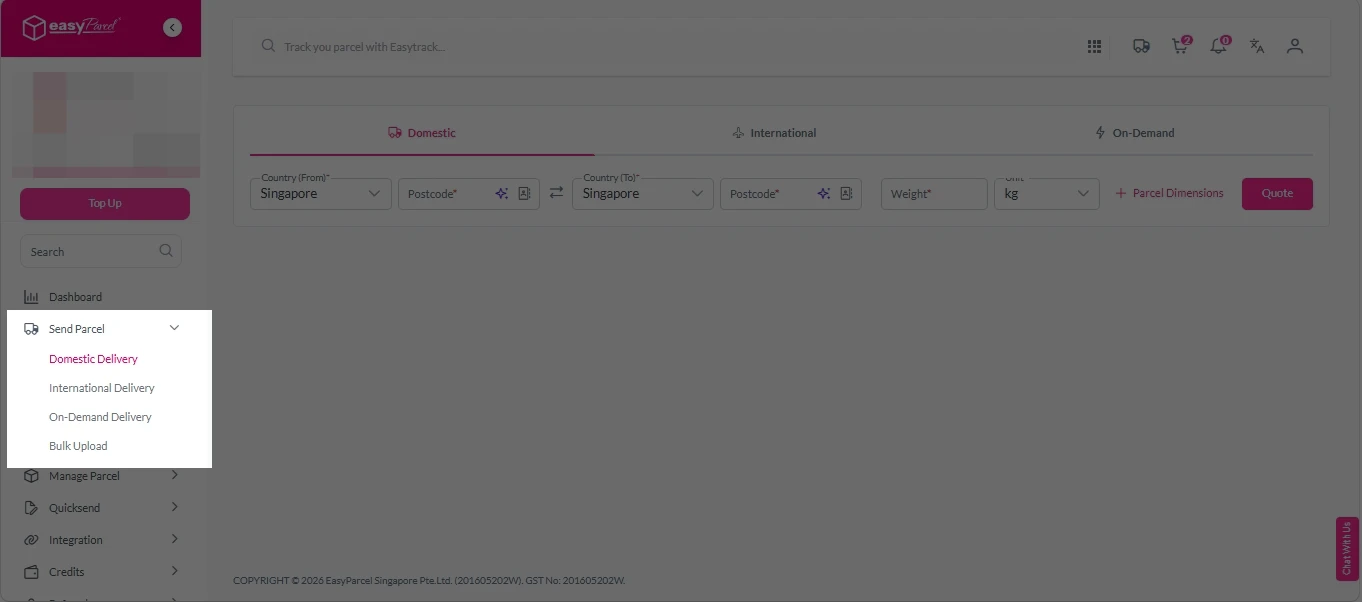
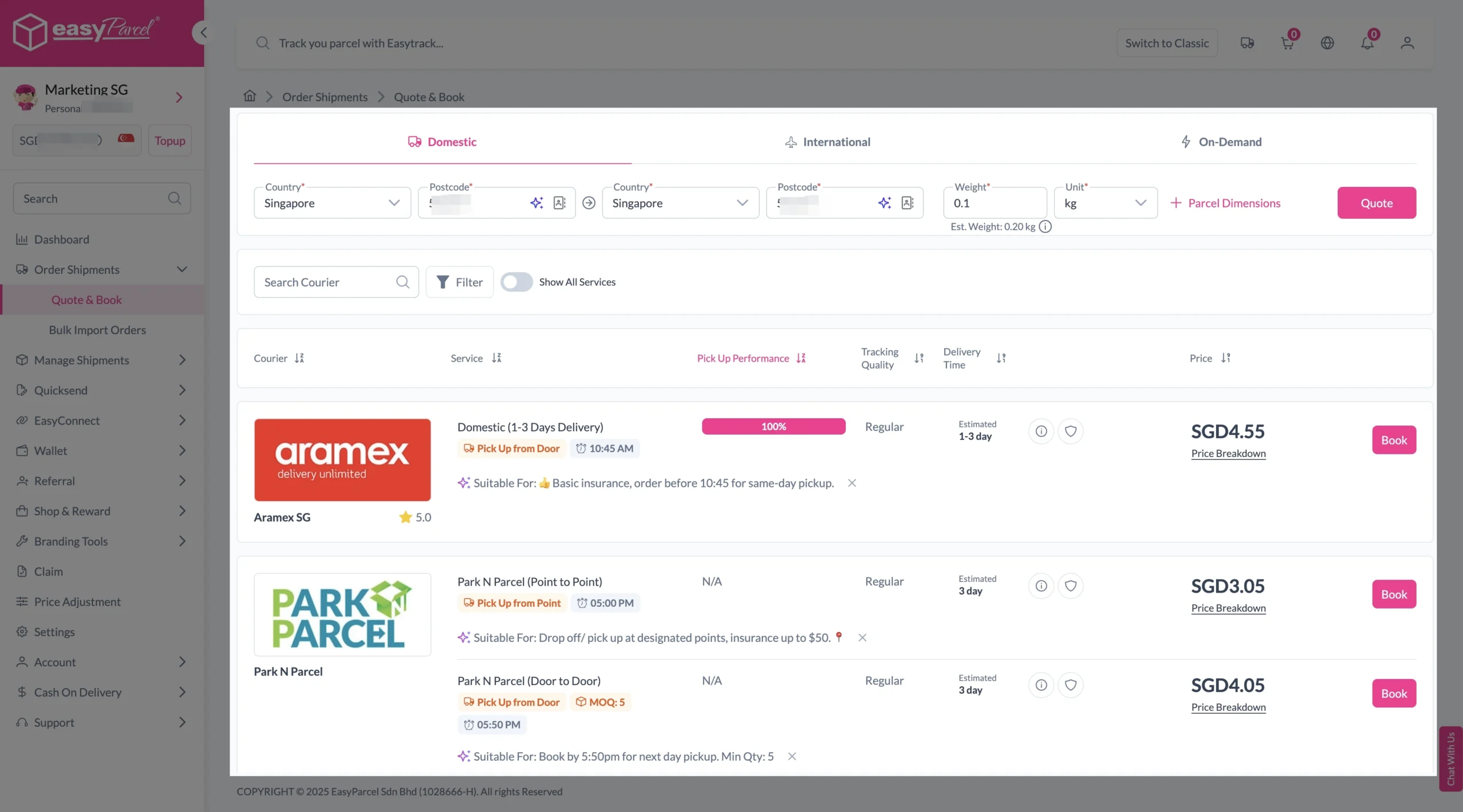
Step 3: Fill in origin, destination with postcode, and parcel weight. Click on “Quote” button.
A list of courier rates will appear below, as shown in the image.
Then, select courier that available for pick up service and click “Book”.
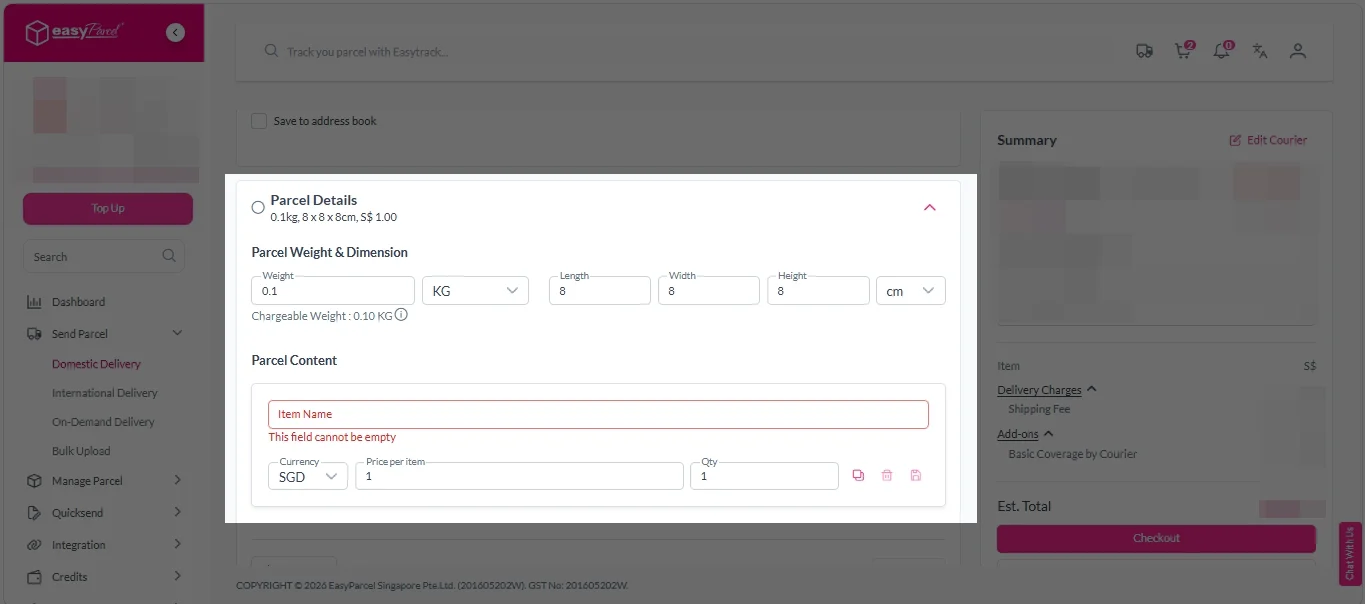
Step 4: Fill in all details included Sender Details, Receiver Details, Parcel Details and Add-On Services.
Sender and Receiver Details:

Parcel Details:
Enter the actual weight, dimension and content of your parcel.
Parcel Content:
Fill in your item name, price per item, and quantity.
Add-On Services:
i. Tick the box to add EasyCover for additional protection against loss.
Note: EasyCover availability depends on the courier selected. Learn more about EasyCover.

ii. Choose your preferred notification channel – SMS, Email, or WhatsApp. Click “Preview” to see how it looks, and click “Customise” to add brand message to the notification.
Note: Learn more about Customise Branding Servcies.

iii. Tick the “Mask Sender Details” checkbox. EasyParcel Next Gen will automatically hide your sender information based on your saved privacy settings.
Note: Mask Sender Details only available for certain couriers. Find out what courier is available for Mask Sender Details.

iv. Tick the “Custom AWB” checkbox. EasyParcel Next Gen will apply your saved AWB template automatically.
Note: Custom AWB is only available for certain couriers. Find out which couriers support Custom AWB.

Step 5: Double check all details and click on “Checkout”.
Step 6: Double check all the details and click on “Pay Now” to make payment.

Step 7: Your shipment has been booked successfully.
To download and print AWB, you can go to “Manage Shipments”.
Single AWB
- Click the three dots icon next to the shipment.
- Select “Print AWB” from the dropdown menu.
- A PDF file will automatically download and save.
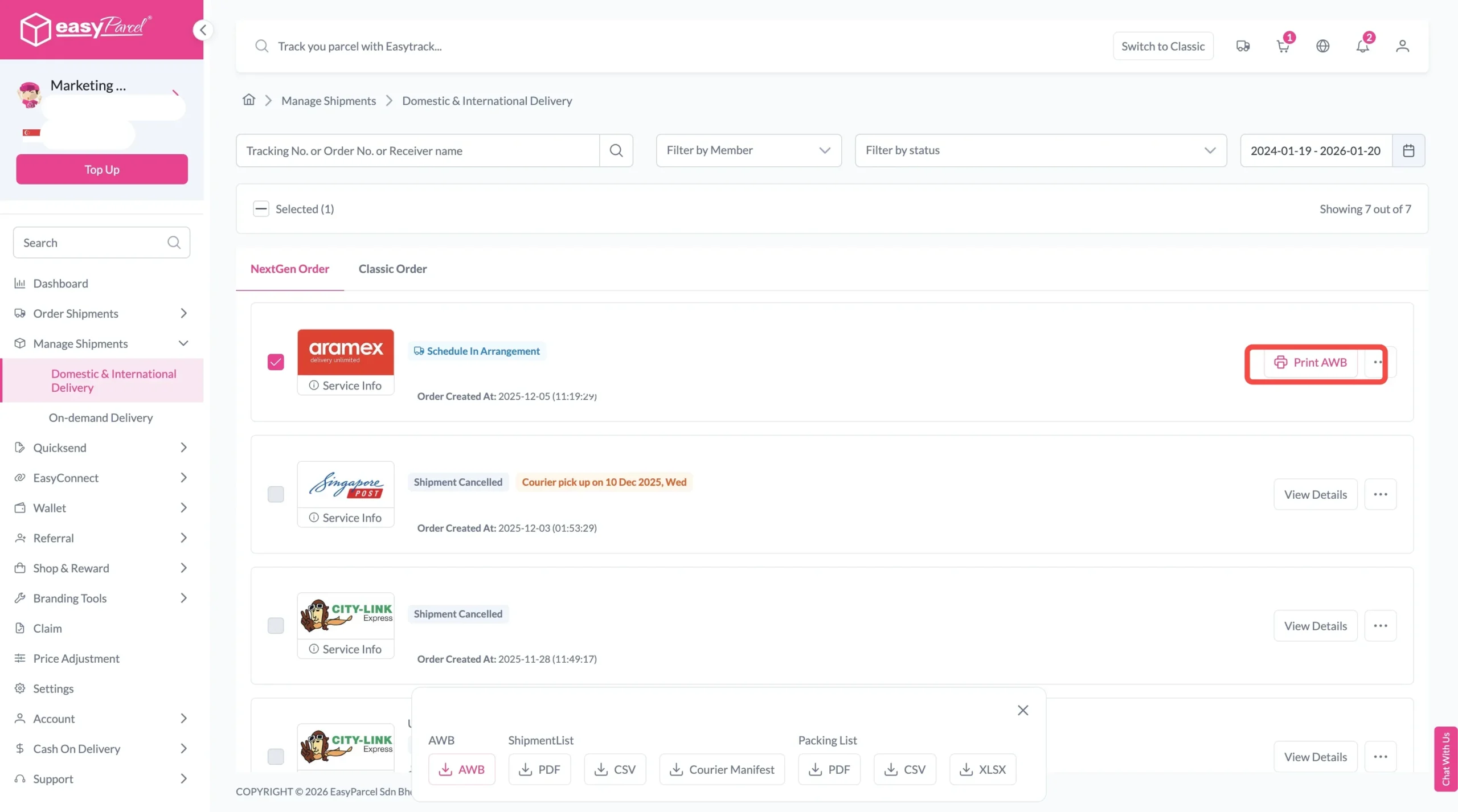
Bulk AWB
For bulk downloads AWB:
- Tick the “Selected” checkbox to choose all your orders.
- A menu will appear at the bottom of the screen.
- Click “AWB” to download all AWBs in bulk.

From Quote to Tracking—All in One Dashboard.

EasyParcel Powerful Tools for Local Package Delivery Service
1. Quote Tools (For Individuals & Business)
What it does: Instantly compare real-time rates from 60+ courier services side by side based on your parcel’s weight, dimensions, and destination.
How it helps:
- Individuals: Find the cheapest option for your one-off shipment
- Businesses: Always choose the most cost-effective courier for every order
- Time saved: No more visiting multiple courier websites or manual rate comparisons
2. eCommerce Integrations (For Business)
What it does: Seamlessly connect (integrate) your online store to EasyParcel. Orders from Shopify, WooCommerce, TikTok Shop, and more fulfill automatically.
How it helps:
- No manual order entry
- Bulk order import with one click
- Tracking numbers sync back to your store automatically
3. Smart Address & Address Book (For Individuals & Business)
What it does: Save frequently used addresses for one-click selection. The Smart Address feature auto-fills recipient details—just paste the address and the system completes all fields.
How it helps:
- Individuals: Save family, friends, and regular recipients
- Businesses: Maintain a database of customer addresses
- Reduced errors: Autofill prevents typos and misdeliveries
- Time saved: Seconds instead of minutes per shipment
4. Team Management (For Business)
What it does: Team Management tool allows invite team members to your EasyParcel account with role-based permissions. Assign admins and members, control what each person can access, and track activity logs.
How it helps:
- Clear accountability: Know who booked which shipment
- Fewer errors: Define roles to prevent overlap
- Faster onboarding: New staff learn the system quickly
- Secure access: Control who can book, track, or view billing
5. Bulk Upload (For Individuals & Business)
What it does: Bulk upload using a spreadsheet with all your orders and generate shipping labels for hundreds of parcels at once.
How it helps:
- Process 100+ shipments in minutes
- No manual data entry per order
- Perfect for peak seasons (11.11, 12.12, festive periods)
- Download all Air Waybills in one batch
6. EasyTrack (For Individuals & Business)
What it does: Unified tracking dashboard, EasyTrack that shows the status of shipments—regardless of which courier is delivering. Track parcels from 80+ courier services in one place, including Ninja Van, J&T Express, SingPost, TracX Logis, FedEx, UPS, Aramex, and more.
How it helps:
- Individuals: Track your gift or return in one place
- Businesses: Monitor all outgoing orders without visiting multiple courier websites
- Proactive updates: Know when parcels are picked up, in transit, and delivered
- Proof of delivery: Digital confirmation for every shipment
7. Custom Branding (For Business)
What it does: Customize your tracking pages, email notifications, SMS, and Air Waybills with brand message, color or logo.
How it helps:
- Professional presentation: Every delivery reflects your brand
- Customer trust: Recognisable tracking notifications build confidence
- Free marketing: Turn every shipment into a brand touchpoint